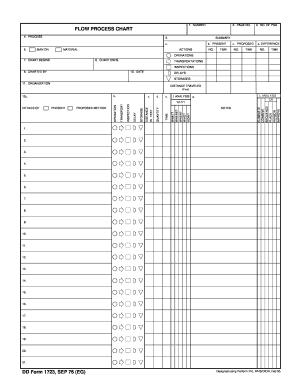
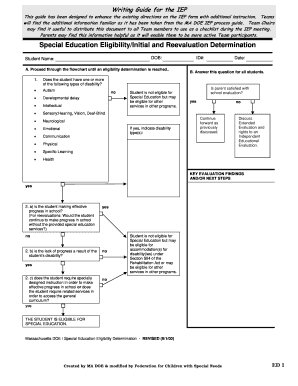
What are Media Flowchart Templates?

Media Flowchart Templates are visual tools that help users organize and map out their media flow strategies. They provide a structured format for planning and managing the distribution of media content across various platforms.

What are the types of Media Flowchart Templates?

There are several types of Media Flowchart Templates available to users, including: - Social Media Flowchart Templates - Advertising Flowchart Templates - Content Marketing Flowchart Templates - Video Production Flowchart Templates - Multimedia Campaign Flowchart Templates

Social Media Flowchart Templates
Advertising Flowchart Templates
Content Marketing Flowchart Templates
Video Production Flowchart Templates
Multimedia Campaign Flowchart Templates

How to complete Media Flowchart Templates

Completing Media Flowchart Templates is a straightforward process that involves the following steps: 1. Gather all relevant information and data regarding your media flow strategy. 2. Determine the key components and stages of your media flowchart. 3. Use the selected Media Flowchart Template that best fits your strategy. 4. Input the gathered information into the designated sections of the template. 5. Review and refine the flowchart to ensure accuracy and coherence.

01
Gather all relevant information and data regarding your media flow strategy.
02
Determine the key components and stages of your media flowchart.
03
Use the selected Media Flowchart Template that best fits your strategy.
04
Input the gathered information into the designated sections of the template.
05
Review and refine the flowchart to ensure accuracy and coherence.

pdfFiller empowers users to create, edit, and share documents online. Offering unlimited fillable templates and powerful editing tools, pdfFiller is the only PDF editor users need to get their documents done.
Video Tutorial How to Fill Out Media Flowchart Templates

Thousands of positive reviews can’t be wrong

Read more or give pdfFiller a try to experience the benefits for yourself
5.0
CCEO Sarah and staff are classy, competent, exceptional and outstanding.
CCEO Sarah and staff are classy, competent, exceptional and outstanding. PDFFILLER support have adequate answers, fast turn arounds and great service. They are professional and it is a pleasure to do business with them. For success and satisfaction use PDFfiller and you will always be a cut above the rest and a step ahead of your competition.
Mark Alleyne
5.0
It's been awesome!
It's been awesome! Not sure why when I click some lines it makes the texts smaller, then I have to make the larger to fit the rest of the doc. But it's an amazing tool!
Julie D
4.0
Great software program Great software program, lots of useful and dynamic featur...
Great software program Great software program, lots of useful and dynamic features, good trial offer - better than all comp., fairly user friendly interface given some basic computer skills, etc. There are a few limitations or features that if were avail., I would increase my rating to 5 instead of 4. Thank you..
T Tames

Questions & answers

A media flowchart is an integral part of any media plan. This document should show the media execution plan at a glance, including the various media (AKA where your ads will be placed) along with the timing and durations of the ads.
Without further ado, here are the five steps to a working media plan: Know Your Target Audience. Define Goals For Your Media Plan. Use Smart Tools for Your Media Plan. Determine the Perfect Media Mix.
How to Make a Flowchart in 7 Simple Steps Step #1: Know the purpose of your flowchart. Step #2: Start with a template. Step #3: Add shapes and symbols. Step #4: Connect your shapes with lines and arrows. Step #5: Split paths or add decisions. Step #6: Customize your flowchart's appearance.
Commonly used flowcharts Document flowchart. Data flowchart. System flowchart. Program flowchart.
What are the Basic Symbols of a Flowchart? Start/End Symbol. The terminator symbol marks the starting or ending point of the system. Multiple Documents Symbol. Represents multiple documents in the process. Manual Input Symbol. Or Symbol. Collate Symbol. Manual Loop Symbol. Data Storage or Stored Data Symbol. Display Symbol.
Go to Insert > Illustrations > Shapes. A drop-down menu will appear when you click on “Shapes.” Find the shapes labeled “Flowchart.” Here is where you will find all of the necessary shapes for building a flowchart, like process and decision boxes. Hovering over the shape will show you each of the shape's functions.