What are Automotive Invoice Templates?

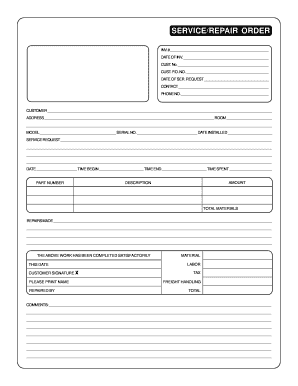
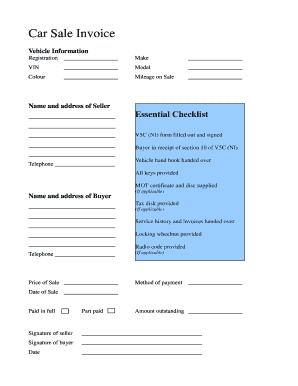
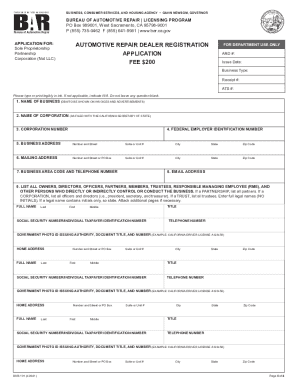
Automotive invoice templates are pre-designed forms that help auto repair shops, car dealerships, and other automotive businesses to bill their customers for services rendered or products sold. These templates typically include fields such as customer information, itemized services or parts, labor costs, taxes, and total due amount.

What are the types of Automotive Invoice Templates?

There are several types of automotive invoice templates available for different types of businesses in the automotive industry. Some common types include:

Standard Automotive Invoice Template
Car Sales Invoice Template
Auto Repair Invoice Template
Vehicle Maintenance Invoice Template

How to complete Automotive Invoice Templates

Completing automotive invoice templates is easy and straightforward. Here are the steps to follow:

01
Open the invoice template on a computer or mobile device.
02
Fill in the necessary details such as customer information, services provided, prices, and totals.
03
Review the completed invoice for accuracy.
04
Save or print the invoice to send it to the customer.

pdfFiller empowers users to create, edit, and share documents online. Offering unlimited fillable templates and powerful editing tools, pdfFiller is the only PDF editor users need to get their documents done.
Thousands of positive reviews can’t be wrong

Read more or give pdfFiller a try to experience the benefits for yourself
5.0
I like the ability to send to sign documents the most.
What do you like best? I like the ability to send to sign documents the most. I use it in my business daily. I like the features to organize my documents and to make templates. The templates are a life saver. Also, PDF filler has a large library of documents, anyone can easily personalize templates, can prepare add signatures, dates and finalize documents all in one step, saves time, LOTS of time! What do you dislike? I like it all. I don't have any complaints.I have used other document signing programs and they are way more difficult to use. No so with PDFfiller. The mobile app is not that easy to use as the (desktop) version. If I had to say Sometimes there is a delay from screen to screen. But that could be connection. Recommendations to others considering the product: If you need a document editing tool that does everything you can think of USE PDFFILLER it ROCKS! If you need to use this product to mark up documents and sign, try this product! I like to keep everything that I do 100% electronic, so with products like this, I am able to do so. What problems are you solving with the product? What benefits have you realized? I can get leases and contracts signed very easily. I like the ability to get clients to sign contracts and leases on their mobile phones. I now use the program Every Single Day to create, manipulate or convert files that used to sit waiting, sometimes for days at a time, to be done by the one or two people with access to more expensive and less user friendly programs. Now I have a new "can-do" attitude to the workings of .pdf files. I can't recommend this online tool enough and it's so affordable, you can buy a license to use at home. Great product, lots of advantages. You will not look back, you will not regret this purchase.
David Nelson
4.0
Wow!
Wow! Finally a real online PDF editor, no more troubles on changing text and much more! Just found it randomly, and since the beginning it shows me lots of features to edit pdf like texts, images, signs, highlights and more. The graphic looks a bit oldie, but this is not a problem at all. Functionality first! 30 days trial, then you've to pay.
Giulio G.
5.0
I like it but only need to fill in a few forms a year so it's not cost efficient...
I like it but only need to fill in a few forms a year so it's not cost efficient for me. I would pay if the pricing were different. Instead I'll just unsubscribe.
Randy B.

Questions & answers

What you need to include on any invoice Your name or company name. Your contact information. Your customer's company name and address. The date the goods or services were provided. The date of the invoice. A breakdown of costs that show prices, hours, or quantities of the goods and services delivered. A subtotal of net costs.
An auto body (mechanic) invoice is a document that is completed by any mechanic who has been authorized by their client to perform auto body services and that details the services rendered.
How to Create a Mechanic Invoice Download the free “Auto Repair Invoice Template” Open the invoice template in your chosen format (. DOC, . Name your auto repair invoice. Example: “(your business name) | Invoice Template” Customize your invoice. Create your first client invoice. Add details to the client invoice. Save.
Include most of the following information when you create your small business invoice: Unique invoice number. Date the goods or services were delivered. Description of the product or service. Amount payable with a due date. Payment terms and payment instructions. Last payment amount and date.
How to create an invoice: A step-by-step guide Brand your invoice. Add a professional header. Include invoice information. Include the dates. Description of goods/services delivered. Include tax details and highlight the total money owed. Include payment terms. Add explanatory notes with terms and conditions.