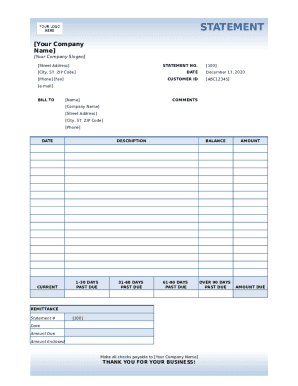
What is Billing Statement Template?
A Billing Statement Template is a pre-formatted document used to provide a detailed summary of all the charges, payments, and outstanding balances related to a particular billing period. It helps individuals and businesses keep track of their financial records in an organized manner.
What are the types of Billing Statement Template?
There are several types of Billing Statement Templates available, each designed for specific purposes. Some common types include:
Simple Billing Statement Template
Itemized Billing Statement Template
Monthly Billing Statement Template
Quarterly Billing Statement Template
How to complete Billing Statement Template
Completing a Billing Statement Template is a straightforward process that involves the following steps:
01
Fill in the customer's name and contact information at the top of the template.
02
Enter the details of each charge or payment in the designated fields.
03
Calculate the total charges, payments, and outstanding balance.
04
Review the completed statement for accuracy and make any necessary adjustments.
05
Save or print the completed Billing Statement for record-keeping and sharing purposes.
pdfFiller empowers users to create, edit, and share documents online. Offering unlimited fillable templates and powerful editing tools, pdfFiller is the only PDF editor users need to get their documents done.
Video Tutorial How to Fill Out Billing Statement Template
Thousands of positive reviews can’t be wrong
Read more or give pdfFiller a try to experience the benefits for yourself
Questions & answers
How do you write a billing statement?
These are: the date of the original invoice. the type of invoice. the invoice number. a brief description of the products or services provided. the amount of the original invoice. the amount that has been paid for the original invoice. the remaining balance that still needs to be paid.
How do I create a billing statement in Excel?
How to Create an Invoice In Excel - Full Guide with Examples Step 1: Open a New Blank Workbook. Step 2: Remove Gridlines. Step 3: Create an Invoice Header. Step 4: Add Invoice Payment Due Date & Invoice Number. Step 5: Enter the Client's Contact Information. Step 6: Create an Itemized List of Services and Products.
What is the difference between a billing statement and an invoice?
An invoice is the legal or technical document for a bill. A statement on the other hand is an up-to-date report on what buyers still owe vendors on account. It is the status of a customer's account at a certain point in time.
What is the difference between a billing statement and an invoice?
While an invoice relates to a specific transaction, a statement can cover multiple transactions. It's a document used when buyers owe the business money on account. The statement is a current report showing the customer's account status, reflecting payments already made and outstanding invoices.
What should be included in a billing statement?
A billing statement has several components including interest charged, fees levied, and the card owner's closing statement balance. Most credit card issuers provide their customers with a monthly billing statement.
What details are usually included in a statement of account?
So, a statement of account does include invoice amounts, payments, and other financial transactions between buyer and seller, but isn't in itself an invoice. An account statement may also include refunds from the vendor, or any other forms of bills, unrelated to the sales invoice.