What is Track Employee Attendance Excel Template?

Track Employee Attendance Excel Template is a user-friendly tool that helps businesses keep an organized record of their employees' attendance. This template is designed to make tracking attendance efficient and convenient for managers and HR professionals.
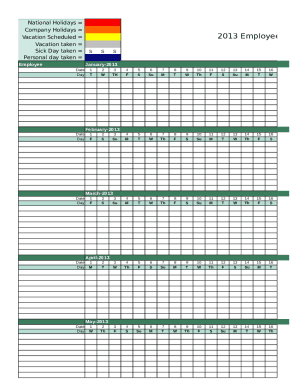
What are the types of Track Employee Attendance Excel Template?

There are several types of Track Employee Attendance Excel Templates available, each offering unique features to suit different business needs. Some common types include:

Basic Attendance Tracker Template
Monthly Attendance Sheet Template
Employee Shift Schedule Template
Vacation Tracker Template

How to complete Track Employee Attendance Excel Template

Completing a Track Employee Attendance Excel Template is straightforward and only requires a few simple steps. Here's how you can efficiently utilize the template:

01
Open the Excel Template and enter the necessary employee information
02
Fill in the attendance data for each employee on a daily or monthly basis
03
Use the template to analyze attendance trends and identify any attendance issues that need to be addressed
04
Save the completed template for future reference or sharing with relevant parties

pdfFiller empowers users to create, edit, and share documents online. Offering unlimited fillable templates and powerful editing tools, pdfFiller is the only PDF editor users need to get their documents done.
Video Tutorial How to Fill Out Track Employee Attendance Excel Template

Thousands of positive reviews can’t be wrong

Read more or give pdfFiller a try to experience the benefits for yourself
5.0
I like the editor!
I like the editor! pdf filler is a simple way to stay on top of your files, workflow, and create your own templates. luv it!!
IME
5.0
It was something I needed temporarily.
It was something I needed temporarily. If I had a continuous need for this program, I would keep it and continue to use it. I really did enjoy the ease of this program.
Connie H
4.0
Does everything I need it to do Does everything I need it to do!
Does everything I need it to do Does everything I need it to do! A little bumpy to get used to, but am finding more uses for it daily!
Pam Mohler

Questions & answers

How to Make an Attendance Sheet in Excel with Formula – Basic Attendance Tracking Formula You can use it to record multiple values such as: Double-click on cell AI6 and put the below-given formula: =COUNTIF(D6:AH6, “A”) =COUNTIF(D6:AH6, “P”)
How to Make an Attendance Sheet in Excel Download the student attendance tracker template for Excel. Open the file and click on the Blank Student Attendance tab at the bottom of the sheet. Enter the information for the spreadsheet cells at the top of the template:
Clockify is the latest free attendance tracker that helps you track work time and employee attendance. See who was present, when, what they worked on, and how long. Start tracking time — It's Free!
First, go to the Developer tab from Insert Options, and click on the check box located under Form controls, as shown in the image below. When you click, you will see a plus sign indicator. click where you want to add a checkbox. If you double-click the excel checkbox, you can edit the text to anything.
Let's look at the steps you need to follow to create a monthly Excel attendance tracking spreadsheet: Open a new Excel spreadsheet and create columns for each date of the month. Create a column for employee names in the left corner. Fill the columns corresponding to weekends and public holidays with color.
5 Easy Steps to Create Attendance Sheet with Time in and Out in Excel Step 1: Prepare Data Set with Additional Information. Step 2: Set Workdays and Weekend. Step 3: Provide Necessary Information Regarding Time. Step 4: Determine Working Hours. Step 5: Show Final Result.