Conference Room Scheduling Excel Template

Get eSignatures done in a snap

Prepare, sign, send, and manage documents from a single cloud-based solution.

What is Conference Room Scheduling Excel Template?

A Conference Room Scheduling Excel Template is a tool that helps businesses efficiently manage and organize their conference room bookings. By using this template, users can easily schedule and coordinate meetings, reserve rooms, and avoid conflicts in scheduling.
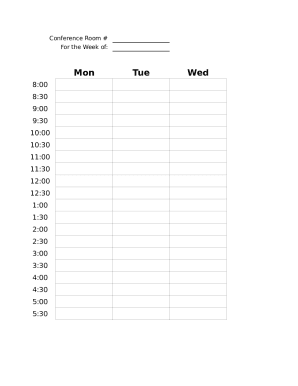
What are the types of Conference Room Scheduling Excel Template?

There are several types of Conference Room Scheduling Excel Templates available for users to choose from based on their specific needs. Some common types include:

Daily Conference Room Schedule Template
Weekly Conference Room Booking Excel Template
Monthly Conference Room Reservation Template
Yearly Conference Room Availability Tracker

How to complete Conference Room Scheduling Excel Template

Completing a Conference Room Scheduling Excel Template is easy and straightforward. Follow these simple steps to effectively organize your conference room bookings:

01
Open the Excel Template on your computer or device
02
Enter the necessary details such as date, time, meeting purpose, and number of attendees
03
Save the completed schedule for future reference and sharing with team members
04
Utilize color-coding or highlighting features to differentiate between bookings

pdfFiller empowers users to create, edit, and share documents online. Offering unlimited fillable templates and powerful editing tools, pdfFiller is the only PDF editor users need to get their documents done.


Video Tutorial How to Fill Out Conference Room Scheduling Excel Template

Thousands of positive reviews can’t be wrong

Read more or give pdfFiller a try to experience the benefits for yourself
5.0
It is very easy to use and user friendly.
What do you like best? It is very easy to use and user friendly. It is also easy to add fields and fill them in. When I am creating a document, I can also easily share them with each of our employee accounts. I also like how I am able to remove an employees account from having access to the documents with a click of a button. What do you dislike? I wish our technicians were able to use the app without internet service. In some cases, we do not have access to service, and we are unable to fill out our paperwork. It would also be nice to be able to add more than 4 other people to the account without having to get a corporate account. Recommendations to others considering the product: It has all you could ever need all in one place. We have used the SignNow and faxing features, in addition to the typical use for pdfFiller. What problems are you solving with the product? What benefits have you realized? We are able to keep all of our paperwork in one place, and the technicians are able to access it on their phones. This has made it easier to make sure all technicians are getting the correct paperwork for every job, and with the different accounts, we are able to hold the technicians accountable.
Randel Lamirande
5.0
I can quickly edit documents has saved me a lot of time.
What do you like best? I can quickly edit documents has saved me a lot of time. What do you dislike? when you save the document, it took a while to find it. Recommendations to others considering the product: do it. What problems are you solving with the product? What benefits have you realized? I do not have to re-create ..
Shawnette Carter
4.0
The ease of dragging and dropping new files into the PDF filler program.
What do you like best? The ease of dragging and dropping new files into the PDF filler program. What do you dislike? The extra options such as notary and other things like fax are not free or easily accessible to find out how they work in advance. What problems are you solving with the product? What benefits have you realized? Converting PDF to JPG is a huge problem being solved. Also, easily changing a date on a flyer that is a PDF.
Kristina Starling

Questions & answers

From your Calendar folder, select New Appointment or click Ctrl+N. From any other folder, click Ctrl+Shift+A. Enter a subject, location, start time, and end time. Select Save & Close to save your appointment.
In Webmail(Outlook Web Access) In Webmail, go to your calendar and click on “Share” and then “Add Calendar” A window prompting you to “Add Calendar” will appear. Click on “All Rooms”. You will see a list of conference rooms available to you. The conference room will appear in the “Select” field. Click “OK”
Many calendar templates are available for use in Microsoft Excel. A template provides a basic calendar layout that you can easily adapt for your needs. An Excel calendar template may have one or more of these features: Twelve months in one or separate worksheets.
A step-by-step guide to make a schedule in Excel Open the Excel app and click More templates at the top right-hand corner. Edit cell F3 with a start time that works best for you. Add this week's appointments, tasks, and events (so far!) to your schedule.
How to create a work schedule for employees Create a blank spreadsheet. If not using a prefilled template, begin by opening a new spreadsheet on your computer. Insert column headings. Fill in employee names. Determine work times. Save as a new document. Share the schedule.
A step-by-step guide to make a schedule in Excel Open the Excel app and click More templates at the top right-hand corner. Edit cell F3 with a start time that works best for you. Add this week's appointments, tasks, and events (so far!) to your schedule.