Add Textbox to PDF Document
Add a textbox to your PDF document easily with pdfFiller's online editor, perfect for quick annotations and information sharing.
What is a Textbox in PDF Documents?
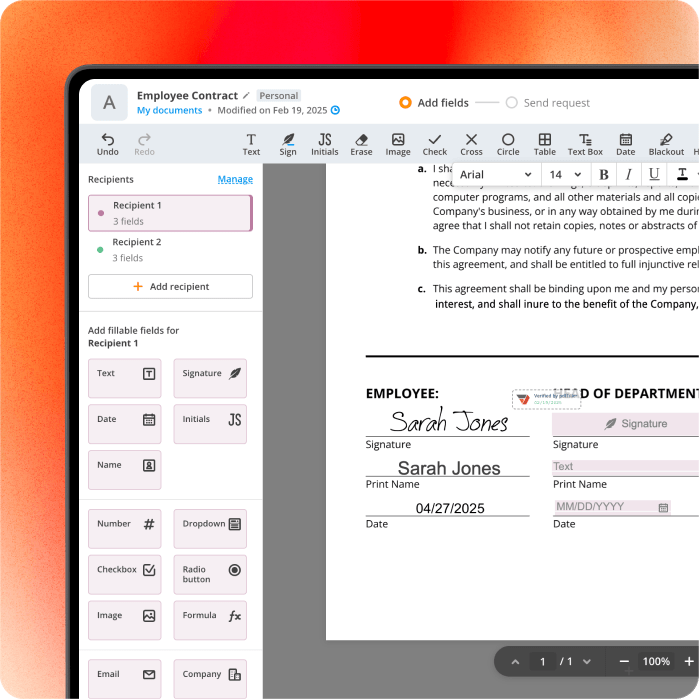
A textbox in a PDF document is a designated area where you can input text. It allows users to annotate PDFs efficiently, making it a valuable tool for small and medium-sized businesses. For instance, you might use a textbox to add comments on a contract or provide additional information on an invoice. Compared to other annotation tools, textboxes are straightforward and user-friendly, making them ideal for professionals who need to manage documents without extensive training.
Why Use Textboxes for PDF Annotation?
Using textboxes for PDF annotation offers several benefits. First, they enhance clarity by allowing you to add specific notes directly on the document. Second, textboxes are easy to use, requiring minimal effort to insert and edit. Third, they support collaboration by enabling multiple users to annotate the same document, streamlining the PDF editing process. This makes them particularly useful for teams working on shared projects.
How to Add a Textbox to a PDF Document
- Open your PDF document in pdfFiller's online editor.
- Select the "Add Textbox" option from the toolbar.
- Click on the area of the PDF where you want to place the textbox.
- Type your text into the textbox that appears.
- Adjust the size and position of the textbox as needed.
- Change the font style and size using the formatting options.
- Save your changes to ensure the textbox is included in the document.
- Share the updated PDF with your colleagues or clients for review.
Managing Textboxes After Placement
Once you've added a textbox to your PDF, you can easily manage it. To move a textbox, click and drag it to your desired location. If you need to resize it, click on the corners and adjust accordingly. To delete a textbox, simply select it and press the delete key. These editing options ensure that your annotations remain clear and relevant throughout the document's lifecycle.
Use Cases for Textboxes in Business Documents
Textboxes have practical applications in various business documents. For example, you can use them in invoices to clarify payment terms or in contracts to highlight key clauses. In reports, textboxes can provide additional commentary or insights. These annotations enhance collaboration, allowing team members to provide feedback directly on the document, which is essential for effective communication in small business documents.
Comparing Textbox Features in PDF Tools
When comparing pdfFiller's textbox feature with competitors, several key differentiators emerge. Adobe Acrobat offers extensive PDF editing features but can be complex for new users, resulting in a higher learning curve. Smallpdf provides a user-friendly interface for basic tasks but lacks advanced features like textboxes, limiting its functionality for professional use. PDF Expert is great for Mac users with strong editing capabilities, but its platform limitation reduces accessibility for Windows users.
Limitations of Textboxes in PDF Documents
While textboxes are useful, they come with limitations. Formatting issues may arise when converting PDFs with textboxes into other formats. Additionally, compatibility with scanned documents can be problematic, as textboxes may not function properly. Editing limitations also exist, as once a PDF is finalized, making changes to textboxes can be cumbersome.
Security Considerations When Using Textboxes
When adding textboxes to PDFs, it's important to consider security. Ensure that data protection measures are in place, especially when handling sensitive information. Compliance with regulations is crucial, and maintaining user privacy should always be a priority. Using a secure PDF tool like pdfFiller can help safeguard your documents during the annotation process.
Next Steps After Adding a Textbox
After adding a textbox, save your document to preserve your changes. You can share the updated PDF with colleagues or clients via email or cloud storage. Consider integrating with e-signature solutions to finalize agreements quickly. This step enhances the document workflow and ensures that all parties have access to the latest version.
Conclusion and Further Resources
In summary, adding a textbox to your PDF document is a straightforward process that enhances annotation capabilities. For further reading, explore pdfFiller's resources on PDF editing and document management. If you have questions or need support, feel free to contact our team for assistance.