Adjust Brand Logo and Comment Box in PDF
Add your brand logo and customize comment boxes in PDFs effortlessly.
What Branding Tools Do in pdfFiller
pdfFiller offers a two-layer branding system that allows you to adjust your brand logo in PDF documents effectively. This system consists of document-level and workspace-level branding, enabling you to customize your documents according to your business needs. The Image Tool allows you to insert logos easily, while the Watermark Tool helps you apply watermarks for added branding. These tools are particularly beneficial for small businesses looking to enhance their professional image without requiring IT support. With pdfFiller, you can achieve document-level branding that is straightforward and user-friendly, ensuring that you can focus on your business rather than technical complexities.
Adding a Logo to a PDF
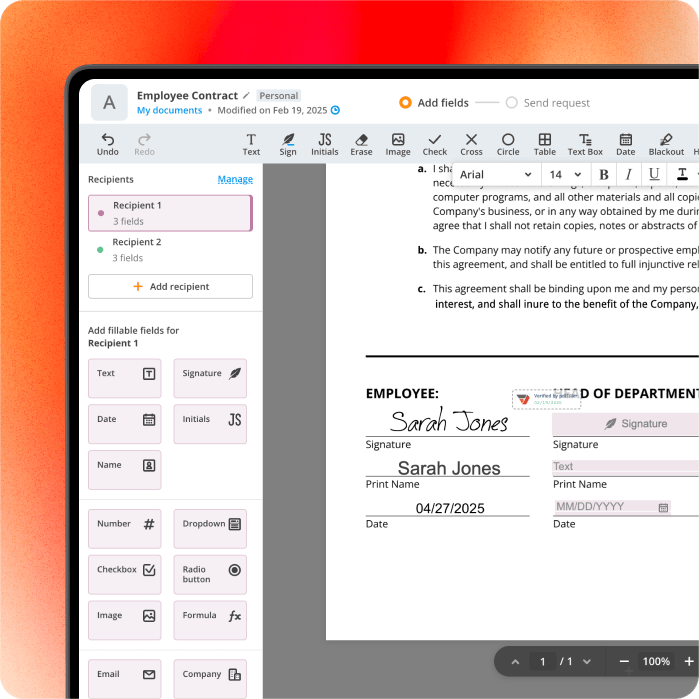
To adjust your brand logo in PDF documents, follow these steps to access the Image Tool. First, open your PDF document in pdfFiller. Next, locate the Image Tool in the toolbar. Once you have accessed the tool, you can upload your logo file. Position the logo in your desired location on the page and use the resizing options to ensure it fits well. Best practices for logo visibility include placing it in a corner or at the top of the document. This method is applicable to various document types, including invoices, contracts, and reports, allowing you to maintain a consistent brand image across all your materials.
Applying a Watermark with the Watermark Tool
Applying a watermark to your documents is straightforward with pdfFiller's Watermark Tool. You can choose between text and image watermarks, each serving different branding purposes. Customize the size and transparency of your watermark to ensure it complements your document without overwhelming the content. Additionally, you can set page scope settings to determine where the watermark appears, whether on all pages or specific ones. Watermarks are particularly useful for business documents that require a level of confidentiality or branding, ensuring your materials are recognized and protected.
Removing a Logo or Watermark from a Document
To remove a logo or watermark from your document, start by selecting the branding element you wish to delete. Click on the logo or watermark, and then choose the delete option. Common issues when removing logos include accidentally deleting other elements, which can affect the document's layout. It’s important to consider the impact on document integrity, especially if the logo or watermark was part of a professional presentation. The type of document may also influence the removal process, as some formats may have restrictions on editing.
Creating a Custom Email Signature
Setting up a custom email signature is an essential step for maintaining your brand identity in communications. Access your account settings in pdfFiller to begin customizing your email signature. Fill in the necessary fields, including your name, title, and contact information, and upload your logo for branding. A well-designed email signature enhances your professionalism and ensures that your branding is consistent across all communications. Ensure compatibility with various email clients to avoid formatting issues that could detract from your brand image.
Branding Scenarios by Role and Document Type
Branding scenarios vary significantly based on the role and document type. For small business owners, using branded invoices can enhance professionalism and trust with clients. Freelancers and consultants can benefit from branded proposals that clearly communicate their identity and value. Commonly branded document types include contracts, reports, and marketing materials. The benefits of branding in professional contexts include increased recognition and a cohesive brand image, which can lead to greater client loyalty and trust.
Browser and Device Compatibility
pdfFiller's branding tools are compatible with a variety of browsers, ensuring that you can access them from different devices. Supported browsers include Chrome, Firefox, and Safari, allowing for flexibility in how you manage your documents. Mobile device access is also available, enabling you to adjust your brand logo in PDF documents on the go. No installation is required, making it easy to use pdfFiller's features across different platforms without any technical setup.
Limitations and Known Constraints
While pdfFiller offers robust branding tools, there are some limitations to be aware of. Supported image formats for logos include JPEG and PNG, but other formats may not be compatible. Additionally, there are size limits for uploads, which can restrict the resolution of your logo. Plan-tier restrictions may also apply to certain branding features, so it’s important to check your account settings. Understanding the difference between account-wide and per-document settings can help you manage your branding effectively.
Security and Data Handling
Security is a priority when handling documents in pdfFiller. The platform uses TLS encryption during document processing to protect your data. Additionally, there are specific file retention and deletion timelines to ensure that your documents are managed securely. Compliance considerations for branding are also in place, ensuring that your branding efforts align with legal requirements. Familiarizing yourself with pdfFiller's data handling policies can provide peace of mind as you manage your documents.
How Does pdfFiller Compare?
When comparing pdfFiller's branding tools with competitors, several key differences emerge. pdfFiller vs. Adobe Acrobat shows that pdfFiller offers a more user-friendly interface for branding without the need for extensive training. In the comparison of pdfFiller vs. DocuSign, pdfFiller provides more flexible branding options that cater to small businesses. Lastly, pdfFiller vs. HelloSign highlights pdfFiller's unique advantage of integrating branding tools with document management seamlessly, making it a preferred choice for many professionals.
Summary and Next Steps
In summary, pdfFiller provides both document-level and workspace-level branding tools that are essential for creating a professional image. Explore related features such as document editing and protection to enhance your branding efforts further. We encourage you to delve into the branding tools available and consider signing up to experience the benefits firsthand. With pdfFiller, you can adjust your brand logo in PDF documents and elevate your professional presence.