Adjust Currency in Document For Free

Drop document here to upload
Select from device
Up to 100 MB for PDF and up to 25 MB for DOC, DOCX, RTF, PPT, PPTX, JPEG, PNG, JFIF, XLS, XLSX or TXT

Last updated on Sep 11, 2026

Adjust Currency in Document

Adjust currency fields in your documents easily using pdfFiller's intuitive interface.

What is Currency Adjustment in Documents?

Adjusting currency in a document is crucial for maintaining accuracy in financial reporting and invoicing. Currency fields are essential for invoices and financial documents, allowing for accurate calculations and reporting. They support multiple currencies, which is especially important for global transactions. By ensuring that currency fields are correctly adjusted, businesses can avoid costly errors and ensure compliance with financial regulations.

Why Use Fillable Currency Fields?

Fillable currency fields enhance the user experience with interactive forms, making it easier for individuals and teams to input financial data. By using these fields, businesses can reduce errors in data entry, which is vital for maintaining accurate records. Additionally, fillable currency fields can include legally binding e-signatures, ensuring that documents are not only interactive but also secure and compliant with legal standards.

How to Access Currency Fields in pdfFiller

  • Open your document in the pdfFiller editor.
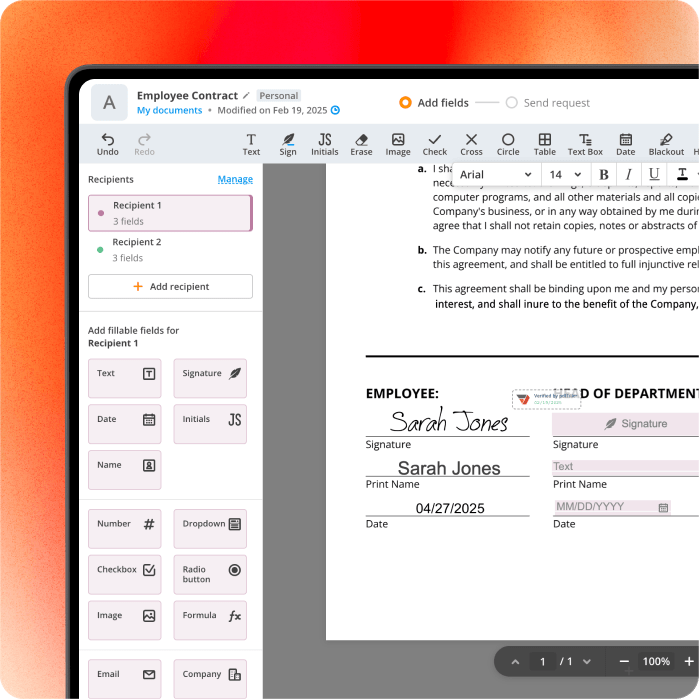
  • Locate the Add Fields button in the editor toolbar.
  • Select the currency field option from the available field types.
  • Differentiate the currency field from other editing modes to ensure correct usage.
  • Confirm that the currency fields are compatible with various document types before proceeding.

Steps to Add Currency Fields

  • Drag and drop the currency field from the panel into your document.
  • Configure the field properties in the right panel to match your requirements.
  • Adjust the size and position of the currency field as needed.
  • Save changes to the document to ensure that the currency fields are preserved.
  • Test the currency fields to confirm they function correctly before finalizing the document.

Configuring Currency Field Properties

Customizing currency field settings is essential for ensuring that they meet your specific needs. You can set the currency format to options like USD, EUR, or others, depending on your requirements. Additionally, adjusting the font size and style can enhance the document's readability. You can also mark fields as required or optional, which is crucial for guiding users on how to fill out the document accurately.

Common Scenarios for Currency Fields

  • Invoicing for services rendered, ensuring that clients receive accurate billing.
  • Expense reports for reimbursements, allowing employees to claim expenses effectively.
  • Sales contracts requiring financial terms to be clearly outlined for all parties involved.

Limitations of Currency Fields

While currency fields offer many benefits, there are some limitations to consider. For instance, there is a maximum number of fields allowed per document, which may restrict complex financial documents. Additionally, the types of fields available can be restricted by the plan tier you are using. Formula fields are also limited to the same document, which may affect your ability to perform calculations across multiple documents.

Security of Currency Adjustments

Security measures are in place to protect your currency adjustments and sensitive data. pdfFiller employs TLS encryption during document handling, ensuring that your information remains secure. Furthermore, there is an automatic deletion timeline for files, which helps to protect your data from unauthorized access. Compliance with data protection regulations is also a priority, providing peace of mind when handling financial documents.

How Does pdfFiller Compare?

pdfFiller offers a more user-friendly interface for currency adjustments compared to Adobe Acrobat, which may provide more advanced features but at a higher cost. Unlike JotForm, pdfFiller includes extensive document management capabilities, making it a better choice for those needing comprehensive document solutions. While DocuSign specializes in e-signatures, pdfFiller integrates e-signatures with broader document workflows, making it a more versatile option.

Next Steps for Adjusting Currency

After learning about adjusting currency in documents, consider starting a free trial with pdfFiller to explore its features. You can access templates for quick setup, which can save you time in creating documents. Additionally, utilize customer support for any assistance you may need while navigating the platform and its features.

Try most popular PDF tools

Discover a full set of tools to handle any document task.

Edit PDFs

Make quick PDF edits online.

Sign

Add legally binding signatures.

Merge

Combine multiple PDFs.

Request signatures

Send a document for signing.

Convert

Transform PDFs into other formats.

Rearrange

Change the order of pages.

Share

Send PDFs for review or editing.

Compress

Reduce PDF file sizes.

How to fill or build a PDF form

1. Upload or create your form

Everything you need to work with forms

  • Make any PDF fillable in seconds Upload any static PDF, from scanned forms to tax templates, and turn it into an interactive form. Add text fields, checkboxes, dropdowns, date pickers, and signature fields anywhere on the form. No redesign. No extra tools needed.
  • Build forms from scratch or let AI do it Start from a blank page, pick a template from pdfFiller's library, or describe what you need and let AI generate a ready-to-use form in seconds. Add fields, set validation rules, mark required inputs — then publish, embed, or share in one click.
  • Fill any form online pdfFiller auto-detects fillable fields as soon as you open a document. Just click and start — type text, check boxes, pick dates, or add your signature. No downloads or extra tools. Works with scanned PDFs and non-interactive forms too.
  • Collect responses, not just files Share your form via a direct link, embed it on your site, or send it to specific recipients. Every submission lands in your pdfFiller account as a separate, trackable response. See who completed the form, get notified when new responses come in, and export all entries to a spreadsheet in one click.
  • Reuse your forms without starting over Save any form as a template and reuse it whenever you need. When the same intake form, contract, or questionnaire needs to go out again, just open the template, update what’s changed, add a signature, and send. Each submission is saved separately, so your original stays intact.

Who needs this?

Explore how professionals across industries use pdfFiller to edit PDFs.

Healthcare

Paper intake forms slow everything down — staff re-enter data, patients wait, and information gets lost. Replace paper with digital forms patients can complete from any device before their appointment. Every submission goes straight into your workflow, organized and easy to search. HIPAA-compliant storage keeps sensitive data secure.

  • Patient registration and intake forms
  • Medical history questionnaires
  • Consent and authorization forms
  • Prescription refill and referral requests
Healthcare
  • G2 — Users Most Likely To Recommend
  • G2 — Grid Leader in Small-Business
  • G2 — High Performer
  • G2 — Regional Leader
  • G2 — Easiest To Do Business With
  • G2 — Best Meets Requirements
  • G2 — Best Support

pdfFiller scores top ratings on review platforms

pdfFiller is rated 4.6 out of 5 stars across 1,000+ G2 reviews.

PDFfiller is a great tool. Would like to see line spacing added to the application.
Denise C
Solved my problem ... quickly with no special training
D J
The support with this company surpasses… The support with this company surpasses anything I have ever dealt with. Honestly, I NEVER write reviews because I have never been moved to do so; however, today I was. Quick response, did exactly what I wanted, no questions asked just solutions. We can all learning something from this great customer service. This is too few and far between nowadays. "Sam" is who helped me today and I hope he gets the recognition that they deserve!
Whitney Copas
I love it I love it, it's easy to use and the app. is very helpful with a lot of Features and capabilitiesز
raghadkane
Great product! Great product!Does what it should do in a simple and intuitive way.Hope it also keeps me private
yuri bernstein
Nice tool to edit pdfs and upload anywhere easily of our day today work.
Tharinda K D

Create, fill, and manage PDF forms — all in one place

Try easy-to-use tools to handle all your documents.

pdfFiller workspace for creating, filling and managing PDF forms

PDF editing is just the beginning

More than a PDF editor

How to Use pdfFiller’s Advanced Form Builder

Want to turn static PDFs into smart, fillable online forms in minutes? This pdfFiller tutorial shows you how to use the advanced form builder to create dynamic documents for resumes, HR forms, client contracts, job applications, and more—no coding needed. Learn how to build interactive forms using drag-and-drop tools with ease.

FAQs

If you can't find what you're looking for, please contact us anytime!

To adjust currency in your document using pdfFiller, simply open your PDF, select the 'Edit' option, and use the text tool to modify the currency values directly. This intuitive process allows you to change amounts, symbols, and formats easily. For best results, ensure that you are familiar with the document's original currency format to maintain consistency. Additionally, consider using the 'Replace' feature if you need to change multiple instances of a currency symbol throughout the document.

To convert currency values in a PDF document, first, identify the currency you want to change. Use the 'Edit' feature in pdfFiller to highlight the currency amount, then manually enter the new value based on the current exchange rate. It's advisable to check a reliable financial source for accurate rates. For efficiency, you can also create a template with pre-set currency formats for future documents, ensuring consistency across your financial reports.

Yes, pdfFiller allows for document automation, which can include currency adjustments. By using templates with predefined fields for currency, you can streamline the process of adjusting currency in documents. Set up your template with placeholders for currency values, and when you fill out the document, simply enter the new amounts. This not only saves time but also reduces the risk of errors in manual entries. For enhanced security, ensure that your templates are stored in a secure, cloud-based environment.

Absolutely, adjusting currency in documents using pdfFiller is secure. The platform employs advanced security protocols, including encryption and secure cloud storage, to protect your sensitive information. When you adjust currency values, your changes are saved in a secure environment, ensuring that your financial data remains confidential. Always ensure that you are logged into your account and that your documents are shared only with trusted collaborators to maintain security.

If you need to adjust multiple currency types in a single document, start by identifying each currency section. Use the 'Edit' tool in pdfFiller to highlight and change each currency value individually. For efficiency, consider using the 'Find and Replace' feature to quickly update all instances of a specific currency symbol. Additionally, keeping a reference of current exchange rates can help ensure accuracy when converting between different currencies in your document.

To ensure your currency adjustments are compliant with financial regulations, always refer to the latest guidelines relevant to your industry. When using pdfFiller, ensure that your documents reflect accurate and current exchange rates, and maintain a record of these rates for auditing purposes. It’s also beneficial to consult with a financial advisor or legal expert when making significant adjustments to ensure compliance with local and international regulations.

Yes, pdfFiller supports real-time collaboration, allowing multiple users to adjust currency in a document simultaneously. You can share your document with team members, who can make edits and suggestions directly within the platform. This feature enhances teamwork and ensures that all currency adjustments are reviewed and approved by relevant stakeholders. To facilitate collaboration, use the comment feature to discuss specific changes or to clarify any adjustments needed.

What businesses achieve with pdfFiller

Discover how you can benefit too.

I tell my employees that if you need to have stuff filled out, hey, check out pdfFiller, that's what I use. Yes, I would and I do recommend it.

Hope Discovery ABA Services

One tool. Every document task.

One workflow shouldn’t take five tools

Start free trial