Adjust Watermark and Signature in PDF
Adjust watermark and signature in PDF documents to enhance branding and security. Use pdfFiller’s intuitive tools for quick modifications.
What is the Watermark Tool?
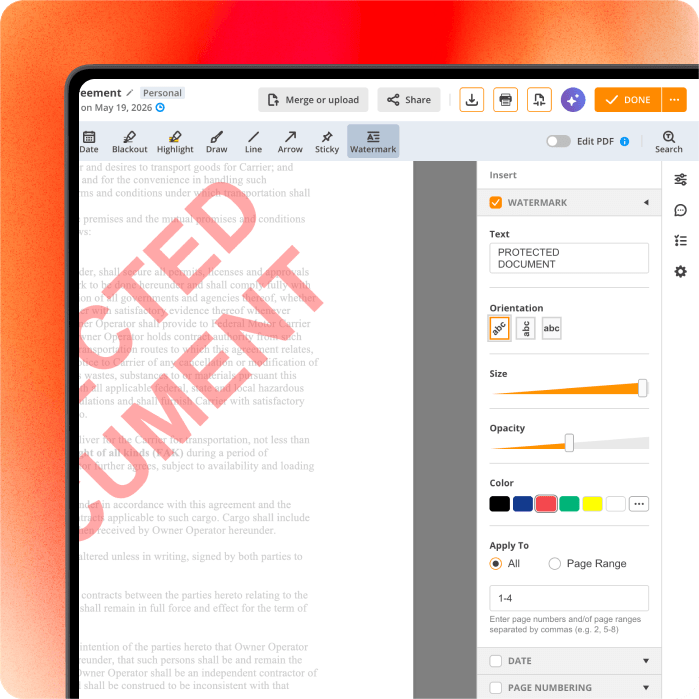
The watermark tool allows you to adjust watermark and signature in PDF documents easily. It provides two types of watermarks: text and image. You can access this feature by navigating to Tools → Watermark. The tool also includes a semi-transparent overlay feature that helps in maintaining the document's readability while branding it effectively.
Why Use Watermarks in Your PDFs?
Watermarking documents serves several important purposes. First, it protects the confidentiality of sensitive documents, ensuring that unauthorized parties cannot misuse them. Additionally, it enhances brand visibility, making your company’s identity more recognizable. Watermarks are particularly useful for legal and professional contexts, where maintaining document integrity is crucial.
How to Add a Text Watermark
- Open your PDF document in pdfFiller.
- Select the watermark tool from the Tools menu.
- Enter your custom text for the watermark in the provided field.
- Adjust the size of the text to fit your document's layout.
- Set the transparency level to create a semi-transparent overlay.
- Choose whether to apply the watermark to all pages or specific pages only.
- Preview the watermark to ensure it appears as desired.
- Click 'Apply' to finalize the watermark on your document.
How to Add an Image Watermark
- Open your PDF document in pdfFiller.
- Navigate to the watermark tool in the Tools menu.
- Upload your logo or emblem by clicking the upload button.
- Configure the image size to fit your document appropriately.
- Adjust the opacity of the image to create a subtle effect.
- Decide if you want the watermark on all pages or just specific ones.
- Preview the watermark to check its placement and visibility.
- Click 'Apply' to add the image watermark to your document.
Customizing Your Watermark Appearance
You can customize your watermark settings to better fit your branding needs. Change the color of the watermark to match your brand identity. Additionally, you can rotate the watermark to create a unique look. Adjust the transparency levels to ensure the watermark does not overpower the document content. Always preview your changes before applying them to see how they affect the overall appearance.
Applying Watermarks to Specific Pages
When applying watermarks, you have options for selective application. You can choose to apply the watermark only to the current page or to all pages in the document. Moreover, you can specify a custom page range for the watermark. Selective watermarking is beneficial for emphasizing certain sections while keeping others clean and unbranded.
Editing or Removing a Watermark
To modify or delete existing watermarks, reopen the watermark tool from the Tools menu. If you want to change the text or image of the watermark, simply select the existing watermark and make your adjustments. To remove a watermark, select the delete option within the watermark tool, ensuring that your document is free of unwanted branding.
Applying a Date Stamp to Your Document
Adding a date stamp can be crucial for legal documents. You can choose from various date formats and decide on the placement within the document. Adjust the transparency settings for the date stamp to ensure it is visible but not distracting. Date stamps serve an important role in establishing the timeline of document creation and modifications.
Adding Page Numbers to Your PDF
To improve document organization, consider adding page numbers. You can select sequential numbering options to ensure consistency throughout the document. Customize the placement and font of the page numbers to fit your design preferences. Page numbering is beneficial for keeping track of document versions and ensuring clarity in multi-page documents.
How Does pdfFiller Compare?
Adobe Acrobat offers extensive PDF editing features but at a higher cost. Users may find it complex for simple watermarking tasks.
Smallpdf provides basic watermarking but lacks advanced customization options. It may not meet the needs of businesses requiring extensive branding.
ilovepdf is a straightforward tool for watermarking but limited in document management features. Users may prefer a more integrated solution like pdfFiller.