Barcode Signature Generator For Free

Create your legally-binding electronic signature using one of the available methods and apply it to any document in seconds.

Drop document here to upload
Select from device
Up to 100 MB for PDF and up to 25 MB for DOC, DOCX, RTF, PPT, PPTX, JPEG, PNG, JFIF, XLS, XLSX or TXT

Last updated on Oct 21, 2026

Barcode Signature Generator

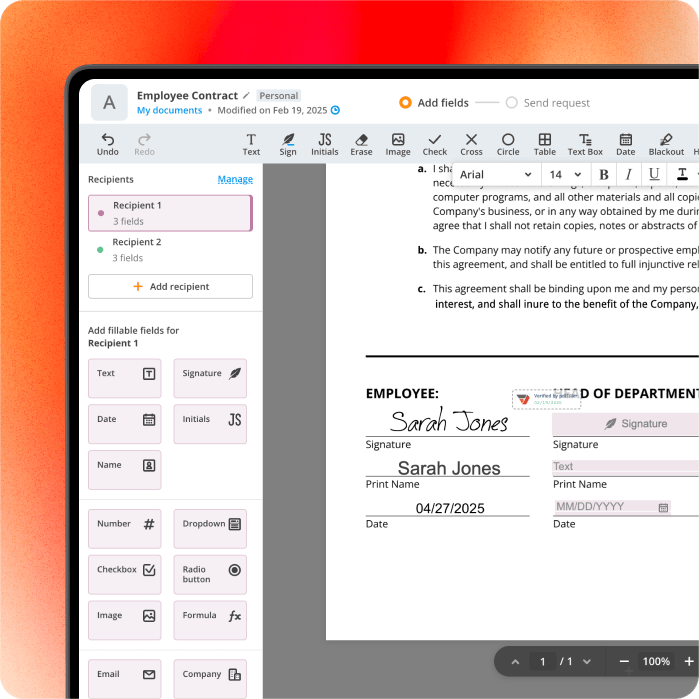
Create your unique barcode signature quickly and easily with pdfFiller's intuitive tool.

What is the Barcode Signature Generator?

The Barcode Signature Generator is a powerful tool designed to create unique barcode signatures for your documents. With easy access via pdfFiller, this signature tool allows you to generate barcodes that are compatible with various document types. It is particularly ideal for small businesses that require efficient document signing without the hassle of complex setup requirements. This tool eliminates the need for lengthy processes, enabling you to focus on your work instead of technical barriers.

How Does the Barcode Signature Workflow Work?

  • Access the barcode signature generator through pdfFiller on your device.
  • Follow the step-by-step process to create your barcode signature.
  • Sign your documents quickly with the generated barcode signature.
  • Utilize the tool from any device, ensuring fast and efficient document signing.
  • Apply the barcode signature in various industries, enhancing your workflow.

Creating Your Barcode Signature

To create your barcode signature, start by selecting your preferred input method for signature creation. You can customize your signature with various options available, ensuring it meets your specific needs. Before finalizing, preview your barcode signature to confirm it appears as intended. Additionally, pdfFiller assures legal compliance for your digital signature, providing peace of mind as you sign important documents.

Legal Validity of Barcode Signatures

Barcode signatures generated through pdfFiller comply with the ESIGN and UETA acts, ensuring their legal validity. Each signature is accompanied by timestamped audit trails, making them legally binding. Furthermore, the pdfFiller badge verifies the authenticity of your barcode signature, reinforcing its acceptance in legal documents.

Saving and Reusing Your Barcode Signature

To save your barcode signature for future use, follow the straightforward steps provided in pdfFiller. You can set a default signature, allowing for quick access in subsequent documents. This feature is particularly beneficial for frequent users, saving time and streamlining your document management process.

Industry Scenarios for Barcode Signatures

Barcode signatures can be applied in various real-world scenarios. For instance, in real estate, agents can sign contracts digitally, expediting the closing process. In finance, professionals can authorize invoices efficiently, reducing delays in payment processing. Healthcare providers can complete patient forms quickly, enhancing service delivery. In education, administrators can streamline approvals for documents, improving operational efficiency.

Browser and Device Compatibility

The barcode signature generator is compatible with a wide range of browsers, ensuring optimal use regardless of your preferred platform. You can access the tool from mobile devices, making it convenient for on-the-go signing. Additionally, it supports various operating systems, allowing you to work from any internet-enabled device without limitations.

Limitations of the Barcode Signature Tool

While the barcode signature generator offers many advantages, it does have limitations. For example, it does not support recipient signature requests, meaning you cannot request signatures from others. Users must manually place saved signatures on documents, which may require additional steps. Furthermore, the tool may not be applicable for all document types, and there are some restrictions on customization features.

Next Steps with Your Barcode Signature

After creating your barcode signature, consider integrating it with pdfFiller's other features for a more comprehensive document management experience. You can easily share documents with your barcode signature, utilizing it in various workflows. Explore additional tools available within pdfFiller to maximize your productivity and enhance your document signing process.

Try most popular PDF tools

Discover a full set of tools to handle any document task.

Edit PDFs

Make quick PDF edits online.

Sign

Add legally binding signatures.

Merge

Combine multiple PDFs.

Request signatures

Send a document for signing.

Convert

Transform PDFs into other formats.

Rearrange

Change the order of pages.

Share

Send PDFs for review or editing.

Compress

Reduce PDF file sizes.

How to sign a document online?

Upload

Signing and editing documents has never been easier

  • Edit and sign in one place Quickly eSign documents after reviewing or editing — no need to juggle tools and move files back and forth. Get your PDFs done fast with all the tools you need at your fingertips.
  • Easy sharing & collaboration After signing a document, share it instantly with clients and stakeholders for review, editing, or comments. To request signatures from other parties, add fillable fields and send the document for signing.
  • Mobile-ready solution Easily edit, sign, and send your documents from anywhere, even on the go. pdfFiller is entirely cloud-based, so you can manage documents effectively from your computer, smartphone, or tablet.
  • Legally binding & secure Sign contracts and agreements following global eSignature laws, including ESIGN, UETA, eIDAS, and GDPR. With HIPAA, PCI DSS, SOC 2 Type II, and other compliance standards, pdfFiller works for any industry.

Who needs this?

Explore how professionals use pdfFiller to sign documents.

Healthcare

Healthcare professionals use pdfFiller to simplify document signing, from patient consent forms to medical record requests. They can easily request, approve, and share signed documents with patients, staff, or suppliers, saving time and improving communication.

  • Patient consent forms
  • Prescription forms
  • Lab test requisition forms
  • Referral and consultation forms
Healthcare
  • G2 — Users Most Likely To Recommend
  • G2 — Grid Leader in Small-Business
  • G2 — High Performer
  • G2 — Regional Leader
  • G2 — Easiest To Do Business With
  • G2 — Best Meets Requirements
  • G2 — Best Support

pdfFiller scores top ratings on review platforms

pdfFiller is rated 4.6 out of 5 stars across 1,000+ G2 reviews.

awesome, so helpful. super easy to use love it
Anonymous Customer
Easy to use and makes sending a PDF Document via fax or email extremely simple
George P
Easy to work with.......even with me that I am not a computer savvy.
Jorge L
So much better than printing out forms and filling in by hand!
Tammy
So far good. A site showing email return and sign would be helpful.
Chandler W
Efficiency When you have no device to print out and thrn scan..you can use this software. It is very good software since you can edit signs and print document without having device to print out. I do not have any leat because it is good at all since it has excelent advantages to me.no disadvantage at all.
Saidi N.

eSign documents with a trusted, all‑in‑one solution

Try easy-to-use tools for all your document management needs.

pdfFiller workspace for creating, filling and managing PDF forms

Why sign documents with pdfFiller?

Ease of use

Watch pdfFiller eSignatures in action

Check out a quick video tutorial that shows how to create and place your signature or send a document for signing.

FAQs

If you can't find what you're looking for, please contact us anytime!

A Barcode Signature Generator creates unique barcodes that can be used as digital signatures for documents. This tool encodes signature data into a barcode format, allowing for easy verification and tracking. Users can generate barcodes that link to their digital signatures, ensuring authenticity and security. To use this feature effectively, ensure your documents are compatible with barcode scanning technology, which enhances document automation and streamlines workflows.

Using a Barcode Signature Generator significantly enhances document security by embedding a unique identifier within the barcode. This identifier can be linked to a secure database that verifies the authenticity of the signature. By implementing security protocols such as encryption and access controls, users can prevent unauthorized alterations. For best practices, always pair barcode signatures with secure cloud storage solutions to ensure that your documents remain protected against tampering.

Yes, a Barcode Signature Generator can be utilized across various platforms, including Windows, Mac, and mobile devices. This cross-platform compatibility allows remote professionals and legal teams to generate and verify barcodes seamlessly, regardless of their operating system. To maximize this functionality, choose a cloud-based solution like pdfFiller that supports multiple file formats and integrates with existing document management systems.

The primary advantage of using a Barcode Signature Generator for legal documents is the enhanced traceability and verification it provides. Barcodes can be scanned to confirm the legitimacy of signatures, which is crucial in legal contexts. Additionally, this method reduces the risk of forgery and simplifies the audit trail process. For legal teams, integrating barcode signatures into document workflows can streamline operations and improve compliance with regulatory standards.

Integrating a Barcode Signature Generator into your existing document workflow involves selecting a compatible tool that can seamlessly connect with your current systems. Start by assessing your document management needs and choose a generator that supports automation features. Once selected, implement the generator by training your team on how to create and verify barcode signatures, ensuring that everyone understands the security protocols involved. This approach will enhance efficiency and maintain document integrity.

When selecting a Barcode Signature Generator, consider factors such as ease of use, security features, and integration capabilities with your existing document management systems. Look for a solution that offers robust encryption and compliance with industry standards to ensure data protection. Additionally, evaluate whether the generator supports various barcode formats and can be accessed across multiple devices. This will ensure that your remote team can efficiently manage and sign documents securely.

While a Barcode Signature Generator offers numerous benefits, there are some limitations to consider. For instance, not all barcode formats are universally recognized, which may affect compatibility with certain scanning devices. Additionally, users must ensure that the generated barcodes are stored securely to prevent unauthorized access. To mitigate these issues, always test the generated barcodes across different platforms and devices before full implementation, ensuring that your document workflows remain efficient and secure.

What businesses achieve with pdfFiller

Discover how you can benefit too.

pdfFiller allows us to tap into additional markets and sell business we might not otherwise have sold because of the speed and ease with which we can produce the forms.

Scaturro Insurance Agency LLC

One tool. Every document task.

One workflow shouldn’t take five tools

Start free trial