Compress Word to Smaller MB Size
Compress Word documents quickly and easily to reduce file size for efficient sharing and storage.
What is the Compress Tool for Word Documents?
The Compress tool is designed to help you Compress Word documents effectively. This tool optimizes embedded images within your documents, ensuring that the visual quality is maintained while reducing the overall file size. You can access this tool directly in the editor, making it convenient for users who need to manage their documents without any IT setup required. This means you can focus on your work without worrying about complex software requirements.
Why Compress Word Files?
Compressing Word files offers several benefits that are particularly important for small and medium-sized businesses. First, it improves sharing efficiency, allowing you to send documents via email without encountering size limitations. Additionally, it saves storage space on your devices, which is crucial when managing numerous files. Compressing documents is essential for email attachments, ensuring that your communications remain smooth and professional.
How to Access the Compress Tool
- Open your document in the pdfFiller editor.
- Locate the header menu at the top of the editor.
- Click on the "All Tools" dashboard option.
- Find the Compress tool listed among the available tools.
- No document is needed to access the Compress tool.
Steps to Compress a Word Document
- Select the Compress tool from the tools menu.
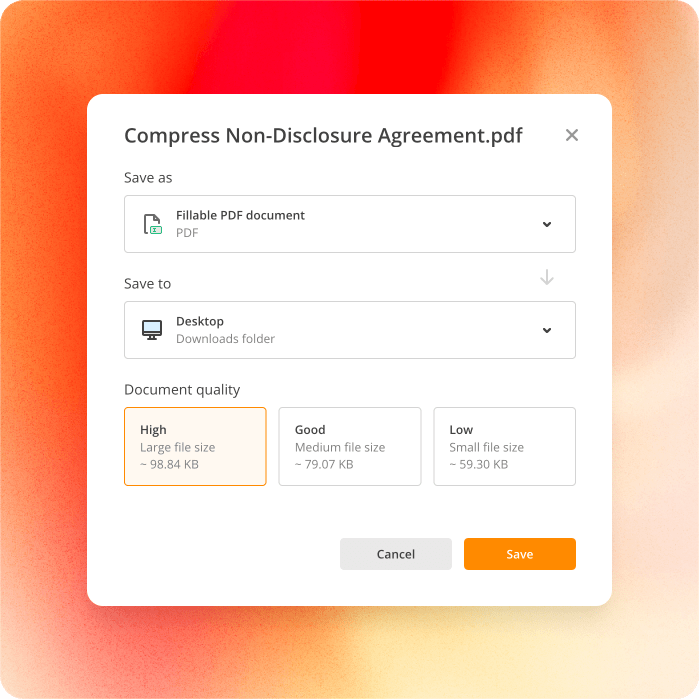
- Choose your desired quality settings for the compression.
- Click the "Compress" button to initiate the process.
- Wait for the tool to process your document.
- Download the compressed file to your device.
Choosing Compression Quality Levels
When you Compress Word documents, you have the option to select different quality levels: high, medium, and low. Each setting impacts the fidelity of images within the document. High quality retains more detail, while medium and low settings reduce file size further but may affect image clarity. It's important to choose a setting that aligns with your needs, as the impact on image fidelity can vary based on the quality selected.
What Changes After Compression?
After you Compress Word documents, some content may be affected. Images within the document may lose quality, which can be noticeable if they are crucial to your presentation. However, the text remains intact, and the overall structure of the document is preserved. This ensures that your document remains functional and readable after compression.
Expected File Size Reduction
The amount of file size reduction you can expect when you Compress Word documents varies based on the content of the document. Image-heavy files typically compress more significantly than text-only files, which may see minimal reduction. Therefore, it's essential to understand that the results can differ based on the specific elements within your document.
What to Do After Compression
Once you have successfully compressed your document, you can take several next steps. First, download the compressed file to your device. You can also share the document directly from pdfFiller, making it easy to distribute without additional steps. If further compression is needed, you can repeat the process to achieve your desired file size.
Comparing Compression Tools
When considering different tools for compressing Word documents, pdfFiller stands out for its user-friendly interface and additional features. For example, Smallpdf offers a straightforward compression tool but lacks the extensive template library that pdfFiller provides, which can be beneficial for document management. Adobe Acrobat is known for its robust features but often comes with a higher price point, making it less accessible for small businesses. Foxit provides competitive compression options but may not integrate as seamlessly with other document management tools, requiring users to navigate multiple platforms for comprehensive solutions.
Industry Scenarios for Compression Needs
Compression needs can vary across different industries. For accountants, compressing Word documents containing financial reports is crucial for efficient sharing with clients. Marketers often need to Compress Word files for promotional materials to ensure quick delivery via email. Legal professionals benefit from optimizing Word files for contracts and agreements, where maintaining document integrity is essential while also managing file sizes for easy submission. Each of these scenarios highlights the practical benefits of using a compression tool tailored to specific professional needs.