Convert JPG to PDF and Unlock PDF for Website For Free

Drop document here to upload
Select from device
Up to 100 MB for PDF and up to 25 MB for DOC, DOCX, RTF, PPT, PPTX, JPEG, PNG, JFIF, XLS, XLSX or TXT
Note: Integration described on this webpage may temporarily not be available.

Last updated on Sep 16, 2026

Convert JPG to PDF and Unlock PDF for Website

Convert JPG images to PDF format quickly and easily with pdfFiller, perfect for small businesses and professionals.

What is JPG to PDF Conversion?

Converting JPG to PDF involves changing a JPG image file into a PDF format. JPG, or Joint Photographic Experts Group, is a commonly used image format that compresses image data. PDF, or Portable Document Format, is a file format used to present documents in a manner independent of application software, hardware, and operating systems. The benefits of this conversion include improved document sharing, as PDFs are widely accepted and can be easily viewed on various devices. Common use cases for converting JPG to PDF include creating business documents, portfolios, and educational materials. For small and medium-sized businesses, understanding the importance of converting files can streamline workflows and enhance professional presentations.

Why Convert JPG to PDF?

The advantages of JPG to PDF conversion are significant. First, improved document sharing is achieved since PDFs maintain formatting across different platforms. Second, the preservation of image quality is crucial; converting to PDF ensures that the original image remains intact without quality loss. Third, PDFs are compatible with various devices, making them ideal for sharing with clients and colleagues. Additionally, legal considerations arise as PDFs can be used for official documents that require signatures, making this conversion essential for businesses.

How to Access the JPG to PDF Tool

  • Open your web browser and visit the pdfFiller website.
  • Navigate to the tools section from the main menu.
  • Select the JPG to PDF conversion tool from the list of available tools.
  • Familiarize yourself with the user interface, which is designed for ease of use.
  • Access the tool on mobile devices by visiting the same website on your smartphone or tablet.

Steps to Convert JPG to PDF

  • Upload your JPG images by clicking the upload button on the tool interface.
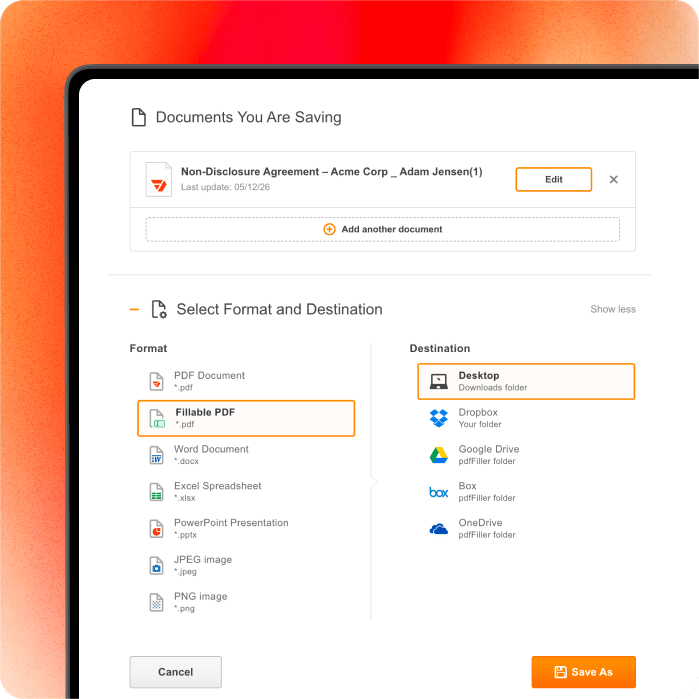
  • Select the output format as PDF from the available options.
  • Click the convert button to initiate the conversion process.
  • Once the conversion is complete, download the PDF file to your device.
  • If you encounter issues, check the file size and format compatibility, and try again.

Supported Output Formats

  • PDF - the primary format for document sharing and archiving.
  • JPG - original format maintained for reference.
  • PNG - another image format that can be converted.
  • GIF - suitable for simple graphics and animations.
  • TIFF - often used for high-quality images in professional settings.

Common Scenarios for JPG to PDF Conversion

There are various real-world applications for converting JPG to PDF. Small businesses often need to create professional documents for clients, such as invoices and reports. Freelancers may require quick conversions to send portfolios to potential clients. Professionals sharing portfolios can benefit from the consistent formatting that PDFs provide, ensuring that their work is presented in the best light. Educational scenarios also arise, where students convert images of notes or diagrams into PDFs for easy sharing and printing.

Limitations of JPG to PDF Conversion

While converting JPG to PDF offers many benefits, there are limitations to consider. File size limits may restrict the number of images you can convert at once. Quality considerations are essential; large images may lose detail if not handled correctly. Complex formatting issues can arise, especially when dealing with multi-page PDFs. Additionally, plan-tier restrictions may limit features available for conversion, impacting the overall user experience.

Security and Data Handling

pdfFiller ensures document security during the conversion process through robust data encryption. Their privacy policies are designed to protect user information, and the document handling process is transparent. Users maintain control over their files, allowing them to delete documents after conversion to ensure confidentiality.

How Does pdfFiller Compare?

Adobe Acrobat is known for its comprehensive features but can be costly for small businesses. It offers extensive editing tools that may be more than needed for basic conversions. Smallpdf provides a user-friendly interface but has limited features compared to pdfFiller, making it suitable for basic conversions only. ilovepdf is a free tool that offers basic functions but may not ensure document security like pdfFiller, and it has limited support for complex documents.

Next Steps After Conversion

After converting JPG to PDF, there are several practical next steps you can take. You can edit the PDF using pdfFiller's editing options to add text or annotations. Signing documents digitally is another option, making it easy to finalize agreements. Sharing PDFs can be done via email or cloud storage, ensuring easy access for collaborators. Finally, consider archiving files for future reference, keeping your documents organized and accessible.

Try most popular PDF tools

Discover a full set of tools to handle any document task.

Edit PDFs

Make quick PDF edits online.

Sign

Add legally binding signatures.

Merge

Combine multiple PDFs.

Request signatures

Send a document for signing.

Convert

Transform PDFs into other formats.

Rearrange

Change the order of pages.

Share

Send PDFs for review or editing.

Compress

Reduce PDF file sizes.

How to convert your PDF?

1. Upload your document

All-in-one PDF converter: Convert, edit, sign, and manage documents

  • Convert and edit docs in one place Upload your document, make quick edits online, and save it as a PDF, text document (DOCX), spreadsheet (XLSX), image (JPEG/PNG), or presentation (PPTX).
  • Equip yourself with powerful PDF tools Edit PDFs online almost as easily as Word documents. Add text, adjust formatting, replace content, insert images, and more.
  • eSign and send documents Sign documents on your own or send them to others for signatures, whether a single recipient or an entire group.
  • Annotate & collaborate Highlight important data, redact sensitive details, add sticky notes, and exchange comments in your PDFs. Then, instantly send documents for review or editing.
  • Collect data without chasing people down Create fillable PDF forms and let others complete them from any device. Publish forms online or share them via a direct link to capture data and signatures.
  • Store files securely in the cloud Organize your documents and templates in secure cloud storage and access them from anywhere. pdfFiller follows strict security regulations to help safeguard your data.

Who needs this?

Explore how professionals across industries use pdfFiller to convert PDFs online.

Real Estate

Real estate agents and brokers rely on pdfFiller to edit and annotate brochures, lease agreements, and contracts. They can easily convert documents to formats like JPEG, PDF, DOCX, or XLSX for quick sharing and signature collection.

  • Property listing brochures
  • Lease agreements
  • Sales contracts
  • Property management forms
Real Estate
  • G2 — Users Most Likely To Recommend
  • G2 — Grid Leader in Small-Business
  • G2 — High Performer
  • G2 — Regional Leader
  • G2 — Easiest To Do Business With
  • G2 — Best Meets Requirements
  • G2 — Best Support

pdfFiller scores top ratings on review platforms

pdfFiller is rated 4.6 out of 5 stars across 1,000+ G2 reviews.

Needed it for filling in a form. Worked as well as could be expected.
Wm D
I like the program. I did pay for it, so I feel that I should be able to upload pictures to the file. Uploading images should be included in a basic membership. I still like the service.
carolina
it was exactly what I was looking/hoping for. Thank you.
kait
Great and Easy interface Great and Easy interface. very helful
Johan Bingen-Jakobsen
PDF Filler is a Outstanding Tool PDF Filler is a Outstanding ToolThank You for Your Leadership and Support on Cutting Edge Software.
Joseph T Robinson Jr
It is great and easy to use, it would be great if you could edit Drawings easy
Neville C

Convert documents with a trusted solution

Try easy-to-use tools for all your document management needs.

pdfFiller workspace for creating, filling and managing PDF forms

Why convert documents with pdfFiller?

More than a PDF converter

Watch our PDF converter in action

Check out a quick video tutorial that shows how to convert any file into an editable PDF in three easy steps.

FAQs

If you can't find what you're looking for, please contact us anytime!

To convert JPG to PDF and unlock PDF for website use, utilize pdfFiller’s online tools. Simply upload your JPG file, select the conversion option, and then use the unlock feature to remove any restrictions. This process ensures your PDF is ready for sharing on your website without limitations. For best results, ensure your JPG files are high-resolution to maintain quality during conversion. Additionally, consider using pdfFiller’s document automation features to streamline your workflow.

Converting JPG to PDF for website integration offers several benefits, including improved document security and compatibility across devices. PDFs maintain their formatting regardless of the platform, ensuring that your content appears professional. By unlocking the PDF, you can allow users to interact with the document, such as filling forms or adding comments. For optimal website performance, compress your PDF files to enhance loading times while preserving quality. This is especially important for remote professionals and legal teams who require efficient document management.

When unlocking PDFs for your website, prioritize security measures such as password protection and encryption. pdfFiller allows you to unlock PDFs while maintaining control over who can access and edit your documents. Always ensure that sensitive information is adequately protected, especially for legal teams handling confidential data. Additionally, consider using secure cloud storage solutions to back up your documents. Regularly update your security protocols to safeguard against unauthorized access.

Yes, you can convert multiple JPG files to PDF at once using pdfFiller’s batch processing feature. This allows you to save time and streamline your document management process. Simply upload all your JPG files, select the batch conversion option, and pdfFiller will create a single PDF file containing all images. This is particularly useful for remote professionals and SMEs needing to present multiple images as a cohesive document on their website. Remember to check the final PDF for quality and formatting.

To optimize PDFs for website performance, focus on file size reduction and accessibility. Use pdfFiller’s compression tools to minimize file size without sacrificing quality, which enhances loading speed on your site. Additionally, ensure that your PDFs are tagged for accessibility, allowing all users, including those with disabilities, to navigate your documents easily. Implementing these best practices not only improves user experience but also boosts your website’s SEO, making it easier for search engines to index your content.

pdfFiller ensures cross-platform compatibility when converting JPG to PDF by utilizing standardized file formats and cloud-based technology. This means that your converted PDFs can be accessed and viewed on any device or operating system without formatting issues. For remote professionals and legal teams, this is crucial for seamless collaboration. Always test your PDFs on different devices after conversion to confirm compatibility, and consider using pdfFiller’s sharing features to distribute documents easily across platforms.

After converting JPG to PDF, pdfFiller offers a suite of features to enhance document management, including eSigning, collaboration tools, and advanced editing options. Users can easily annotate, highlight, and fill out forms within the PDF, streamlining workflows for remote teams and legal professionals. Additionally, pdfFiller’s cloud-based platform allows for real-time collaboration, ensuring that all team members can access the latest version of documents. Leverage these features to improve efficiency and maintain control over your document processes.

What businesses achieve with pdfFiller

Discover how you can benefit too.

Other software options offering customized branding have really extreme pricing. Compared to the monthly costs of PandaDoc, we are now saving unbelievable amounts of money.

B2B Services Message Direct

One tool. Every document task.

One workflow shouldn’t take five tools

Start free trial