Convert Word to PDF and eSign PDF for Server For Free

Drop document here to upload
Select from device
Up to 100 MB for PDF and up to 25 MB for DOC, DOCX, RTF, PPT, PPTX, JPEG, PNG, JFIF, XLS, XLSX or TXT
Note: Integration described on this webpage may temporarily not be available.

Last updated on Sep 18, 2026

Convert Word to PDF and eSign PDF for Server

Convert Word documents to PDF and eSign them easily with pdfFiller.

What Does the Conversion Tool Do?

The conversion tool allows you to convert Word documents to PDF format without needing to install any software. This is particularly beneficial for small businesses and professionals who require a fast and efficient solution. With pdfFiller, you can easily convert your documents while ensuring layout fidelity, which is crucial for maintaining the original look of your files. Additionally, the tool supports e-signatures for PDFs, making it a comprehensive solution for document management.

Why Format Matters in Document Workflows

Understanding the importance of document formats is essential for effective communication and collaboration. Converting Word documents to PDF is vital for sharing, as PDFs preserve the formatting and layout, ensuring that the document appears the same on any device. While editing capabilities in Word allow for flexibility, extracting data to Excel or embedding images in documents can lead to complications if the format is not handled correctly. Thus, choosing the right format is crucial in document workflows.

How to Access the Convert Tool

  • Access the conversion tool via the Done dropdown menu.
  • Utilize the All Tools card to find the conversion option.
  • Click on the More menu option in the document row to access the tool.
  • No prior setup is needed to use the conversion tool.

Upload Options for Document Conversion

When converting documents, pdfFiller supports various file types for upload, including Word documents and images. The platform automatically converts non-PDF files, ensuring a user-friendly upload interface. This compatibility extends across various devices, allowing you to upload documents easily from your computer, tablet, or smartphone. This flexibility makes it convenient for professionals on the go.

Step-by-Step Instructions for Conversion

  • Access the conversion tool from the Done dropdown or All Tools card.
  • Upload your Word document by selecting it from your device.
  • Select PDF as the output format to ensure proper conversion.
  • Download the converted PDF to your device for further use.

Supported Output Formats

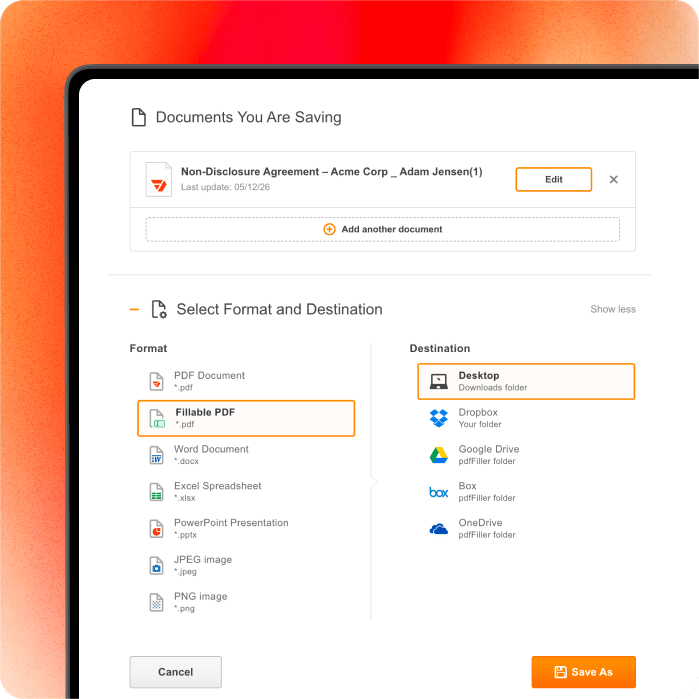
pdfFiller allows you to convert documents into various output formats, including:

  • PDF format (.pdf) for universal compatibility.
  • Word format (.docx) for further editing.
  • Excel format (.xlsx) for data manipulation.
  • Image formats (.jpg, .png) for visual documents.

Accepted Input File Types

To ensure a smooth conversion process, pdfFiller accepts several input file types, including:

  • Word documents (.doc, .docx) for direct conversion.
  • Excel spreadsheets (.xls, .xlsx) for data extraction.
  • PowerPoint presentations (.ppt, .pptx) for conversion to PDF.
  • Image files (.jpg, .png) for image-based documents.

What to Expect from Converted Files

When converting files, it's important to understand what to expect. Layout fidelity may vary, especially with complex documents. Native PDFs typically convert with higher accuracy compared to scanned PDFs, which may require OCR for text editing. Additionally, image conversion results in one image per page, which can affect the overall document structure. Being aware of these factors will help set realistic expectations for the conversion quality.

Limitations and Known Constraints

While pdfFiller offers a powerful conversion tool, there are some limitations to consider. Page count limits may apply, particularly for larger documents. OCR availability is necessary for converting scanned documents accurately. Complex formatting may not convert perfectly, and certain features may be restricted based on your plan tier. Understanding these constraints can help you navigate the conversion process more effectively.

Security and Data Handling During Conversion

Security is a top priority during the conversion process. pdfFiller ensures that documents are handled securely, with no data retention post-conversion. The platform complies with data protection standards, prioritizing user privacy throughout the document handling process. This commitment to security allows you to convert documents with confidence, knowing that your information is safe.

How Does pdfFiller Compare to Alternatives?

pdfFiller stands out among other conversion tools for several reasons:

Adobe Acrobat offers comprehensive features but requires installation and is more expensive. Users may find it complex for simple tasks.

Smallpdf provides basic conversion tools but lacks advanced features like e-signatures, which may not meet all business needs.

Nitro is good for PDF editing but can be costly and requires installation. In contrast, pdfFiller offers a straightforward, no-installation approach that is more accessible for small businesses.

Next Steps After Conversion

After converting your documents, you have several options to consider. You can edit the converted PDF to make any necessary adjustments. Additionally, pdfFiller allows you to eSign the document, ensuring that it is legally binding. Sharing capabilities after conversion make it easy to distribute your documents, and integration with other pdfFiller features enhances your overall document management workflow.

Try most popular PDF tools

Discover a full set of tools to handle any document task.

Edit PDFs

Make quick PDF edits online.

Sign

Add legally binding signatures.

Merge

Combine multiple PDFs.

Request signatures

Send a document for signing.

Convert

Transform PDFs into other formats.

Rearrange

Change the order of pages.

Share

Send PDFs for review or editing.

Compress

Reduce PDF file sizes.

How to convert your PDF?

1. Upload your document

All-in-one PDF converter: Convert, edit, sign, and manage documents

  • Convert and edit docs in one place Upload your document, make quick edits online, and save it as a PDF, text document (DOCX), spreadsheet (XLSX), image (JPEG/PNG), or presentation (PPTX).
  • Equip yourself with powerful PDF tools Edit PDFs online almost as easily as Word documents. Add text, adjust formatting, replace content, insert images, and more.
  • eSign and send documents Sign documents on your own or send them to others for signatures, whether a single recipient or an entire group.
  • Annotate & collaborate Highlight important data, redact sensitive details, add sticky notes, and exchange comments in your PDFs. Then, instantly send documents for review or editing.
  • Collect data without chasing people down Create fillable PDF forms and let others complete them from any device. Publish forms online or share them via a direct link to capture data and signatures.
  • Store files securely in the cloud Organize your documents and templates in secure cloud storage and access them from anywhere. pdfFiller follows strict security regulations to help safeguard your data.

Who needs this?

Explore how professionals across industries use pdfFiller to convert PDFs online.

Real Estate

Real estate agents and brokers rely on pdfFiller to edit and annotate brochures, lease agreements, and contracts. They can easily convert documents to formats like JPEG, PDF, DOCX, or XLSX for quick sharing and signature collection.

  • Property listing brochures
  • Lease agreements
  • Sales contracts
  • Property management forms
Real Estate
  • G2 — Users Most Likely To Recommend
  • G2 — Grid Leader in Small-Business
  • G2 — High Performer
  • G2 — Regional Leader
  • G2 — Easiest To Do Business With
  • G2 — Best Meets Requirements
  • G2 — Best Support

pdfFiller scores top ratings on review platforms

pdfFiller is rated 4.6 out of 5 stars across 1,000+ G2 reviews.

Easy to use, very helpful, easy to find necessary form..
Sabrina
your staff is awesome and helpful too...thanks..
eric
My handwriting seems to get worse with age and in this world of no typewriters for forms that need to be readable I have at odds when it comes to filling out many of todays forms. To date PDFfiller has proven to be a god send for my dilemma.
George W
The best app ever The best app ever, it is so easy to use and hassle free. 100% recommend
Jess
The solution works great. It covers all our needs. Support is really24/7.
Milos C
Great customer support Great customer support. I forgot about a 30-day free trial period because I didn’t use the app after registering and checking it only once. They took the money for the whole year through PayPal and when I explained the situation they helped me with the cancellation of my subscription in a half an hour. They gave me the whole sum of money back.
Ewa Kuk

Convert documents with a trusted solution

Try easy-to-use tools for all your document management needs.

pdfFiller workspace for creating, filling and managing PDF forms

Why convert documents with pdfFiller?

More than a PDF converter

Watch our PDF converter in action

Check out a quick video tutorial that shows how to convert any file into an editable PDF in three easy steps.

FAQs

If you can't find what you're looking for, please contact us anytime!

You can securely convert Word to PDF and eSign PDF for Server using pdfFiller's cloud-based platform. Simply upload your Word document, select the 'Convert to PDF' option, and then use the eSignature feature to sign the document. This process ensures that your files are encrypted and compliant with security protocols. For enhanced security, consider using password protection for your PDF files, which adds an extra layer of protection against unauthorized access.

Converting Word to PDF for server use provides several benefits, including improved compatibility and security. PDFs preserve the formatting of your documents, ensuring they look the same on any device or platform. Additionally, PDFs are less susceptible to unauthorized editing, making them ideal for legal and official documents. For best practices, always use a reliable service like pdfFiller to ensure your documents are securely converted and stored.

Yes, you can automate the process of converting Word to PDF and eSigning PDFs for Server using pdfFiller’s API. This allows you to integrate document automation into your existing workflows, saving time and reducing manual errors. To implement this, you can set up triggers that automatically convert documents and send them for eSignature, streamlining your document management process.

When converting Word to PDF and eSigning, it’s crucial to consider security measures such as encryption and access controls. pdfFiller employs advanced security protocols to protect your documents during conversion and storage. Always ensure that your eSignatures are legally compliant and consider using multi-factor authentication for added security when accessing sensitive documents.

No, cross-platform compatibility is not an issue when using pdfFiller to convert Word to PDF and eSign documents. The platform is designed to work seamlessly across various devices and operating systems, ensuring that your PDFs can be accessed and signed from anywhere. For optimal results, make sure to test your documents on different devices after conversion to confirm that the formatting remains intact.

If you encounter issues when converting Word to PDF and eSigning, first check your internet connection and ensure that your document is not corrupted. If problems persist, try clearing your browser cache or switching to a different browser. pdfFiller also offers customer support to assist with technical difficulties, ensuring that you can efficiently manage your document tasks without interruptions.

When selecting a tool to convert Word to PDF and eSign PDFs for Server, look for features such as user-friendly interfaces, robust security measures, and comprehensive document management capabilities. pdfFiller stands out with its ability to edit, collaborate, and manage documents all in one platform, making it a powerful choice for remote professionals and legal teams.

What businesses achieve with pdfFiller

Discover how you can benefit too.

Other software options offering customized branding have really extreme pricing. Compared to the monthly costs of PandaDoc, we are now saving unbelievable amounts of money.

B2B Services Message Direct

One tool. Every document task.

One workflow shouldn’t take five tools

Start free trial