Create Watermark and Date in PDF For Free

Drop document here to upload
Select from device
Up to 100 MB for PDF and up to 25 MB for DOC, DOCX, RTF, PPT, PPTX, JPEG, PNG, JFIF, XLS, XLSX or TXT

Last updated on Oct 14, 2026

Create Watermark and Date in PDF

Create watermarks and date stamps in your PDFs easily with pdfFiller.

What is the Watermark Tool?

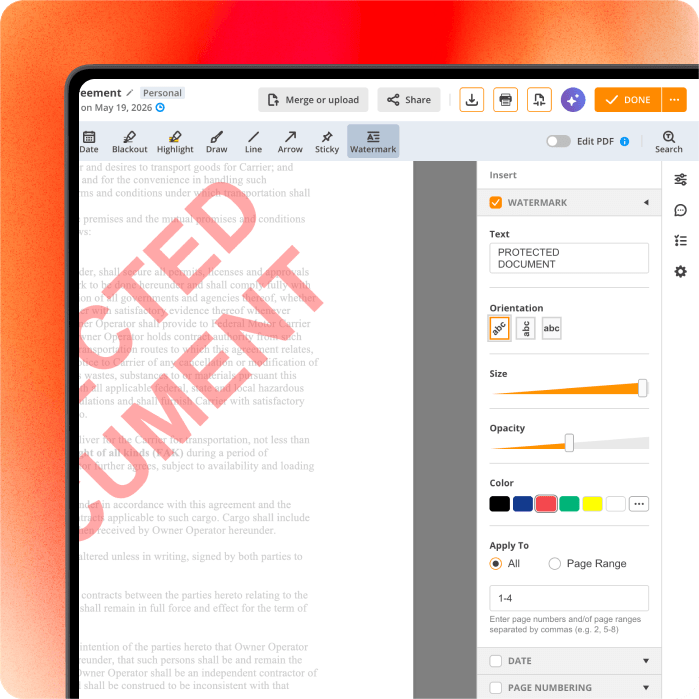
The watermark tool allows you to create watermark text and images to protect or brand your documents. You can choose from various watermark types, including text and image options, to customize your PDFs. This tool also provides document-wide stamping tools, making it easy to apply your watermark to all pages or specific ones. You can access the watermark tool conveniently via the editor toolbar, ensuring a user-friendly experience without the need for complex software terms.

How Does Watermarking Improve Document Workflows?

Watermarking enhances document management by protecting sensitive information and enhancing brand visibility. When you apply a watermark, it serves as a protective measure that discourages unauthorized use of your documents. Additionally, it facilitates document classification, making it easier to identify and organize files. For instance, a legal firm can use watermarks to signify the confidentiality of sensitive documents, thereby improving their workflow efficiency.

How to Add a Text Watermark

  • Open your PDF document in pdfFiller and navigate to the watermark tool.
  • Enter your custom text for the watermark in the designated field.
  • Adjust the size and transparency of the text to fit your document's design.
  • Choose whether to apply the watermark to specific pages or all pages in the document.
  • Preview the watermark to ensure it appears as desired before finalizing.
  • Click the apply button to add the text watermark to your PDF.

How to Add an Image Watermark

  • Access the watermark tool in pdfFiller and select the option to upload an image.
  • Upload your logo or emblem from your device.
  • Customize the image size and placement on the document as needed.
  • Ensure the transparency settings are correctly adjusted for the watermark effect.
  • Preview the image watermark to confirm it looks right on your document.
  • Apply the image watermark to your PDF by clicking the appropriate button.

Customizing Your Watermark's Appearance

You can customize your watermark's appearance by adjusting various settings. First, you can change the color and rotation of the watermark to match your branding. Additionally, setting the opacity levels allows you to control how visible the watermark is against the document's content. Before applying any changes, use the preview feature to see how your adjustments will look on the final document.

Applying Watermarks to Specific Pages

To control where your watermark appears, you can select specific pages or define custom page ranges. Start by choosing whether to apply the watermark to the current page or all pages. If you prefer to apply it to certain pages, specify the page numbers or ranges. Always preview your selections before finalizing to ensure the watermark is applied correctly.

Editing or Removing a Watermark

  • Reopen the watermark tool in pdfFiller to access existing watermarks.
  • Select the watermark you wish to modify or remove from the document.
  • Adjust the text or image settings as needed to update the watermark.
  • If you want to delete the watermark, choose the delete option and confirm your action.

Applying a Date Stamp to Your Document

  • Open your document in pdfFiller and navigate to the date stamp feature.
  • Insert today's date or select a custom date to include in your document.
  • Choose the format and placement for the date stamp to fit your layout.
  • Adjust the font style and transparency to ensure visibility against the document background.
  • Preview the date stamp to confirm it appears as desired.
  • Apply the date stamp to your PDF by clicking the apply button.

Adding Page Numbers to Your Document

  • Access the page numbering feature in pdfFiller while editing your document.
  • Select your preferred numbering format for the page numbers.
  • Set the placement and font options to match your document's design.
  • Preview the page numbers to ensure they are correctly formatted before applying.
  • Click the apply button to add sequential page numbers to your document.

Understanding Bates Numbering for Legal Use

Bates numbering is essential for legal documents, allowing you to apply unique identifiers across pages. You can customize the prefix and suffix of the Bates numbers to fit your legal requirements. This feature is particularly useful during legal discovery processes, ensuring that each document is easily identifiable and organized.

Browser Compatibility and Access

pdfFiller supports various browsers and operating systems, ensuring you can access your documents from any device. Mobile access is also available, allowing you to work on the go. Importantly, no installation is required, making it easy to start using pdfFiller immediately.

Limitations of the Watermark Tool

While the watermark tool is powerful, it does have some limitations. Supported image formats and size limits may restrict the types of images you can use. Additionally, there are constraints on opacity ranges for watermarks, which can affect visibility. Custom page range availability may also vary depending on your subscription plan.

Security and Data Handling Practices

pdfFiller employs TLS encryption during document handling to ensure your data remains secure. The platform follows strict file retention and deletion timelines, complying with data protection standards. This commitment to security helps safeguard your documents throughout the watermarking process.

Free vs. Paid Watermark Features

pdfFiller offers free features for watermarking, allowing you to create basic watermarks without any cost. However, enhanced features are available on paid plans, providing greater flexibility and customization options. This makes pdfFiller a valuable choice for small businesses looking for cost-effective document solutions.

How Does pdfFiller Compare?

pdfFiller offers unique user-friendly features that set it apart from competitors. Trusted by millions for document solutions, it provides a cost-effective alternative to other tools. For instance, while ilovepdf offers basic watermarking features, it lacks advanced customization options, limiting functionality for branding. Smallpdf provides a user-friendly interface but charges for premium features, which may not offer the best value for small businesses. Adobe Acrobat is the industry standard with extensive features but comes at a higher price point, making it less cost-effective for small and medium-sized businesses.

Next Steps in Your Document Workflow

After watermarking your documents, you can easily move to the next steps in your workflow, such as signing, sharing, and tracking. By integrating watermarking into your document processes, you can enhance collaboration with pdfFiller and streamline your overall document management.

Try most popular PDF tools

Discover a full set of tools to handle any document task.

Edit PDFs

Make quick PDF edits online.

Sign

Add legally binding signatures.

Merge

Combine multiple PDFs.

Request signatures

Send a document for signing.

Convert

Transform PDFs into other formats.

Rearrange

Change the order of pages.

Share

Send PDFs for review or editing.

Compress

Reduce PDF file sizes.

How to add a watermark to a PDF?

1. Upload

Brand your documents with custom watermarks

  • Add a final touch after editing Add stamps, dates, and page or bates numbering to ensure PDFs are secure and professional. Customize watermarks by adjusting size, orientation, color, and transparency.
  • Clarify your contracts Avoid confusion when sending documents for review or signing. Stamp them as "Draft", "Final" or "Copy" to add clarity and indicate versions during contract negotiations.
  • Share with confidence Protect documents with watermarks before sharing. Ensure everyone who has access knows their status and owner.
  • Organize at a glance Add watermarks to see which documents are "Drafts", "For Review", or "Archived", saving you from opening the wrong version.

Who uses this tool?

Learn how professionals use pdfFiller to brand and protect their documents.

Business Owners

Protect intellectual property and maintain brand consistency across all documents. Add a company name to proposals to enhance branding or apply a custom text watermark to internal documents to indicate their status before sharing.

  • Business plans
  • Pitch decks
  • Internal memos
  • Marketing materials
Business Owners
  • G2 — Users Most Likely To Recommend
  • G2 — Grid Leader in Small-Business
  • G2 — High Performer
  • G2 — Regional Leader
  • G2 — Easiest To Do Business With
  • G2 — Best Meets Requirements
  • G2 — Best Support

pdfFiller scores top ratings on review platforms

pdfFiller is rated 4.6 out of 5 stars across 1,000+ G2 reviews.

Easy to use. Up & printed prior year W-2 in less than 5 minutes.
Keith F
GREAT PROGRAM! It helps me to fill out PDF forms for taxes and reports to the governement
KEN D
I like that I can fill out the form print and save. I appreciate the access to professional documents.
Mary S
Great for filling out all kinds of forms as week as editing documents when Word and Mac are not compatible. Great customer service too!
Bibi
It was very easy to use.. User friendly indeed!
janet
as a beginner to using pdf apps i have found it quite easy
Anonymous Customer

Watermark PDFs with a trusted, all-in-one solution

Try pdfFiller for all your document management needs.

pdfFiller workspace for creating, filling and managing PDF forms

Why trust pdfFiller to watermark your documents?

All-in-one solution

Watch PDF watermarking in action

Check out this video tutorial to learn how to protect and personalize your PDFs with custom watermarks.

FAQs

If you can't find what you're looking for, please contact us anytime!

To create a watermark in your PDF using pdfFiller, simply upload your document to the platform and select the 'Watermark' option from the editing tools. This feature allows you to customize the text or image watermark, adjusting its opacity and position for optimal visibility. For added security, consider using a watermark that includes your company name or a confidential label. This not only protects your document but also ensures that recipients understand its sensitivity. Remember, adding a watermark can deter unauthorized use of your PDF, making it a crucial step in document management.

To add a date stamp to your PDF, upload the document to pdfFiller and choose the 'Date' tool from the editing options. You can select the format of the date and position it anywhere on the page. This is particularly useful for legal documents or contracts where the date is critical. For best practices, ensure the date is clearly visible and in a consistent format throughout your documents. This not only enhances professionalism but also aids in tracking document versions, which is essential for remote professionals and legal teams.

Yes, you can create a watermark and date in your PDF simultaneously using pdfFiller. After uploading your document, first add your desired watermark, then use the 'Date' tool to place the date stamp. This dual functionality allows you to enhance the security and professionalism of your document in one go. A practical tip is to adjust the transparency of the watermark so that it doesn’t overshadow the date, ensuring both elements are clearly visible. This is particularly beneficial for SMEs needing to maintain document integrity.

Adding a watermark and date to your PDFs significantly enhances their security. A watermark can deter unauthorized copying or distribution, while a date stamp provides a clear record of when the document was created or modified. This is especially important for legal teams and remote professionals who need to maintain a clear audit trail. To maximize security, consider using unique watermarks that include your organization’s branding or confidential notices. This practice not only protects your intellectual property but also reinforces your document's authenticity.

Absolutely! pdfFiller allows you to fully customize the appearance of your watermark. You can choose the text, font style, size, color, and opacity to match your branding or document theme. This level of customization ensures that your watermark is not only functional but also visually appealing. For optimal impact, consider placing the watermark diagonally across the page, which is a common practice for enhancing visibility without distracting from the document’s content. This is particularly useful for businesses looking to maintain a professional image.

To ensure your watermark and date are applied correctly across multiple pages in pdfFiller, use the 'Apply to All Pages' option after setting up your watermark and date. This feature allows you to maintain consistency throughout your document, which is crucial for legal and official documents. Additionally, double-check the positioning on a few pages to ensure visibility and alignment. This approach not only saves time but also enhances the professionalism of your documents, making it easier for remote teams to collaborate effectively.

In pdfFiller, you can use both text and image formats for your watermark. For text watermarks, you can customize the font, size, and color to fit your document's style. If you prefer an image watermark, you can upload a logo or graphic that represents your brand. This flexibility allows you to create a unique watermark that aligns with your organization's identity. For best results, ensure that your image is high-resolution and appropriately sized to maintain clarity across different PDF pages.

Transforming businesses with pdfFiller

Check out these success stories.

I was happy to do this for patients, but I simply didn't have 30–60 minutes to fill out each form. It was a true waste of resources to do it that way, and as a surgeon, my time is better spent in patient care, which was often delayed.

Marshall Orthopaedics

One tool. Every document task.

One workflow shouldn’t take five tools

Start free trial