Electronic Signature Generator
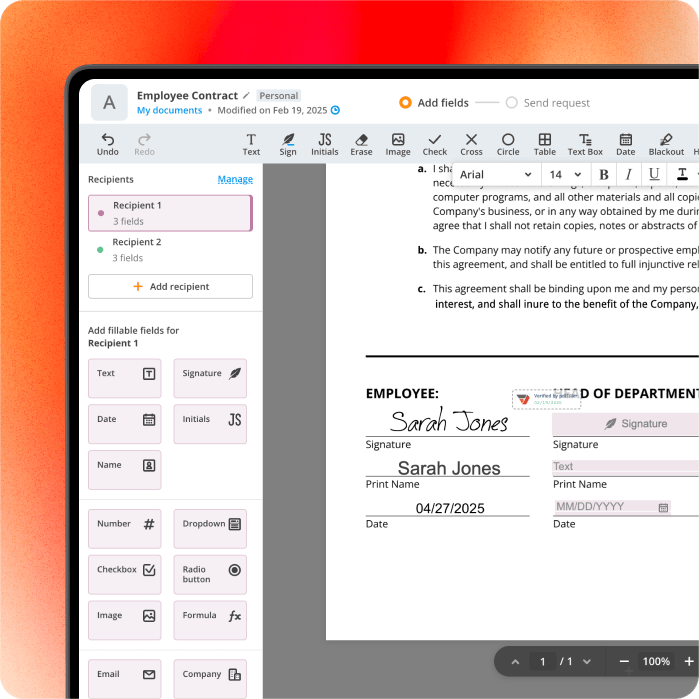
Create your electronic signature in seconds using pdfFiller’s intuitive tool. Sign documents from any device without any technical setup.
What is an Electronic Signature Generator?
An Electronic Signature Generator is a tool that allows you to create and apply digital signatures to documents. This tool is essential for small and medium-sized businesses that need to sign documents quickly and efficiently. Unlike complex enterprise solutions, pdfFiller offers a user-friendly interface that makes the process straightforward. You can create legally binding signatures without requiring any IT setup. This means you can focus on your business rather than getting bogged down by complicated software.
How Does This Tool Solve Document Workflow Problems?
The Electronic Signature Generator addresses common document workflow issues by significantly reducing the time spent on signing. It eliminates the need for printing and scanning, which can be cumbersome and time-consuming. This tool is suitable for various document types, making it ideal for small businesses that need to manage multiple contracts and agreements efficiently. By simplifying the signing process, pdfFiller enhances your overall document workflows.
Three Ways to Create Your Signature
You can create your signature using three different methods with pdfFiller. Each method is designed to be user-friendly and legally equivalent to traditional signatures. The options include:
- Draw your signature using a mouse or touchscreen.
- Type your signature and choose from various font styles.
- Upload an image of your existing signature for quick application.
These methods allow for customization, ensuring that your signature meets your personal or business preferences.
Drawing Your Signature
To draw a signature, follow these steps:
- Open the pdfFiller Electronic Signature Generator tool.
- Select the option to draw your signature.
- Use your mouse or touchscreen to create your signature.
- Adjust the thickness and color of the line as desired.
- Preview your signature to ensure it meets your expectations.
- Save your drawn signature for future use.
- Apply your signature to any document as needed.
Typing Your Signature
To type your signature, follow these steps:
- Access the pdfFiller tool and choose the typing option.
- Enter your name in the designated field.
- Select a font style that you prefer from the available options.
- Choose a color for your signature text.
- Position your signature where you want it on the document.
- Preview the signature to ensure it looks as you want.
- Save the typed signature for future documents.
Uploading Your Signature Image
To upload a signature image, follow these steps:
- Open the pdfFiller Electronic Signature Generator.
- Select the upload option for your signature.
- Choose a supported file format, such as PNG or JPEG.
- Ensure the image quality is clear and legible.
- Upload your signature image from your device.
- Adjust the placement of the signature on the document as needed.
- Save the uploaded signature for future use.
Adding Initials to Your Documents
To add initials, you can use various methods available in pdfFiller. You can draw, type, or upload your initials, ensuring they hold legal validity. Customization options allow you to choose the style and placement of your initials. For example, you might add initials to contracts or agreements to signify approval. This flexibility makes it easy to incorporate initials into your document workflows.
Customizing Your Signature Appearance
When you customize your signature, you can choose from various options to enhance its appearance. You can adjust the color and thickness of your signature line, resize it, and reposition it on the document. These customization features allow you to create a signature that reflects your personal or business style, making it visually appealing and professional.
Saving and Reusing Your Signatures
To save signatures for future documents, follow these steps:
- Create your signature using any of the methods described above.
- Choose the option to save your signature within the pdfFiller tool.
- Set your saved signature as the default if desired.
- Access your saved signatures easily for future documents.
- Reuse your signatures to save time and maintain consistency.
Legal Validity of Your Signatures
The signatures created with pdfFiller comply with legal standards, ensuring their legal validity. They meet the requirements set by ESIGN, UETA, eIDAS, and GDPR. Each signature includes an audit trail feature and a verified badge, which adds an extra layer of security and compliance. This ensures that your signatures are recognized as legally binding in various jurisdictions.
How Does pdfFiller Compare?
When comparing pdfFiller with other tools, it stands out for its simplicity and affordability. For instance, DocuSign is known for its extensive features but can be complex for small businesses. In contrast, pdfFiller offers a straightforward solution without the need for IT setup. Adobe Sign provides robust capabilities but often comes with higher costs, while pdfFiller delivers essential features at a more affordable price point. Additionally, signNow offers competitive pricing but lacks the extensive template library that pdfFiller provides, which includes over 1 million templates for diverse needs.