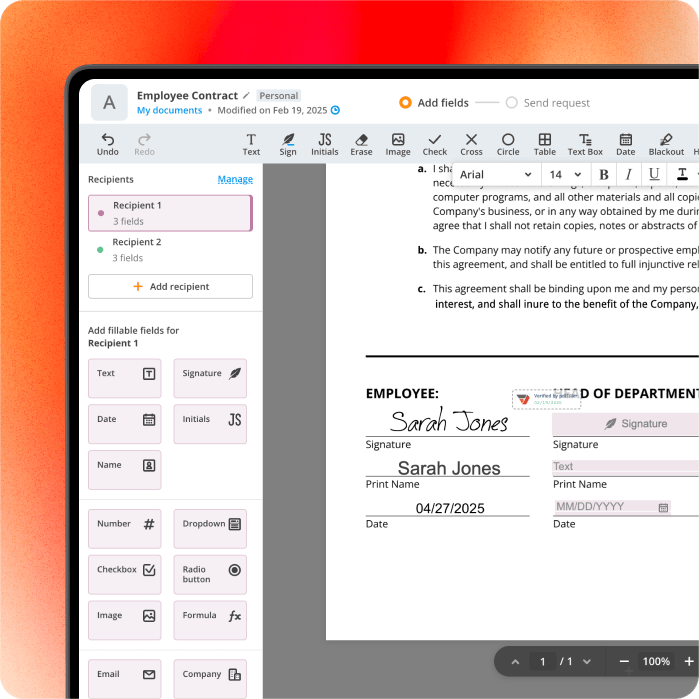
Fill and Sign PDF For Free

Drop document here to upload
Select from device
Up to 100 MB for PDF and up to 25 MB for DOC, DOCX, RTF, PPT, PPTX, JPEG, PNG, JFIF, XLS, XLSX or TXT

Last updated on Sep 12, 2026

Fill and Sign PDF

Fill and sign your PDF documents quickly using pdfFiller's intuitive tools.

What is the Signature Tool?

The signature tool in pdfFiller allows you to fill and sign PDF documents efficiently. It provides a user-friendly interface that simplifies the self-signing process. You can choose to self-sign your document or send it to others for their signatures. The signature tool's capabilities include drawing, typing, or uploading your signature, making it versatile for different preferences. This ensures that anyone can complete their document signing tasks without the need for complex jargon or technical terms.

How Does This Feature Solve Document Workflow Problems?

Small businesses often face challenges in document workflows, such as delays in obtaining signatures and the need for quick document turnaround. pdfFiller addresses these common issues by enabling you to fill and sign PDF documents rapidly. The importance of digital signatures cannot be overstated, as they provide a secure and efficient way to finalize agreements. With the ability to complete documents online, businesses can enhance their productivity and streamline their operations.

Three Ways to Create a Signature

pdfFiller offers three methods to create a signature: drawing, typing, and uploading an image. Each method is legally equivalent, ensuring that your signature holds the same validity regardless of how it is created. Users can choose their preferred method based on convenience and comfort. This flexibility allows you to fill and sign PDF documents in a way that suits your style.

How to Draw Your Signature

  • Access the signature tool within pdfFiller.
  • Select the option to draw your signature using a mouse or touchscreen.
  • Use the drawing tools provided to create your signature.
  • Adjust the thickness and color of the line for better visibility.
  • Once satisfied, place your signature in the desired location on the document.
  • Save your document to retain the signature.
  • Consider practicing your signature on a blank canvas for best results.
  • Ensure your signature is clear and legible for legal purposes.

How to Type Your Signature

  • Open the signature tool in pdfFiller.
  • Select the option to type your signature.
  • Choose from various font styles and colors to customize your signature.
  • Adjust the size and position of your typed signature as needed.
  • Preview your signature to ensure it meets your expectations.
  • Place the signature in the appropriate area of the document.
  • Save your document to keep the typed signature.
  • Consider using this method for a clean and professional appearance.

How to Upload a Signature Image

  • Navigate to the signature tool in pdfFiller.
  • Select the option to upload a signature image.
  • Ensure your image is in a supported format, such as PNG or JPEG.
  • Follow the prompts to upload your image file.
  • Resize and reposition your signature on the document as necessary.
  • Check that the image is clear and properly aligned.
  • Save your document to retain the uploaded signature.
  • Use this method for a personal touch to your documents.

Adding Initials to Your Document

Adding initials to your document can be done in several ways using pdfFiller. You can draw, type, or upload an image of your initials. Each method allows for customization, ensuring your initials match your personal style. It's important to consider the legal implications of initials, as they can signify agreement or acknowledgment in a document. By using pdfFiller, you can easily incorporate your initials wherever necessary.

Saving and Reusing Signatures

To save and reuse signatures in pdfFiller, first create your signature using any of the available methods. Once created, you can save it in your account for future use. Setting a default signature can streamline your document signing process, allowing you to fill and sign PDF documents more efficiently. Reusing signatures not only saves time but also ensures consistency across your documents.

Legal Validity of Signatures

Signatures created with pdfFiller comply with legal standards such as ESIGN, UETA, eIDAS, and GDPR. This compliance is crucial for ensuring that your signed documents are legally binding. Additionally, pdfFiller provides an audit trail, which is essential for verifying the authenticity of signatures. The verified by pdfFiller badge further enhances the credibility of your signed documents.

Comparison with Other E-Signature Tools

When comparing pdfFiller to other e-signature tools, several key differentiators emerge. For instance, while DocuSign offers extensive integrations, it can be complex for small businesses. Adobe Acrobat Sign is known for its robust features but may come with a higher price tag. In contrast, pdfFiller provides a user-friendly interface and affordability, making it an ideal choice for small and medium businesses.

Next Steps for Using pdfFiller

To start using pdfFiller, simply create an account on their website. Once registered, you can explore the various features available, including document editing, filling, and signing. pdfFiller also offers a wide range of templates that can help you get started quickly. Take advantage of these resources to enhance your document management experience.

Try most popular PDF tools

Discover a full set of tools to handle any document task.

Edit PDFs

Make quick PDF edits online.

Sign

Add legally binding signatures.

Merge

Combine multiple PDFs.

Request signatures

Send a document for signing.

Convert

Transform PDFs into other formats.

Rearrange

Change the order of pages.

Share

Send PDFs for review or editing.

Compress

Reduce PDF file sizes.

How to sign a document online?

Upload

Signing and editing documents has never been easier

  • Edit and sign in one place Quickly eSign documents after reviewing or editing — no need to juggle tools and move files back and forth. Get your PDFs done fast with all the tools you need at your fingertips.
  • Easy sharing & collaboration After signing a document, share it instantly with clients and stakeholders for review, editing, or comments. To request signatures from other parties, add fillable fields and send the document for signing.
  • Mobile-ready solution Easily edit, sign, and send your documents from anywhere, even on the go. pdfFiller is entirely cloud-based, so you can manage documents effectively from your computer, smartphone, or tablet.
  • Legally binding & secure Sign contracts and agreements following global eSignature laws, including ESIGN, UETA, eIDAS, and GDPR. With HIPAA, PCI DSS, SOC 2 Type II, and other compliance standards, pdfFiller works for any industry.

Who needs this?

Explore how professionals use pdfFiller to sign documents.

Healthcare

Healthcare professionals use pdfFiller to simplify document signing, from patient consent forms to medical record requests. They can easily request, approve, and share signed documents with patients, staff, or suppliers, saving time and improving communication.

  • Patient consent forms
  • Prescription forms
  • Lab test requisition forms
  • Referral and consultation forms
Healthcare
  • G2 — Users Most Likely To Recommend
  • G2 — Grid Leader in Small-Business
  • G2 — High Performer
  • G2 — Regional Leader
  • G2 — Easiest To Do Business With
  • G2 — Best Meets Requirements
  • G2 — Best Support

pdfFiller scores top ratings on review platforms

pdfFiller is rated 4.6 out of 5 stars across 1,000+ G2 reviews.

Great PDF filler has every form I need and is very easy to fill out. Thank you so much.
immigration and family law speciality consultant of fresno c
Most helpful in accomplishing business task for person who works remotely often.
Rukeia D
I was very impressed that I could find the forms I needed even if was for a prior year.
Francine
As a business owner any type of forms i need are right here.
Lucretia B
it is great it is great. It is very user friendly. It does exactly what I need it to do.
DJVIQUE
Great functionality. Revolutionised our field documents filling process.
Peter

eSign documents with a trusted, all‑in‑one solution

Try easy-to-use tools for all your document management needs.

pdfFiller workspace for creating, filling and managing PDF forms

Why sign documents with pdfFiller?

Ease of use

Watch pdfFiller eSignatures in action

Check out a quick video tutorial that shows how to create and place your signature or send a document for signing.

FAQs

If you can't find what you're looking for, please contact us anytime!

To fill and sign a PDF using pdfFiller, first upload your document to the platform. Next, use the editing tools to add text, checkmarks, or other necessary annotations. Finally, click on the 'Sign' option to create your signature, which can be drawn, typed, or uploaded as an image. This process ensures that you can fill and sign PDF documents efficiently, making it ideal for remote professionals and legal teams. For best results, ensure your PDF is properly formatted to avoid any editing issues.

Yes, filling and signing PDFs online with pdfFiller is secure. The platform employs advanced security protocols, including encryption and secure cloud storage, to protect your sensitive information. This is particularly important for legal teams and SMEs that handle confidential documents. Additionally, pdfFiller complies with industry standards, ensuring that your data remains safe throughout the process. Always verify that you are using secure connections when accessing your documents.

Absolutely! pdfFiller allows you to fill and sign PDF documents on mobile devices through its user-friendly app. This cross-platform compatibility means you can manage your documents from anywhere, whether you're in the office or on the go. Simply download the pdfFiller app, upload your PDF, and use the same tools available on the desktop version to fill and sign your documents. This flexibility is essential for remote professionals who need to stay productive.

pdfFiller offers robust document automation features that streamline the process of filling and signing PDFs. Users can create templates for frequently used documents, enabling quick access and consistent formatting. Additionally, the platform supports integration with other applications, allowing for seamless workflows. This is particularly beneficial for legal teams and SMEs looking to enhance productivity. To maximize efficiency, consider setting up automated reminders for document signing deadlines.

To ensure your filled and signed PDF is legally binding, use pdfFiller's eSignature feature, which complies with the ESIGN Act and UETA regulations. When you sign a document through pdfFiller, it captures your intent to sign, providing a secure and verifiable signature. Additionally, you can add a timestamp and audit trail for further validation. This is crucial for legal teams that require enforceable agreements. Always confirm that the recipient recognizes electronic signatures for the specific document type.

If you encounter issues while filling and signing a PDF, first check your internet connection and ensure you are using an updated browser or the latest version of the pdfFiller app. If problems persist, consult the pdfFiller help center for troubleshooting guides or contact customer support for assistance. This proactive approach can save time and ensure that you can fill and sign PDFs without unnecessary delays, which is vital for remote professionals.

Yes, pdfFiller allows for real-time collaboration while filling and signing PDFs. You can invite others to view or edit the document, making it easy for teams to work together on contracts or agreements. This feature is particularly useful for legal teams that require input from multiple stakeholders. To collaborate effectively, use the commenting tools to communicate directly within the document, ensuring everyone is on the same page.

What businesses achieve with pdfFiller

Discover how you can benefit too.

pdfFiller allows us to tap into additional markets and sell business we might not otherwise have sold because of the speed and ease with which we can produce the forms.

Scaturro Insurance Agency LLC

One tool. Every document task.

One workflow shouldn’t take five tools

Start free trial