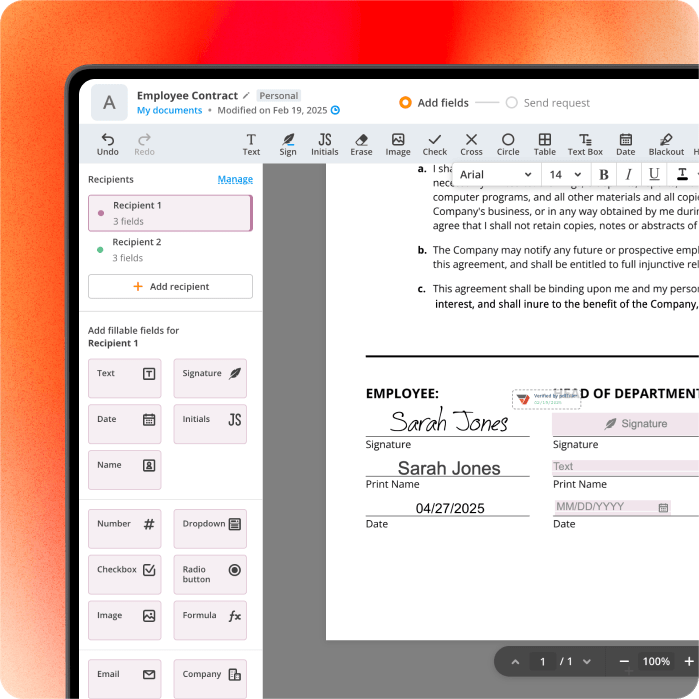
Get Instant Notifications on Signing
Receive instant notifications when your documents are signed, ensuring you stay updated without any hassle.
What is the E-Signature Request Workflow?
The e-signature request workflow is a straightforward process designed to facilitate document signing. With pdfFiller, you can get instant notifications on signing, which keeps you informed every step of the way. This workflow supports multiple signers, allowing you to send documents to several recipients at once. Notably, recipients do not need a pdfFiller account to sign documents, making it accessible for everyone involved.
Each signature obtained through this process is legally binding, ensuring that your agreements hold up in court. Additionally, automated notifications are sent to signers, reminding them to complete their tasks. This simplicity stands in stark contrast to the complex enterprise solutions offered by competitors, making pdfFiller a preferred choice for small and medium-sized businesses.
How to Upload Documents for Signing
Uploading documents to pdfFiller is a hassle-free experience. You can easily upload documents in various formats, including PDF and DOCX. The platform allows you to upload files directly from cloud services such as Google Drive or Dropbox, streamlining your workflow.
Moreover, the drag-and-drop functionality simplifies the upload process, enabling you to quickly add files to your workspace. For those on the go, mobile upload options are available, ensuring you can manage your documents from anywhere without facing complicated upload processes.
Assign Signature Fields to Recipients
Assigning signature fields to recipients is a critical step in the e-signature process. With pdfFiller, you can easily designate roles for each participant, whether they are a signer or a viewer. The drag-and-drop field placement feature allows you to position signature fields precisely where they are needed in the document.
Additionally, you can configure the signing order to ensure that documents are signed in the correct sequence. Setting reminders for signers is another useful feature that helps keep the process on track, ensuring that everyone completes their tasks promptly. This clarity in field assignment prevents any confusion during the signing process.
Managing Recipients and Their Roles
Managing recipients effectively is essential for a smooth signing process. You can add recipients by entering their email addresses, allowing for quick access to the documents that need signing. Each recipient can be assigned specific roles and permissions, ensuring they have the appropriate access to the document.
Editing recipient details is straightforward, enabling you to update information as needed. Additionally, tracking recipient status helps you stay informed about who has signed and who still needs to complete their tasks. This level of management is crucial for maintaining an organized signing workflow.
Configuring Signing Order: Sequential vs. Parallel
Understanding how to configure the signing order is vital for efficiency. You can choose between sequential and parallel signing methods based on your needs. Sequential signing requires each signer to complete their task before the next can begin, while parallel signing allows multiple signers to sign simultaneously.
Knowing when to use each method can significantly impact your document turnaround time. The user interface in pdfFiller makes it easy to set the signing order, ensuring that your documents flow smoothly through the signing process without any confusion.
Step-by-Step Instructions for Sending E-Signature Requests
- Select the document you wish to send for signing.
- Add recipients by entering their email addresses.
- Review the document and ensure all fields are correctly assigned.
- Send the e-signature request to the recipients.
- Track the request status to see who has signed and who hasn't.
Tracking the Status of Your E-Signature Requests
Monitoring the progress of your e-signature requests is essential for effective document management. You can easily view the signer status to see who has completed their signatures. If needed, you can resend requests to remind recipients to sign.
Cancelling requests is also an option if circumstances change. Additionally, you will receive notifications for completed signatures, ensuring you are always updated on the status of your documents.
Setting Reminders and Expiration Dates
Setting reminders for signers is a crucial feature that helps ensure timely document completion. You can configure reminder intervals to prompt signers at appropriate times. Additionally, setting expiration dates for documents is essential to maintain deadlines.
These reminders play a significant role in ensuring that documents are signed promptly. The user interface in pdfFiller makes it easy to set these options, allowing you to manage your signing process effectively.
Understanding the Audit Trail
The audit trail is an important feature in the e-signature process, capturing all actions taken on a document. It provides a legal record of who signed, when they signed, and any changes made to the document. This information is crucial for legal enforceability.
Accessing the audit trail in pdfFiller is straightforward, allowing you to review the history of your documents easily. Compliance with regulations is another benefit, as the audit trail helps ensure that your e-signature process meets legal standards.
Legal Validity of E-Signatures
The legal framework surrounding e-signatures is governed by laws such as the ESIGN Act and UETA. pdfFiller complies with these regulations, ensuring that your e-signatures are legally valid. This compliance is vital for businesses that rely on electronic agreements.
Understanding the legal implications of e-signatures can help you navigate potential challenges. Knowing that pdfFiller adheres to these laws provides peace of mind when managing your documents.
Real-World Scenarios for E-Signature Requests
There are numerous practical applications for e-signature requests. For instance, sending a service contract can be done quickly and efficiently through pdfFiller. Routing an employment agreement for signatures is another common scenario where e-signatures simplify the process.
Collecting NDAs is also streamlined with e-signature requests, making it easier for small businesses to protect their interests. These real-world scenarios demonstrate the versatility and effectiveness of pdfFiller in managing document signing.
Free vs. Paid Access to E-Signature Features
Understanding the differences in access levels for e-signature features is important. Free plans offer basic functionalities, but they may come with limitations, such as fewer templates and restricted features. Upgrading to paid plans unlocks additional capabilities that can enhance your document management experience.
User feedback indicates that many find the benefits of upgrading worthwhile, especially for businesses that rely heavily on document signing.
Browser Compatibility for E-Signature Requests
Ensuring browser compatibility is crucial for a smooth e-signature experience. pdfFiller supports various browsers for both senders and recipients, ensuring that everyone can access documents without issues. Mobile device compatibility is also a priority, allowing users to sign documents on the go.
Details regarding OS support are available, emphasizing the importance of compatibility for users across different platforms. This flexibility enhances the overall user experience.
Security Measures for E-Signature Requests
Security is a top priority when it comes to e-signature requests. pdfFiller employs encrypted delivery of documents to protect sensitive information. Secure signing links are provided for recipients, ensuring that only authorized individuals can access the documents.
Compliance with data protection regulations further enhances user trust. These security measures are essential for maintaining the integrity of your documents throughout the signing process.
How Does pdfFiller Compare with Other E-Signature Tools?
pdfFiller stands out from competitors like DocuSign and Adobe Acrobat Sign due to its user-friendly interface and affordability. Users appreciate the straightforward document management capabilities that pdfFiller offers.
In terms of pricing structure, pdfFiller provides competitive options that cater to small and medium-sized businesses. The availability of over 1 million templates also sets pdfFiller apart, making it a versatile choice for various document needs.
Next Steps for Using E-Signatures
To make the most of your e-signature requests, consider connecting to broader document workflows. This integration can enhance your overall document management strategy. Additionally, exploring the various features available in pdfFiller can lead to more efficient processes.
For any assistance, user support options are readily available to help you navigate the platform effectively.