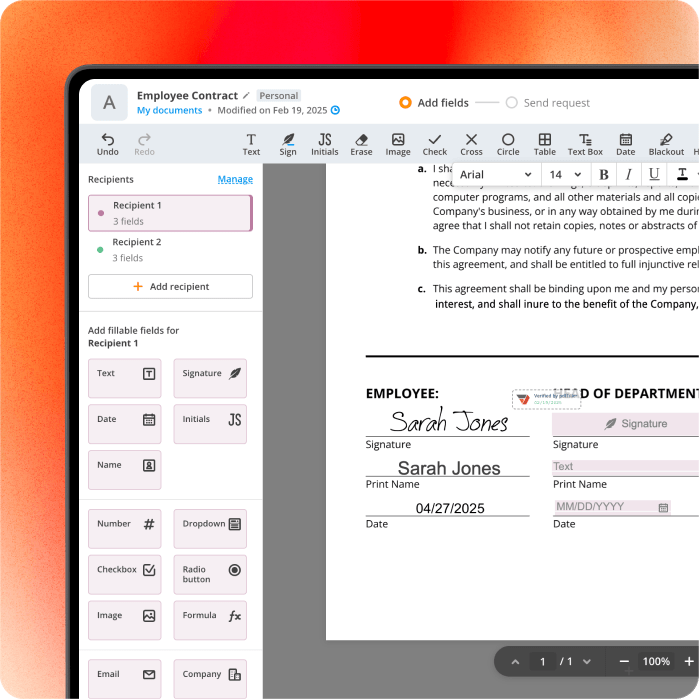
Highlight Brand Logo and Stamp in PDF
Highlight your brand logo and add stamps to PDFs easily with pdfFiller.
What is Highlighting in PDF?
Highlighting in PDF refers to the use of markup tools that visually emphasize important information within a document. This feature is particularly beneficial for branding and document reviews, allowing users to draw attention to key elements such as logos or important notes. Highlighting works effectively on both native and scanned PDFs, making it a versatile tool for various document types.
By using highlighting, you can ensure that your brand logo stands out, which is crucial for maintaining brand identity in shared documents. It also aids in document reviews by allowing collaborators to focus on specific areas that need attention. Overall, highlighting enhances the clarity and visual appeal of your PDFs, making them more engaging and easier to navigate.
How to Highlight Your Brand Logo
- Open your PDF document in pdfFiller.
- Select the "Highlight" tool from the toolbar.
- Click and drag over your brand logo to highlight it.
- Adjust the highlight color and opacity as needed.
- Save your changes to preserve the highlighted logo.
- Export the PDF to share with others, ensuring the highlight remains intact.
- Access the document from any device to make further edits if necessary.
- Repeat the process for any additional logos or important elements in the document.
Benefits of Stamping in PDF
Stamping in PDF documents offers several advantages that enhance the overall functionality and professionalism of your files. Firstly, stamps can enhance document authenticity, making it clear that a document has been reviewed or approved. This is particularly useful for contracts and legal agreements where signatures or approvals are necessary.
Stamps are also beneficial for approvals and signatures, allowing for quick and efficient document processing. With various stamp designs available, you can customize your stamps to reflect your brand identity, further reinforcing your branding efforts. User feedback often highlights the ease of use and the positive impact that stamps have on document workflows, making them an essential tool for small businesses.
Upload Options for Your PDF
When it comes to uploading documents for editing, pdfFiller supports multiple upload paths, ensuring that you can easily access your files. You can upload PDFs directly from your computer, import them from cloud storage services, or even drag and drop files into the interface. This flexibility allows you to work with various file formats, including DOCX, XLSX, and more.
Importantly, no installation is required to use pdfFiller, which means you can start editing your PDFs right away without any technical setup. This convenience is particularly beneficial for small and medium-sized businesses looking to streamline their document management processes.
Managing Your Annotations
Managing your highlights and stamps in a PDF is straightforward with pdfFiller's intuitive interface. You can easily select and move annotations to ensure they are positioned correctly within the document. Additionally, options for resizing and recoloring your highlights and stamps allow for further customization, ensuring that they align with your branding.
If you make a mistake or wish to change something, the undo and delete features are readily available, allowing you to maintain control over your document's appearance. This level of management ensures that your annotations remain clear and effective, enhancing the overall quality of your PDFs.
Collaboration and Review Use Cases
Highlighting and stamping can significantly aid collaboration within teams. For instance, during a project review, team members can use highlights to indicate areas of concern or importance, facilitating focused discussions. Annotations improve feedback loops by allowing team members to leave comments directly on the document, ensuring that everyone is on the same page.
Small businesses have reported success in using these features to streamline their workflows. For example, a marketing team might highlight key statistics in a report while using stamps to indicate approval from management, making the review process more efficient and organized.
Security and Compliance Features
Security is a top priority when managing PDF documents, and pdfFiller offers robust document encryption and protection features. These measures ensure that your sensitive information remains secure during editing and sharing. Compliance with industry standards is also a key feature, providing peace of mind that your documents meet necessary regulations.
Secure sharing options are available, allowing you to control who has access to your documents. This level of security is essential for professionals handling confidential information, ensuring that your documents are protected at all times.
Limitations of Highlighting and Stamping
While highlighting and stamping features are powerful, there are some limitations to be aware of. For instance, not all features may be available on the free plan, which could restrict access to certain tools. Additionally, some tools may require a subscription for full functionality.
It's also important to note that limitations exist when working with scanned PDFs, as certain features may not function as expected. Being aware of these constraints will help you plan your document editing more effectively.
Next Steps for Your PDF Workflow
To integrate highlighting and stamping into your PDF workflow, consider connecting these features to your e-signature processes. This can streamline approvals and enhance the overall efficiency of your document management. Encourage your team to explore other features available in pdfFiller, such as template creation and form filling, to maximize productivity.
For further resources, links to tutorials and guides are available within the platform, helping you to fully utilize the capabilities of pdfFiller. By taking these steps, you can create a more efficient and effective document workflow that meets the needs of your business.