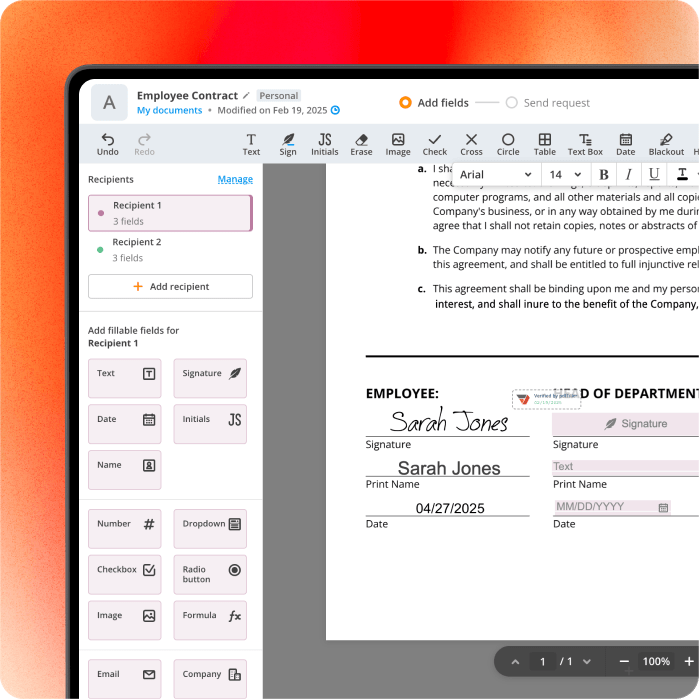
Highlight Calculation and Margin in PDF
Learn how to highlight and calculate margins in PDF documents easily using pdfFiller’s intuitive tools.
What is Highlight Calculation in PDF?
Highlight calculation in PDF refers to the process of marking important sections of a document for emphasis. This feature is essential for PDF annotation, allowing users to draw attention to key points, making documents clearer and easier to review. For small businesses, this tool is invaluable when preparing reports or proposals, ensuring that critical information stands out. The best part is that no technical setup is required, making it accessible for anyone looking to improve their document management.
How to Calculate Margins in PDF Documents
- Open your PDF document in pdfFiller.
- Navigate to the margin settings in the editing toolbar.
- Select the area of the document where you want to adjust the margins.
- Input your desired margin measurements in the provided fields.
- Preview the changes to ensure the layout meets your needs.
- Save the document to apply the new margin settings.
- Export the PDF to your preferred format if necessary.
- Review the document to confirm that the margins are correctly applied.
Benefits of Highlighting in PDF Editing
Using highlighting tools for PDF documents significantly enhances document clarity. This feature is particularly useful for collaboration, allowing team members to quickly identify important information during reviews. Moreover, highlighting saves time by reducing the need for lengthy explanations, as annotations can be legally binding. This efficiency is crucial for professionals in various fields, including legal and financial services, where precision is paramount.
Uploading PDFs to pdfFiller
To upload PDFs for editing, simply drag and drop your file into the pdfFiller interface. Supported file formats include PDF, DOCX, and more. You can also upload files directly from cloud storage services. There are no hidden fees associated with uploading, ensuring a straightforward process for all users. This ease of access allows for quick document management without complications.
Managing Highlights and Margins After Placement
After placing highlights and adjusting margins, you can easily manage these annotations. To edit highlights, click on the highlighted area and choose the edit option. Adjust margins by revisiting the margin settings and modifying the measurements as needed. If you make a mistake, you can undo actions with a simple click. Always remember to save changes to ensure your edits are retained.
Common Scenarios for Highlighting and Margin Calculation
Highlight calculation in PDF is widely used across various industries. For instance, legal professionals often highlight critical clauses in contracts to ensure clarity during negotiations. In real estate, agents use highlighting to emphasize key property features in listings. Similarly, finance professionals rely on accurate margin calculations for invoices to maintain precise billing practices. These examples illustrate the importance of accuracy and collaboration in document workflows.
Compatibility and Browser Support
pdfFiller supports a wide range of browsers, including Chrome, Firefox, and Safari, ensuring that you can access your documents from any device. Mobile access is also available, allowing you to edit PDFs on the go. There is no installation required, making it easy to start working on your documents immediately. This cross-device functionality enhances your ability to manage PDFs efficiently.
Limitations of Highlighting Tools
While highlighting tools are beneficial, there are some limitations to be aware of. Certain tools may have restrictions on the types of PDFs they can edit, particularly scanned documents. Additionally, some features may vary depending on the subscription plan you choose. User feedback often highlights these limitations, so it's essential to understand what your chosen plan includes.
Security and Compliance in PDF Editing
Security is a top priority when using pdfFiller for PDF editing. The platform includes document protection features to safeguard your information. Compliance certifications ensure that your documents meet industry standards, while user privacy is maintained through strict data security measures. This focus on security helps you feel confident when managing sensitive documents.
Next Steps for Using Highlight and Margin Tools
To start using highlight calculation and margin tools effectively, visit pdfFiller and explore the available resources. You can access tutorials that guide you through the features and functionalities. Additionally, user support options are available to assist you with any questions. Begin enhancing your document workflows today!
How Does pdfFiller Compare?
Adobe Acrobat offers comprehensive PDF editing tools but can be complex for small businesses. Users may find pdfFiller’s interface more user-friendly.
Smallpdf provides basic PDF tools but lacks the extensive features of pdfFiller. pdfFiller offers more advanced annotation options.
PDF Expert is known for its robust features but comes with a higher price point. pdfFiller delivers similar capabilities without the enterprise cost.