Japanese Signature Generator For Free

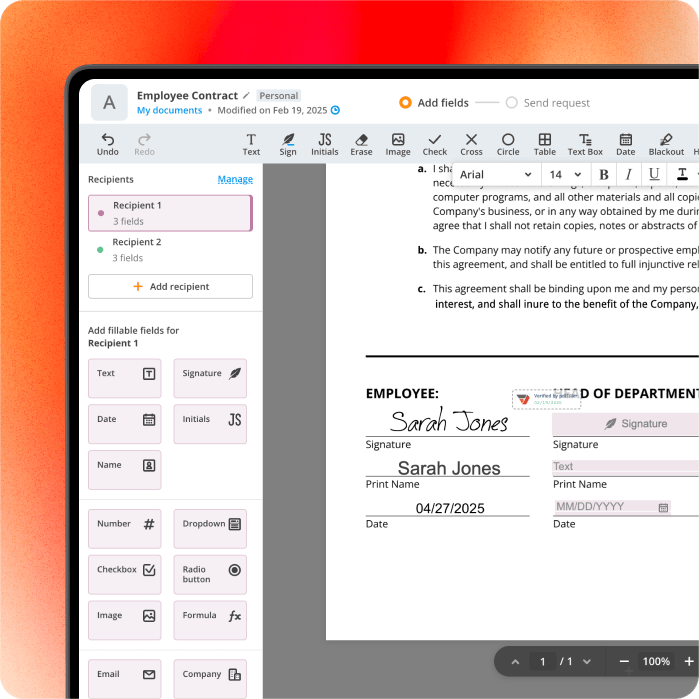
Create your legally-binding electronic signature using one of the available methods and apply it to any document in seconds.

Drop document here to upload
Select from device
Up to 100 MB for PDF and up to 25 MB for DOC, DOCX, RTF, PPT, PPTX, JPEG, PNG, JFIF, XLS, XLSX or TXT

Last updated on Oct 21, 2026

Japanese Signature Generator

Generate your own Japanese signature quickly and easily using pdfFiller's online tool. No technical setup is required, making it perfect for busy professionals.

What is a Japanese Signature Generator?

A Japanese Signature Generator is a tool that allows you to create a digital version of a traditional Japanese signature, known as a "hanko." These signatures are essential in Japanese business culture, serving as a form of identification and approval on documents. In contrast to traditional signatures, digital signatures offer convenience and efficiency, especially for small and medium-sized businesses that require quick document workflows. The Japanese Signature Generator simplifies the process, enabling you to generate an e-signature without the need for complex software or technical knowledge.

How Does This Tool Work?

The Japanese Signature Generator operates through a user-friendly interface that allows you to create your signature in just a few steps. First, you access the tool via your web browser, eliminating the need for installation. Next, you can choose to draw, type, or upload your signature. Once you finalize your design, the tool generates your digital signature, ready for use in documents. This straightforward process ensures that even those with minimal technical skills can create their own signatures effortlessly.

Three Methods to Create Your Signature

There are three primary methods to create your signature using the Japanese Signature Generator: drawing, typing, and uploading. When you choose to draw, you can use your mouse or touchscreen to create a signature that mimics your handwriting. Typing allows you to select from various font styles to create a signature that reflects your personal brand. Lastly, the upload option lets you scan and upload an existing signature for digital use. Each method offers legal validity, ensuring that your signature is recognized in business transactions. Depending on your preferences, you can select the method that best suits your needs.

Customizing Your Japanese Signature

Personalizing your signature is an important step in the creation process. With the Japanese Signature Generator, you can customize various aspects of your signature, including font styles, color options, and size adjustments. This flexibility allows you to create a signature that aligns with your brand identity or personal style. For instance, you might choose a bold font for a more professional appearance or a playful color for a creative touch. By tailoring your signature, you ensure that it stands out and represents you effectively.

Saving and Reusing Your Signature

Once you have created your signature, the Japanese Signature Generator allows you to save it for future use. The saving process is straightforward; simply follow the prompts to store your signature in the tool. You can set default settings for your signature, making it easy to access and reuse in various documents. This feature is particularly beneficial for small business owners and freelancers who frequently need to sign contracts or agreements.

Legal Validity of Your Signature

Signatures created with the Japanese Signature Generator are legally binding, provided they meet compliance standards. The tool ensures that your digital signature includes necessary audit trails and verification processes, making it suitable for official documents. This legal validity is crucial for professionals, such as real estate agents and freelancers, who require assurance that their signatures will be accepted in business transactions. Understanding these legal aspects helps you use the tool confidently.

Common Use Cases for Japanese Signatures

Japanese signatures are essential in various scenarios, including business contracts, lease agreements, and freelance work. For instance, a real estate agent may need to sign property agreements digitally, while freelancers often require signatures for client contracts. The Japanese Signature Generator simplifies these processes, allowing professionals to sign documents efficiently and securely. By utilizing this tool, you can ensure that your agreements are completed promptly and professionally.

Browser Compatibility for Signature Generation

The Japanese Signature Generator is compatible with most modern web browsers, ensuring accessibility across different devices. Users can access the tool on desktops, laptops, and mobile devices without any issues. This compatibility allows you to create and manage your signatures from anywhere, making it a convenient option for busy professionals who are often on the go.

Limitations of the Japanese Signature Generator

While the Japanese Signature Generator offers many benefits, it does have some limitations. For example, the tool does not allow for recipient signatures, meaning that you cannot collect signatures from others directly through the platform. Additionally, users must manually place their signatures on documents, as there is no auto-apply feature. Understanding these limitations helps you use the tool effectively and plan your document workflows accordingly.

Next Steps After Generating Your Signature

After generating your signature with the Japanese Signature Generator, you can easily integrate it into your document workflows. This includes filling out documents, sharing signed agreements with clients, and integrating your signature with other tools for enhanced efficiency. By following these next steps, you can ensure that your document signing process is smooth and effective.

How Does pdfFiller Compare?

DocuSign offers extensive features for enterprise-level solutions but can be complex for small businesses.

Adobe Acrobat Sign is known for its robust PDF editing capabilities but may be more expensive than necessary for SMBs.

signNow provides competitive pricing but lacks the extensive template library of pdfFiller.

Try most popular PDF tools

Discover a full set of tools to handle any document task.

Edit PDFs

Make quick PDF edits online.

Sign

Add legally binding signatures.

Merge

Combine multiple PDFs.

Request signatures

Send a document for signing.

Convert

Transform PDFs into other formats.

Rearrange

Change the order of pages.

Share

Send PDFs for review or editing.

Compress

Reduce PDF file sizes.

How to sign a document online?

Upload

Signing and editing documents has never been easier

  • Edit and sign in one place Quickly eSign documents after reviewing or editing — no need to juggle tools and move files back and forth. Get your PDFs done fast with all the tools you need at your fingertips.
  • Easy sharing & collaboration After signing a document, share it instantly with clients and stakeholders for review, editing, or comments. To request signatures from other parties, add fillable fields and send the document for signing.
  • Mobile-ready solution Easily edit, sign, and send your documents from anywhere, even on the go. pdfFiller is entirely cloud-based, so you can manage documents effectively from your computer, smartphone, or tablet.
  • Legally binding & secure Sign contracts and agreements following global eSignature laws, including ESIGN, UETA, eIDAS, and GDPR. With HIPAA, PCI DSS, SOC 2 Type II, and other compliance standards, pdfFiller works for any industry.

Who needs this?

Explore how professionals use pdfFiller to sign documents.

Healthcare

Healthcare professionals use pdfFiller to simplify document signing, from patient consent forms to medical record requests. They can easily request, approve, and share signed documents with patients, staff, or suppliers, saving time and improving communication.

  • Patient consent forms
  • Prescription forms
  • Lab test requisition forms
  • Referral and consultation forms
Healthcare
  • G2 — Users Most Likely To Recommend
  • G2 — Grid Leader in Small-Business
  • G2 — High Performer
  • G2 — Regional Leader
  • G2 — Easiest To Do Business With
  • G2 — Best Meets Requirements
  • G2 — Best Support

pdfFiller scores top ratings on review platforms

pdfFiller is rated 4.6 out of 5 stars across 1,000+ G2 reviews.

It is the best PDF program I have ever used.
Anonymous Customer
Its good if you cant find a fillable form.
John A. M
great so far just getting used to the new way....
steve
What do you like best?
I like that it's pretty intuitive and easy to use.
What do you dislike?
Loading times are a little long sometimes.
What problems are you solving with the product? What benefits have you realized?
Processing of any kind of documents.
Carolien Gilbert
great and fast to sign and edit PDFs in 30 seconds
Moath
This is very easy to do and all of the work you do shows up and even when you download and save it. I love this PDF- Filler so much. Thank You!
ebony b

eSign documents with a trusted, all‑in‑one solution

Try easy-to-use tools for all your document management needs.

pdfFiller workspace for creating, filling and managing PDF forms

Why sign documents with pdfFiller?

Ease of use

Watch pdfFiller eSignatures in action

Check out a quick video tutorial that shows how to create and place your signature or send a document for signing.

FAQs

If you can't find what you're looking for, please contact us anytime!

A Japanese Signature Generator is an online tool that allows users to create digital signatures that reflect traditional Japanese calligraphy styles. This tool works by providing customizable templates where users can input their name in Japanese characters, select a style, and generate a signature that can be used for various documents. For remote professionals and legal teams, using a Japanese Signature Generator ensures that their signatures maintain cultural authenticity while being legally recognized. To maximize its effectiveness, ensure that the generated signature is saved in a secure format, such as PDF, to maintain document integrity.

To ensure the security of your digital signature created with a Japanese Signature Generator, choose a reputable platform like pdfFiller that employs robust security protocols, including encryption and secure cloud storage. This protects your signature from unauthorized access and ensures compliance with legal standards. Additionally, regularly update your passwords and use two-factor authentication when available. By following these practices, you can safeguard your digital identity while utilizing document automation tools effectively.

Yes, you can use a Japanese Signature Generator for official documents as long as the generated signature meets the legal requirements of your jurisdiction. Many organizations and legal teams accept digital signatures created with such generators, especially when they are accompanied by a verified identity. To enhance the legitimacy of your signature, consider using a platform like pdfFiller that provides options for eSigning and document verification. This ensures that your documents are not only signed but also secure and compliant with relevant regulations.

Using a Japanese Signature Generator offers several benefits over traditional signing methods, including convenience, speed, and enhanced security. Digital signatures can be created and applied instantly, eliminating the need for printing, signing, and scanning documents. This is particularly advantageous for remote professionals and SMEs who require efficient document management. Additionally, digital signatures can be easily stored and retrieved from cloud-based platforms like pdfFiller, ensuring that your documents are organized and accessible anytime. For best practices, always verify the signature's compatibility with the specific document type you are working with.

Yes, most Japanese Signature Generators allow for a high degree of customization. Users can typically choose from various calligraphy styles, adjust the size, and even add personal touches such as unique symbols or designs. This customization ensures that your signature not only reflects your identity but also aligns with your professional branding. When using pdfFiller, take advantage of the platform's editing tools to further refine your signature and ensure it meets your specific needs for document automation.

A Japanese Signature Generator can seamlessly integrate with cloud-based document management systems like pdfFiller, allowing users to create, store, and manage their signatures within a single platform. This integration streamlines the signing process, enabling users to apply their signatures directly to documents without the need for multiple applications. For optimal use, ensure that your document management system supports various file formats and provides security features to protect your signed documents. This approach enhances efficiency and ensures that all your document workflows are secure and compliant.

When selecting a Japanese Signature Generator, look for features that ensure compliance with legal standards, such as encryption, audit trails, and compatibility with eSignature laws. A reputable generator should provide clear documentation on its compliance with regulations like the ESIGN Act and UETA in the U.S. or similar laws in other jurisdictions. Using a trusted platform like pdfFiller can help guarantee that your digital signatures are legally binding and secure, making it easier for remote professionals and legal teams to manage their documents effectively.

What businesses achieve with pdfFiller

Discover how you can benefit too.

pdfFiller allows us to tap into additional markets and sell business we might not otherwise have sold because of the speed and ease with which we can produce the forms.

Scaturro Insurance Agency LLC

One tool. Every document task.

One workflow shouldn’t take five tools

Start free trial