Merge PDF and Reorder PDF for iOS For Free

Drop document here to upload
Select from device
Up to 100 MB for PDF and up to 25 MB for DOC, DOCX, RTF, PPT, PPTX, JPEG, PNG, JFIF, XLS, XLSX or TXT

Last updated on Sep 17, 2026

Merge PDF and Reorder PDF for iOS

Merge PDF files and reorder pages quickly using pdfFiller's iOS platform.

What is the Merge Tool?

The Merge tool allows you to combine multiple files into one PDF document. Accessible via the pdfFiller dashboard, it eliminates the need for complex software installations. This tool is ideal for consolidating contracts and reports, making document management straightforward for small and medium-sized businesses. With the Merge tool, you can efficiently manage your documents without the hassle of fragmented solutions.

How Does Merging Solve Workflow Issues?

Merging documents addresses common workflow challenges by streamlining document management. It reduces the time spent on file handling, allowing you to combine contracts and attachments effortlessly. This capability is essential for SMBs and professionals who require efficient document workflows. By using the Merge tool, you can enhance productivity and focus on more critical tasks.

How to Upload Documents for Merging

  • Access the Merge tool from your pdfFiller dashboard.
  • Select the option to upload files from your local device or MyDocs.
  • Utilize cloud storage integration to upload documents directly from services like Google Drive or Dropbox.
  • Access previously uploaded files for easy merging.
  • Ensure your documents are in compatible formats for merging.

Supported File Formats for Merging

The Merge tool supports various file formats, including PDF, Word, Excel, and images. Non-PDF formats convert automatically to ensure document fidelity during the merging process. This feature allows for easy handling of mixed file types, making it convenient to consolidate different document formats into one PDF.

Step-by-Step Instructions for Merging

  • Select the files you wish to merge from your device or cloud storage.
  • Reorder pages using the drag-and-drop feature to arrange them as needed.
  • Click the 'Merge' button to combine the selected files into one PDF.
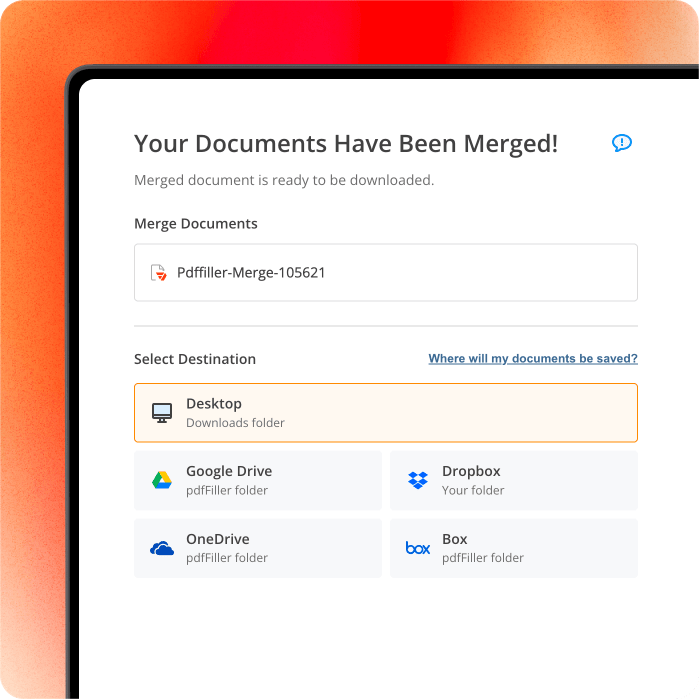
  • Download the merged PDF immediately or save it to MyDocs for future access.

Reordering Pages Before Merging

To reorder pages in the Merge tool, use the drag-and-drop thumbnails to adjust the sequence of your documents. You can preview the page order before finalizing the merge, ensuring that the final layout meets your requirements. This flexibility allows you to make adjustments as needed before completing the merging process.

Output File and Saving Options

After merging, the output is a single PDF file. You have the option to download it immediately or save it to MyDocs for easy access later. Additionally, you can share the merged document via email, and legally binding e-signatures are available for added convenience.

Merge vs. Rearrange Pages: What's the Difference?

Merging combines separate files into one document, while rearranging adjusts the pages within a single document. Understanding when to use each tool is essential for effective document management. The Merge tool is ideal for consolidating multiple documents, whereas the rearranging feature is useful for organizing pages within an existing document.

Editing the Merged Document After Combining

Once you have merged your PDF, you can open it in the pdfFiller editor. This allows you to annotate, fill, or sign the document as needed. You can save any changes made to MyDocs, ensuring that your edited documents are easily accessible. Sharing edited documents with colleagues or clients is also straightforward.

Real-World Scenarios for Merging PDFs

Merging PDFs is beneficial in various practical scenarios. For instance, you can combine contracts with exhibits for legal purposes, merge multiple invoices for clients, or compile bids for proposals. This functionality is particularly useful for legal and business professionals who need to manage multiple documents efficiently.

Limitations and Known Constraints

There are some limitations to be aware of when using the Merge tool. The maximum file count for merging may vary, and there are size limits for uploads. Additionally, conversion fidelity issues can arise with certain file types. Be mindful of plan-tier constraints that may affect available features, ensuring you choose the right plan for your needs.

Free vs. Paid Access to Merging Features

Free plans offer basic merging capabilities, but upgrading to paid plans unlocks additional features. Limitations of free access may include fewer file formats and reduced functionality. For small and medium-sized businesses, the value proposition of paid plans is clear, providing enhanced features and greater flexibility.

Browser and Device Compatibility

The Merge tool is compatible with various browsers, ensuring accessibility across devices. You can access the tool via iOS without any installation requirements, making it easy to merge documents on the go. Performance remains consistent across different devices, allowing you to work from anywhere.

Security and Data Handling

pdfFiller prioritizes security in document handling. Files are encrypted during uploads, and the platform complies with data protection regulations. Safe handling of sensitive documents is a key feature, with user privacy measures firmly in place to protect your information.

How Does pdfFiller Compare?

When comparing pdfFiller's merging tool to competitors like ilovepdf, Adobe Acrobat Online, and Smallpdf, several unique features stand out. pdfFiller offers a user-friendly interface and robust functionality at competitive pricing. Additionally, the accessibility of pdfFiller's tool across devices enhances the user experience, making it a preferred choice for many.

Next Steps After Merging

After merging your documents, you have several options. You can edit or sign the merged documents as needed, share them with clients or colleagues, and save them to MyDocs for easy access. Integrating with other pdfFiller features allows for a comprehensive document management experience.

Try most popular PDF tools

Discover a full set of tools to handle any document task.

Edit PDFs

Make quick PDF edits online.

Sign

Add legally binding signatures.

Merge

Combine multiple PDFs.

Request signatures

Send a document for signing.

Convert

Transform PDFs into other formats.

Rearrange

Change the order of pages.

Share

Send PDFs for review or editing.

Compress

Reduce PDF file sizes.

How to merge PDFs?

1. Upload

Combine, organize, and edit your PDFs

  • Merge & edit in one place Combine multiple PDFs into one file and jump straight into editing. Add text, annotations, or rearrange pages—all in one seamless workflow.
  • Merge, sign, and share Combine your documents, eSign them, and share the finalized file. Keep signed docs bundled to reduce clutter and simplify sharing.
  • Stay organized and productive Merge scattered PDFs and keep them organized in pdfFiller’s cloud. With folders, smart tags, and quick search tools, managing your documents is a breeze.
  • Simplify сollaboration Combine multiple PDFs into one file to share with your team or clients. No more juggling attachments—just one file, ready for review, feedback, or signing.

Who uses this tool?

Explore how professionals use pdfFiller to merge and share documents.

Business Owners

Combine invoices, contracts, and reports into a single file for easy sharing and record-keeping. Keep your business documents organized and accessible in one place.

  • Invoices and receipts
  • Business reports
  • Client contracts
Business Owners
  • G2 — Users Most Likely To Recommend
  • G2 — Grid Leader in Small-Business
  • G2 — High Performer
  • G2 — Regional Leader
  • G2 — Easiest To Do Business With
  • G2 — Best Meets Requirements
  • G2 — Best Support

pdfFiller scores top ratings on review platforms

pdfFiller is rated 4.6 out of 5 stars across 1,000+ G2 reviews.

Great way to edit your PDFs. So many features!
Wil S
Program was easy to work with. I made corrections easily and moved my answers to suit my picky disposition.
Kristine W
Its been a great experience for me I really love this application.
Brenda L
What do you like best about the product? It's the best tool for PDF editing I have found so far What do you dislike about the product? Too expensive if you're not a business user (the price is too high for myself when I need the tool for a few times during the month, so it doesn't worth the price) What problems is the product solving and how is that benefiting you? It works perfectly as an editor, so I can easily change my documents with minimum effort.
Ilia Vorontcov
PDF filler has been easy to work with… PDF filler has been easy to work with and great program when needing to do quick templates.
Catherine Adams
You guys have been very responsive in answering all my questions.
Julie L

Merge documents with a trusted, all-in-one solution

Try pdfFiller for all your document management needs.

pdfFiller workspace for creating, filling and managing PDF forms

Why trust pdfFiller to merge your documents?

All-in-one solution

Watch our PDF tools in action

Check out this video tutorial to learn how to merge and rearrange PDF pages right in the editor.

FAQs

If you can't find what you're looking for, please contact us anytime!

To merge PDF files on iOS with pdfFiller, start by uploading the files you want to combine. Once uploaded, select the 'Merge PDF' option from the tools menu. This feature allows you to drag and drop files into the desired order before finalizing the merge. After merging, you can save the new document directly to your device or cloud storage. For best results, ensure your files are well-organized prior to merging to streamline the process.

Reordering PDF pages on iOS using pdfFiller is straightforward. First, open the PDF document in the app. Navigate to the 'Reorder PDF' tool, where you can view all pages as thumbnails. Simply drag and drop the pages into your preferred sequence. Once satisfied with the new order, save the document. This feature is particularly useful for legal teams needing to adjust document flow for presentations or submissions.

Yes, merging and reordering PDFs using pdfFiller on iOS is secure. The platform employs advanced security protocols, including encryption, to protect your documents during upload and processing. Additionally, pdfFiller ensures that your files are not stored longer than necessary, enhancing privacy. For remote professionals handling sensitive information, this security measure is crucial when managing documents.

Absolutely! pdfFiller allows you to merge PDFs from various cloud storage services directly on your iOS device. Simply connect your cloud accounts, such as Google Drive or Dropbox, within the app. After linking, you can select files from these services to merge. This cross-platform compatibility makes it easy for SMEs to manage documents without switching between apps.

Using pdfFiller for PDF management on iOS offers several advantages, including a user-friendly interface, comprehensive editing tools, and seamless document collaboration. The ability to merge PDF and reorder PDF for iOS enhances workflow efficiency, especially for legal teams and remote professionals. Additionally, the cloud-based nature of pdfFiller allows for easy access and sharing of documents from anywhere, ensuring that you can work effectively on the go.

Yes, after merging PDF files on iOS using pdfFiller, you can easily edit the combined document. The platform provides robust editing tools that allow you to add text, images, or annotations as needed. This feature is particularly beneficial for users who need to make last-minute changes or updates to documents before finalizing them. Simply open the merged PDF in pdfFiller and utilize the editing tools to make your adjustments.

With pdfFiller on iOS, you can merge various file types with PDFs, including Word documents, Excel spreadsheets, and image files (JPEG, PNG). This flexibility allows you to create comprehensive documents that include different formats, which is ideal for legal teams compiling evidence or reports. To merge different file types, simply upload them alongside your PDFs and follow the merging process as usual.

Transforming businesses with pdfFiller

Check out these success stories.

Other software options offering customized branding have really extreme pricing. Compared to the monthly costs of PandaDoc, we are now saving unbelievable amounts of money.

B2B Services Message Direct

One tool. Every document task.

One workflow shouldn’t take five tools

Start free trial