Notarize Signature Form For Free

Drop document here to upload
Select from device
Up to 100 MB for PDF and up to 25 MB for DOC, DOCX, RTF, PPT, PPTX, JPEG, PNG, JFIF, XLS, XLSX or TXT

Last updated on Sep 14, 2026

Notarize Signature Form

Notarize your documents online with pdfFiller's easy-to-use feature, ensuring secure and legal notarization from anywhere.

What is Remote Online Notarization?

Remote Online Notarization (RON) is a process that allows individuals to notarize documents online using digital platforms. This method offers several benefits, including convenience and efficiency, as it eliminates the need for in-person meetings. Compared to traditional notarization, RON can be completed from anywhere, making it ideal for busy professionals or those in remote locations. By utilizing the Notarize Signature Form, you can easily access this service and ensure your documents are legally recognized.

Why Do You Need Notarization?

Notarization is essential for various legal documents, ensuring their authenticity and preventing fraud. Common scenarios requiring notarization include real estate transactions, powers of attorney, and affidavits. The legal implications of notarization are significant; without it, documents may not hold up in court or during official proceedings. In real estate, for example, notarized documents are often required to finalize transactions and protect all parties involved.

How to Access the Notarize Feature

  • Log in to your pdfFiller account.
  • Navigate to the "Documents" section on the dashboard.
  • Click on the "Notarize" option in the menu.
  • Select the document you wish to notarize using the Notarize Signature Form.
  • Follow the prompts to complete the document submission process.

Step-by-Step Notarization Process

  • Select the document you want to notarize from your files.
  • Enter the signer’s details accurately to ensure proper identification.
  • Initiate a video call with the notary for identity verification.
  • Present your identification documents as required during the video call.
  • Sign the document electronically using the e-signature feature.
  • Complete the notarization process by confirming all details are correct.
  • Receive a copy of the notarized document for your records.

Understanding Identity Verification

Identity verification is a crucial step in the notarization process, ensuring that the signer is who they claim to be. Required ID types typically include government-issued photo IDs such as passports or driver's licenses. The timing of verification occurs during the video call with the notary, where the signer must present their ID for review. This process is vital to prevent fraud and ensure the integrity of the notarization.

State Availability for Remote Online Notarization

Remote online notarization is permitted in several states, each with specific rules governing its use. For instance, some states may limit the types of documents that can be notarized online. It's essential to check the regulations in your state to ensure compliance. For more information, you can visit state-specific pages that outline the legal documents eligible for online notarization.

Common Document Types for Notarization

Several document types are frequently notarized, including real estate contracts, powers of attorney, and notarized affidavits. Each of these documents serves a distinct purpose in legal proceedings. For example, a notarized affidavit is often used to provide sworn statements in court, while real estate contracts require notarization to validate the agreement between parties. Understanding the importance of these documents can help you navigate the notarization process more effectively.

Tracking Your Notarization Status

To monitor your notarization requests, access the "Sent" folder in your pdfFiller account. This section provides updates on the status of your notarization, including whether it has been completed or is still pending. Notifications will also be sent to inform you of any changes or confirmations regarding your notarization requests.

Notarization vs. E-Signature

Notarization and e-signatures serve different purposes in the legal realm. Notarization involves a notary public verifying the identity of the signer and the authenticity of the document, which carries legal implications in many scenarios. In contrast, an e-signature is simply a digital representation of a person's signature and may not provide the same level of legal protection. Understanding when to choose notarization over an e-signature can help you make informed decisions regarding your documents.

Scenarios for Using Notarization

Notarization is necessary in various scenarios, particularly in real estate transactions, where it ensures that contracts are legally binding. Additionally, powers of attorney require notarization to grant legal authority to another individual. Affidavits, which are sworn statements made under oath, also need notarization to be considered valid. Each of these scenarios highlights the importance of notarization in protecting your interests and ensuring compliance with legal requirements.

How Does pdfFiller Compare?

Notarize by Proof offers comprehensive online notarization services but can be more expensive. Ideal for users needing extensive features.

NotaryCam provides a user-friendly interface but lacks some advanced features of pdfFiller. Good for basic notarization needs.

DocVerify focuses on document security but may not be as intuitive as pdfFiller. Suitable for users prioritizing security over ease of use.

Try most popular PDF tools

Discover a full set of tools to handle any document task.

Edit PDFs

Make quick PDF edits online.

Sign

Add legally binding signatures.

Merge

Combine multiple PDFs.

Request signatures

Send a document for signing.

Convert

Transform PDFs into other formats.

Rearrange

Change the order of pages.

Share

Send PDFs for review or editing.

Compress

Reduce PDF file sizes.

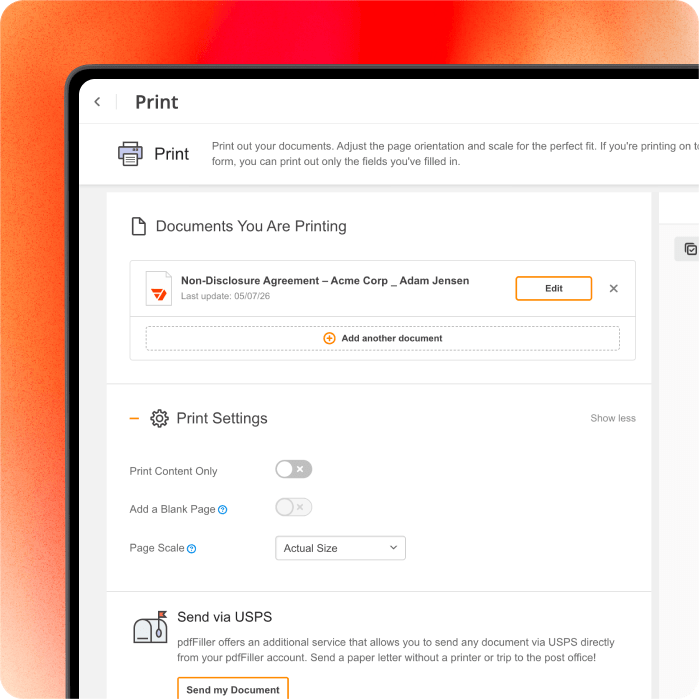
How to print, fax, or notarize a document

1. Upload or open your document

Print, fax, notarize, and store — all in one place

  • Print any document from anywhere Upload your PDF and send it to any printer — at the office, at home, or at a local print shop — directly from your pdfFiller account. No downloading, no formatting issues. Your document comes out exactly as it looks on screen.
  • Send a fax without a fax machine Some industries still run on fax — healthcare, legal, insurance, government. pdfFiller lets you send and receive faxes directly from your browser. Upload the document, enter the number, and it's gone. No hardware, no dedicated fax line, no extra subscription.
  • Get documents notarized online Notarization no longer means booking an appointment and driving across town. Connect with a commissioned notary online, complete the session by video, and get your document notarized in minutes — legally valid, fully digital.
  • Sign before you send Add your signature, initials, or date stamp directly inside your document—then print, fax, or share it. Sign a contract before faxing it to the bank, or add initials to a lease before sending it to a client. Draw, type, or upload once, then reuse it across any document.
  • Pull from any cloud, save back instantly Connect Google Drive, Dropbox, Box, or OneDrive and work with files directly — no downloading, no re-uploading. Pull a document, fill it, sign it, fax it, and save it back to the same folder it came from.

Who needs this?

Explore how professionals across industries use pdfFiller to edit PDFs.

Healthcare

Patient forms, referral requests, insurance claims — healthcare runs on paperwork that needs to move fast and stay compliant. Print intake forms directly from your account, fax referrals to specialists without a fax machine, and get consent forms notarized online without scheduling an in-person appointment. HIPAA-compliant storage keeps every document secure.

  • Patient intake and registration forms
  • Referral letters and specialist requests
  • Insurance claims and prior authorization forms
  • Consent forms requiring notarization
Healthcare
  • G2 — Users Most Likely To Recommend
  • G2 — Grid Leader in Small-Business
  • G2 — High Performer
  • G2 — Regional Leader
  • G2 — Easiest To Do Business With
  • G2 — Best Meets Requirements
  • G2 — Best Support

pdfFiller scores top ratings on review platforms

pdfFiller is rated 4.6 out of 5 stars across 1,000+ G2 reviews.

Feels as though I am working within my computer space. Effective
John
It is everything I've been looking for!!
Delecia
I never have any problems finding a form that I need to have, quickly with PDFfiller. Everything that I could ever need in one place!
Ishmael H
The site is easy to navigate and the filler is great for work.
Kara S
What do you like best?
Ease of use and the ability to transpose images.
What do you dislike?
Needs a larger variety of fonts. The color chart also needs to have more choices.
Recommendations to others considering the product:
PDFfiller has eased my document management and truly "filled" my non-filler documents!
What problems are you solving with the product? What benefits have you realized?
I make documents writable because I absolutely do not write out anything.
User in Government Administration
Such a great tool for editing PDF Such a great tool for editing PDF! totally recommended! thank you pdffiller, I'll forever be in debt w you. God Bless!
NSAR

Print, fax, notarize, and store PDFs without the back-and-forth

No extra tools, no wasted time.

pdfFiller workspace for creating, filling and managing PDF forms

PDF editing is just the beginning

More than a PDF editor

What’s New in pdfFiller: AI, Editing, eSignatures & Document Management

Discover the latest pdfFiller features and new features designed to make document work easier for small businesses, teams, freelancers, and individuals. In this full feature walkthrough, you’ll see how to create, edit, fill, manage, store, and eSign documents for everyday workflows like resumes, contracts, HR forms, applications, invoices, onboarding paperwork, and more — all in one place.

FAQs

If you can't find what you're looking for, please contact us anytime!

A Notarize Signature Form is a document that requires a notary public's verification of a signature to ensure its authenticity. This form is crucial in legal and financial transactions where the identity of the signer must be confirmed. Notarization adds a layer of security and trust, making it essential for documents like contracts, wills, or real estate agreements. To effectively use a Notarize Signature Form, ensure that you have a reliable notary service, either in-person or through a digital platform like pdfFiller, which offers integrated notarization options.

You can notarize a signature form online using pdfFiller by following a few simple steps. First, upload your document to the pdfFiller platform. Next, select the 'Notarize' option, where you can connect with a licensed notary via video call. The notary will guide you through the signing process, ensuring that your signature is properly witnessed and notarized. This method not only saves time but also guarantees that your document meets all legal requirements for notarization. Always check that your notary is compliant with state regulations for online notarization.

Documents that typically require a Notarize Signature Form include legal agreements, real estate transactions, powers of attorney, and affidavits. These documents often involve significant legal implications, making notarization necessary to prevent fraud and verify the identity of the signers. For remote professionals and legal teams, using pdfFiller to manage these documents can streamline the notarization process, ensuring that all necessary forms are securely stored and easily accessible.

When notarizing a signature form online, security protocols include identity verification, secure video conferencing, and encrypted document storage. pdfFiller employs advanced security measures to protect your information, such as multi-factor authentication and SSL encryption. These protocols ensure that your notarized documents remain confidential and tamper-proof. Always verify that the online notarization service you choose adheres to these security standards to safeguard your sensitive information.

Yes, pdfFiller allows you to automate the notarization process for multiple documents efficiently. By utilizing document templates and batch processing features, you can prepare several Notarize Signature Forms at once. This automation not only saves time but also reduces the risk of errors in document preparation. To maximize efficiency, integrate pdfFiller with your existing workflow tools, ensuring a seamless experience in managing and notarizing your documents.

If your Notarize Signature Form is rejected, first review the reasons provided by the notary or the receiving party. Common issues include incorrect signatures, missing information, or improper notarization procedures. To resolve this, ensure that all required fields are filled out correctly and that the document complies with state-specific notarization laws. Using pdfFiller, you can easily edit and resubmit your document, ensuring that it meets all necessary requirements for acceptance.

Yes, it is legal to notarize a signature form remotely in many jurisdictions, provided that the notary complies with state laws regarding online notarization. pdfFiller supports remote notarization, allowing users to connect with licensed notaries through secure video calls. Always check the specific regulations in your state to ensure that your notarized documents are valid and legally binding. This flexibility is particularly beneficial for remote professionals and legal teams needing efficient document management.

What businesses achieve with pdfFiller

Discover how you can benefit too.

I tell my employees that if you need to have stuff filled out, hey, check out pdfFiller, that's what I use. Yes, I would and I do recommend it.

Hope Discovery ABA Services

One tool. Every document task.

One workflow shouldn’t take five tools

Start free trial