Protected Document For Free

Drop document here to upload
Select from device
Up to 100 MB for PDF and up to 25 MB for DOC, DOCX, RTF, PPT, PPTX, JPEG, PNG, JFIF, XLS, XLSX or TXT

Last updated on Sep 13, 2026

Protected Document

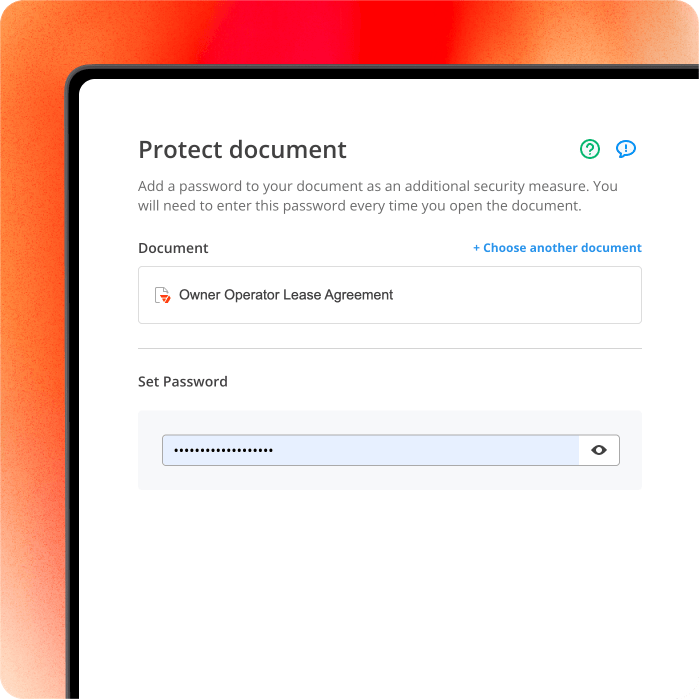
Password protect your PDF documents easily with pdfFiller.

What is Protect Document?

The Protect Document feature in pdfFiller allows you to secure your PDF files with password protection. This feature applies a password to either the entire document or specific pages, ensuring that only authorized individuals can access sensitive information. You can easily access this feature by navigating to Tools → Protect Document. It also includes legally binding e-signatures, making it ideal for sensitive documents such as contracts and HR files. By using this feature, you enhance the confidentiality of your documents and ensure that they are protected from unauthorized access.

How to Access the Protect Document Feature

To find and use the Protect Document feature, navigate to the Tools section in the document action menu. This feature is available on all devices, ensuring that you can secure your documents wherever you are. There is no IT setup required, making it quick and easy for you to access the password protection options. This straightforward access allows you to secure your documents without any technical barriers.

Steps to Add a Password to a PDF

  • Select the document or specific pages you want to protect with a password.
  • Enter your chosen password that meets the security requirements.
  • Click the Apply button to secure your document with the password.
  • Receive confirmation that your document has been successfully protected.

How to Open a Password-Protected PDF

To access a password-protected PDF, enter the password when prompted. You can access the document via the pdfFiller link or from a downloaded file. This feature is compatible with all devices, ensuring a quick unlock process for authorized users. By following these steps, you can easily open and view your secured documents.

Protecting the Entire Document vs. Specific Pages

When deciding between full document protection or page-specific security, consider the sensitivity of the information. Choosing full document protection provides comprehensive security for all content, while selecting specific pages allows for targeted protection of sensitive sections. Evaluate your user needs and the confidentiality requirements of the document to make the best choice.

Understanding the Confidential Folder

The Confidential folder in pdfFiller requires phone verification for access, adding an extra layer of security. This feature allows you to set custom password protection for sensitive documents and isolates them from the main lists. By using the Confidential folder, you enhance workspace-level security, ensuring that only authorized personnel can access critical information.

Creating a Read-Only PDF for Recipients

To make PDFs read-only for external users, set the document to read-only via the Protect Document feature. This allows you to control recipient access effectively, making it ideal for sensitive contracts. By ensuring document integrity, you prevent unauthorized modifications while sharing important files.

When to Password-Protect a PDF

Password protection is essential in various scenarios, such as when dealing with legal contracts that require high security. HR documents often need confidentiality to protect employee information. Additionally, financial records must be safeguarded to prevent unauthorized access, and personal IDs require protection to maintain privacy.

Browser and Device Compatibility

The password protection feature in pdfFiller is compatible with all major browsers, ensuring a consistent user experience. It is mobile-friendly, allowing you to access secured documents from your smartphone or tablet. This cross-device functionality means you can manage your documents securely, regardless of the device you are using.

Limitations and Known Constraints

There are some limitations to be aware of regarding password protection. For instance, maximum password length restrictions may apply, and page-range protection can vary depending on your plan. Additionally, there may be behavioral differences when downloading versus sharing links, and specific encryption standards are applied to ensure document security.

How Does pdfFiller Compare?

pdfFiller offers a user-friendly interface that simplifies the document management process. In comparison, competitors like ilovepdf may provide simpler features but lack the depth that pdfFiller offers. Additionally, pdfFiller's extensive template library enhances the user experience, making it easier to create and manage documents. For small businesses, pdfFiller is more cost-effective than Adobe Acrobat, which, while offering advanced features, comes at a higher price point.

Next Steps to Secure Your PDFs

Start protecting your documents in minutes with pdfFiller. No software installation is required, and you can access the Protect Document feature from any device. Join over 68 million satisfied users who trust pdfFiller for their document management needs.

Try most popular PDF tools

Discover a full set of tools to handle any document task.

Edit PDFs

Make quick PDF edits online.

Sign

Add legally binding signatures.

Merge

Combine multiple PDFs.

Request signatures

Send a document for signing.

Convert

Transform PDFs into other formats.

Rearrange

Change the order of pages.

Share

Send PDFs for review or editing.

Compress

Reduce PDF file sizes.

How to protect a PDF with a password?

1. Upload

Keep your documents confidential

  • Edit, then lock it down Edit text, add images, or fill out forms to complete your PDF. After, create a password to lock down the final version and prevent unauthorized access.
  • eSign and protect After you’ve signed an agreement, protect it with a password to ensure its integrity and keep its contents confidential.
  • Verify signers Sending a document for signing? Add an extra layer of security by setting a unique password or sending a one-time SMS code to your recipients before they can eSign.
  • Share with confidence Send sensitive files without the stress. Add a password before you share via link or email, ensuring only the right people can access your document.
  • Your digital cabinet—secured Keep all documents neatly organized in your secure cloud storage. Move sensitive files, such as contracts or personal records, to a confidential folder accessible only via password.

Who uses this tool?

Learn how professionals use pdfFiller to keep sensitive information safe.

Business Owners

Add a password to confidential documents to safeguard your company’s critical data. Ensure that only authorized partners, investors, or team members can access proprietary information, protecting your business from data leaks.

  • Business plans
  • Financial reports
  • Investor agreements
  • Strategic plans
Business Owners
  • G2 — Users Most Likely To Recommend
  • G2 — Grid Leader in Small-Business
  • G2 — High Performer
  • G2 — Regional Leader
  • G2 — Easiest To Do Business With
  • G2 — Best Meets Requirements
  • G2 — Best Support

pdfFiller scores top ratings on review platforms

pdfFiller is rated 4.6 out of 5 stars across 1,000+ G2 reviews.

So far I've found PDFfiller user friendly and most convenient. In all likelihood it will only improve as I learn to navigate it.
Robert F
I like that I can fill out the form print and save. I appreciate the access to professional documents.
Mary S
Works great Works great, low prices, I only wish I could get an app on my Microsoft computer.
Marianne Grano
It is magical. Yes I suggest you to use this product
BHAGWAN C
I found that I no longer needed pdfFiller but the subscription was renewed. Upon advising prfFiller they promptly refunded the subscription. A good and honest company.
Bruce R
It is easy and great forms to choose from. If you have a business you will need pdf filler.
Lee V

Protect PDFs with a trusted, all-in-one solution

Try pdfFiller for all your document management needs.

pdfFiller workspace for creating, filling and managing PDF forms

Why trust pdfFiller to secure your documents?

All-in-one solution

Watch our PDF tools in action

Check out this video tutorial to learn how to secure your PDFs from unauthorized access using password protection.

FAQs

If you can't find what you're looking for, please contact us anytime!

A Protected Document is a file that has been secured to prevent unauthorized access or modifications. For remote professionals, ensuring the integrity and confidentiality of sensitive information is crucial. Protected Documents often utilize encryption and password protection, which safeguard against data breaches and unauthorized edits. To effectively manage Protected Documents, consider using pdfFiller’s robust security features, which allow you to easily set permissions and track document access, ensuring that only authorized users can view or edit your files.

Creating a Protected Document with pdfFiller is straightforward. Start by uploading your PDF file to the platform. Once uploaded, navigate to the security settings where you can set a password and choose encryption options. This ensures that only individuals with the correct password can access or modify the document. For added security, consider enabling features like watermarking or setting expiration dates for access. This process not only protects sensitive information but also enhances your document management strategy.

To share Protected Documents securely, always use encrypted email or secure file-sharing services. When using pdfFiller, you can send documents directly from the platform with built-in security features. Ensure that you set appropriate permissions, such as view-only or edit rights, based on the recipient's needs. Additionally, consider using time-limited access links to further enhance security. By following these best practices, you can maintain control over your documents while facilitating collaboration with your team or clients.

Yes, Protected Documents can be edited after they are secured, but only by users who have the necessary permissions. In pdfFiller, you can unlock a Protected Document by entering the correct password, allowing you to make changes as needed. However, it’s important to remember that any modifications should be done carefully to maintain the document's integrity. Always keep a backup of the original file before making significant changes, ensuring that you can revert if necessary.

When selecting a platform for managing Protected Documents, look for robust security protocols such as AES-256 encryption, secure access controls, and regular security audits. pdfFiller employs these protocols to ensure that your documents are protected against unauthorized access and data breaches. Additionally, consider features like two-factor authentication and detailed audit trails, which provide transparency and accountability in document management. These security measures are essential for remote professionals and legal teams handling sensitive information.

pdfFiller ensures compliance with regulations such as GDPR and HIPAA when handling Protected Documents by implementing strict data protection measures. The platform provides users with tools to manage consent and data access, ensuring that sensitive information is handled according to legal standards. By utilizing pdfFiller, remote professionals and legal teams can confidently manage Protected Documents, knowing that their compliance needs are met. Regularly review your document management practices to stay updated with evolving compliance requirements.

Using pdfFiller for managing Protected Documents offers several advantages, including a user-friendly interface, comprehensive security features, and seamless integration with other tools. The platform allows for easy editing, eSigning, and collaboration on Protected Documents, all while maintaining high security standards. Additionally, pdfFiller supports cross-platform compatibility, enabling users to access and manage their documents from any device. This flexibility is particularly beneficial for remote professionals and SMEs who require efficient document management solutions.

Transforming businesses with pdfFiller

Check out these success stories.

This saved us an incredible amount of time! It feels like pdfFiller was custom-created for us.

Sales Frontline Insurance Group

One tool. Every document task.

One workflow shouldn’t take five tools

Start free trial