Require Signers to Draw Signature and Initials
Enable signers to draw their signatures directly on documents using pdfFiller's e-signature request feature.
What is the E-Signature Request Workflow?
The e-signature request workflow in pdfFiller allows you to require signers to draw their signature directly on documents. This feature simplifies the document signing process, making it more efficient and user-friendly. It supports multiple signers, which is particularly useful for businesses that often deal with collaborative documents. Recipients do not need a pdfFiller account to sign, which reduces barriers to completion. Each signer receives a secure email link to access the document, ensuring that signatures are legally binding. This workflow eliminates complex signing processes, allowing you to complete your document workflows without unnecessary hurdles.
How to Upload Documents for Signing
To upload documents for e-signature requests, you can choose from several methods. You can upload directly from your computer or select files from cloud storage services. Supported file formats include PDF and DOCX, ensuring compatibility with most documents. The drag-and-drop functionality makes it easy to add files, and mobile upload options are also available, allowing you to work from anywhere. This flexibility ensures that you can initiate e-signature requests without complicated upload procedures.
How to Add Signature and Form Fields
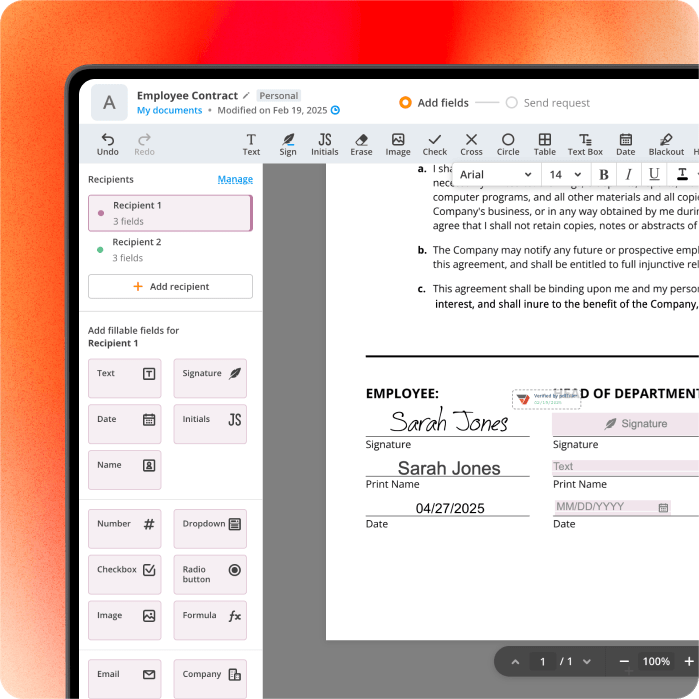
- Switch to Add Fields mode in your pdfFiller account.
- Drag-and-drop signature fields onto the document where signatures are required.
- Assign fields to specific recipients to ensure the right person signs in the correct place.
- Customize field properties, such as size and appearance, to fit your document's design.
- Save your changes to ensure all fields are properly configured before sending.
Managing Recipients for E-Signatures
Managing recipients for e-signatures in pdfFiller is straightforward. You can add recipients by entering their email addresses, which allows you to send documents to multiple signers or viewers. Assign roles to each recipient, designating them as either a signer or a viewer based on their involvement in the signing process. You can also configure the signing order, ensuring that documents are signed in a specific sequence. Setting reminders for pending signatures helps keep the process on track, ensuring that no signatures are overlooked.
Configuring Signing Order: Sequential vs. Parallel
Understanding the signing order is crucial for effective document management. Sequential signing requires each signer to complete their signature before the next person can sign, which is beneficial for documents that need to follow a strict order. Parallel signing, on the other hand, allows multiple signers to sign simultaneously, speeding up the process. You can configure the signing order in pdfFiller easily, with a visual representation available to help you understand how your document will flow through the signing process.
Step-by-Step Instructions for Sending E-Signature Requests
- Select the document you wish to send for e-signature.
- Add the necessary fields and assign recipients to ensure all signatures are captured.
- Review the document and the assigned fields to confirm everything is correct.
- Send the request and wait for confirmation that it has been sent successfully.
Tracking E-Signature Progress
Tracking the progress of your e-signature requests is essential for timely document completion. You can view who has signed the document and who is still pending, allowing you to follow up as necessary. If needed, you can resend requests to remind recipients to sign. Additionally, you have the option to cancel requests if circumstances change. Notifications for completed signatures keep you informed, ensuring you are always up to date on the status of your documents.
Setting Reminders and Expiration Deadlines
Setting reminders and expiration deadlines for signatures is a key feature in pdfFiller. You can configure automated reminders to prompt signers about pending signatures, which helps ensure timely completion. It is also important to establish expiration deadlines for signatures to maintain the relevance of the document. You can customize the frequency of reminders and set notifications for recipients, ensuring they are aware of the deadlines they need to meet.
Understanding the Audit Trail for E-Signatures
The audit trail in pdfFiller captures all actions taken during the e-signature process, providing a detailed record of who signed and when. This is crucial for legal enforceability, as it offers proof of the signing process. You can access the audit trail easily within your pdfFiller account, and the availability of this feature may vary depending on your plan. Understanding the audit trail is essential for maintaining compliance and verifying signatures.
Legal Validity of E-Signatures
pdfFiller's e-signatures comply with legal standards set by the ESIGN Act and UETA. This compliance ensures that your electronic signatures are legally recognized and enforceable. Understanding the legal validity of e-signatures is important for businesses, as it affects how documents are treated in legal contexts. pdfFiller's commitment to compliance means you can confidently use e-signatures in your business transactions.
Industry-Specific Scenarios for E-Signatures
There are numerous practical scenarios where e-signatures can be beneficial across various industries. For instance, sending a service contract for signature can streamline the onboarding process for new clients. Routing an employment agreement through e-signatures can expedite hiring processes. Additionally, collecting NDAs from multiple parties can be simplified using this technology. Each of these examples illustrates how e-signatures can enhance efficiency in different business contexts.
Next Steps in Your Document Workflow
As you integrate e-signatures into your document workflow, consider exploring the full capabilities of pdfFiller. E-signatures are just one aspect of how pdfFiller can improve your document management processes. By going digital, you can enhance efficiency and reduce reliance on paper-based workflows. We encourage you to explore other features that pdfFiller offers to further streamline your document management tasks.