Unlock Image Format For Free

Drop document here to upload
Select from device
Up to 100 MB for PDF and up to 25 MB for DOC, DOCX, RTF, PPT, PPTX, JPEG, PNG, JFIF, XLS, XLSX or TXT

Last updated on Sep 14, 2026

Unlock Image Format

Unlock image formats in your PDF documents easily with pdfFiller. Edit, resize, and reposition images without complex software.

What is the Image Tool?

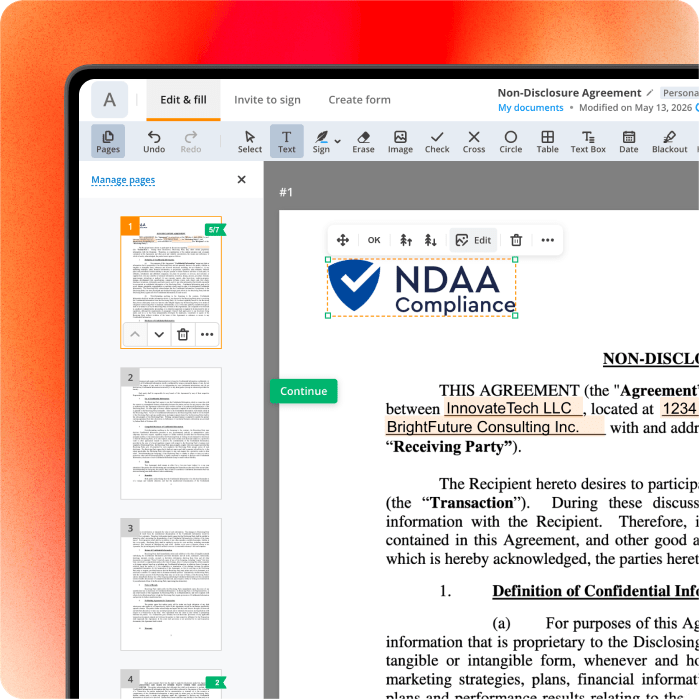
The Image Tool in pdfFiller allows you to unlock image formats within your PDF documents. This tool supports image editing by enabling you to overlay images, such as logos or graphics, directly onto your documents. You can work with popular formats like JPEG, PNG, and GIF, all without needing to install complicated software solutions. This simplicity makes it accessible for anyone looking to enhance their PDF documents with images.

How Does Image Editing Solve Workflow Problems?

Image editing can significantly improve your document management workflows. By using pdfFiller to unlock image formats, you can insert logos easily and edit images without the need to rebuild your entire document. This saves time on document edits, allowing you to focus on more critical tasks instead of manual document rebuilding.

Uploading Documents for Image Editing

To start editing images in your PDF, you first need to upload your document to pdfFiller. Supported formats for upload include PDF files, and you can utilize the drag-and-drop functionality for convenience. There are no size limits on uploads, ensuring that you can work with large documents without any issues. Avoid unsupported file types to ensure a smooth upload process.

Supported Image Formats for Unlocking

When using pdfFiller, you can unlock image formats such as JPEG, PNG, and GIF. However, it's important to note that SVG or TIFF formats are not supported. Understanding these format limitations will help you prepare your images for successful integration into your PDF documents.

Step-by-Step Instructions for Unlocking Image Formats

  • Open pdfFiller and log into your account.
  • Upload your PDF document by dragging and dropping it into the upload area.
  • Select the Image Tool from the editing options available.
  • Choose the image you want to add from your device.
  • Resize the image as needed using the drag handles.
  • Position the image where you want it on the PDF.
  • Use the options to rotate or layer the image as necessary.
  • Save your document after making all desired changes.

Resizing and Repositioning Images

After placing images in your PDF, you can easily resize and reposition them. Use the drag handles to resize images while maintaining their aspect ratio. You can move images freely across the document, allowing for precise placement of overlay elements. This flexibility ensures that your images fit perfectly within your document layout.

Rotating and Layering Images

pdfFiller allows you to rotate images freely, giving you control over how they appear in your document. You can manage the layer order of images, bringing certain elements forward or sending them backward as needed. This capability ensures that your document maintains a professional appearance with well-organized visual elements.

Adjusting Image Opacity

Adjusting the transparency of images is another feature available in pdfFiller. The opacity settings depend on your subscription plan, so be aware that some features may vary. You can see visual examples of opacity changes in real-time, allowing you to choose the best use cases for transparency in your documents.

Managing Image Elements After Placement

Once images are placed in your document, managing them is straightforward. You can select and move images as needed, duplicate or delete elements, and undo recent changes if necessary. This ease of management helps you maintain control over your document's visual elements without complicated processes.

Industry Scenarios for Image Editing

Image editing with pdfFiller is beneficial across various industries. For real estate agents, inserting property images into listings can enhance marketing materials. Freelancers can create professional presentations by adding customized graphics. Small businesses can use image editing for branding purposes, ensuring their documents reflect their identity effectively. These real-world scenarios highlight the practical benefits of unlocking image formats in PDFs.

Limitations of the Image Tool

While the Image Tool in pdfFiller is powerful, it does have limitations. There is no crop dialog available, and you are limited to using JPEG, PNG, and GIF formats. Additionally, opacity control can vary depending on your subscription plan, so it's essential to understand these constraints when planning your document edits.

Security and Data Handling

pdfFiller takes security seriously, implementing TLS encryption for documents in transit. There are automatic deletion timelines for documents, ensuring that your data is handled responsibly. Compliance with data regulations is also a priority, providing peace of mind when managing sensitive documents.

How Does pdfFiller Compare?

Adobe Acrobat offers extensive features for image editing but requires a steep learning curve and higher costs. Users may find it overwhelming compared to pdfFiller's simplicity.

Smallpdf provides basic image editing capabilities but lacks the comprehensive features and templates available in pdfFiller. Users may miss out on advanced functionalities.

PDF24 is a free tool with limited features; while it’s cost-effective, it does not match the user-friendly interface and extensive template library of pdfFiller.

Try most popular PDF tools

Discover a full set of tools to handle any document task.

Edit PDFs

Make quick PDF edits online.

Sign

Add legally binding signatures.

Merge

Combine multiple PDFs.

Request signatures

Send a document for signing.

Convert

Transform PDFs into other formats.

Rearrange

Change the order of pages.

Share

Send PDFs for review or editing.

Compress

Reduce PDF file sizes.

How to edit images with pdfFiller

1. Upload or create

Perfect your finalized PDFs: Edit and remove images online

  • Fix contract errors without workarounds Quickly fix mistakes in signed contracts without asking clients to start over. Edit PDFs to fix errors, remove old signatures, and resend the updated contract for signing from any device.
  • Save time by reusing signed documents Easily reuse signed documents for new clients. Update the details, clear out old info, and remove the signatures before sending the contract for signing. No need to start from scratch or search for unsigned versions.
  • Customize any document to match your branding Found the perfect template but it doesn’t match your company’s branding? Remove unwanted logos and start using documents right away—no need to waste time searching for new forms.
  • Adjust PDFs to fit your creative vision Easily adjust PDF content to fit your specific design needs. Rearrange text and images, move elements around, or reuse visuals in new documents. Save valuable time, simplify your workflow, and focus on what matters most.

Who needs this?

Explore how professionals across industries use pdfFiller to edit images in documents.

Education

Teachers and administrators use image editing to update and reuse educational materials by removing outdated logos or signatures, ensuring documents remain professional and relevant.

  • Student enrollment forms
  • Permission slips
  • Class schedules
  • Lesson plans
Education
  • G2 — Users Most Likely To Recommend
  • G2 — Grid Leader in Small-Business
  • G2 — High Performer
  • G2 — Regional Leader
  • G2 — Easiest To Do Business With
  • G2 — Best Meets Requirements
  • G2 — Best Support

pdfFiller scores top ratings on review platforms

pdfFiller is rated 4.6 out of 5 stars across 1,000+ G2 reviews.

It is very easy to save, review, edit and email.
bryan h
PDFfiller has saved me so much time. Easy to use and professional end result.
Paul E
good and very encouraging so far, but further improvement will help, e.g. some more pdf document font editing options?
David T
I needed to be able to get several military documents and complete them electronicly. This program helped me do that with relative ease.
David S
Totally satisfied with the ease of use. Have only used it for a day but I find no issues.
Leslie T
it's so smart it's so smart. simple and fast
norton mbuku

Edit images in PDFs using an all-in-one solution

pdfFiller workspace for creating, filling and managing PDF forms

Why use pdfFiller for image editing?

All-in-one solution

Watch image editing in action

Watch this quick video tutorial to learn how to edit images in finalized PDFs.

FAQs

If you can't find what you're looking for, please contact us anytime!

To unlock image formats for editing in pdfFiller, simply upload your image file to the platform, and use the 'Convert' feature to change it into a PDF. This allows you to edit, annotate, or eSign the document easily. For best results, ensure your image is of high quality and in a common format like JPEG or PNG. Once converted, you can utilize pdfFiller’s robust editing tools to unlock the full potential of your image content.

pdfFiller supports a variety of image formats that you can unlock for editing, including JPEG, PNG, BMP, and GIF. By converting these formats into PDFs, you can take advantage of advanced document automation features like eSigning and collaboration. To ensure compatibility, always check that your image adheres to standard resolutions and sizes, which can enhance the conversion quality and editing experience.

Yes, pdfFiller employs robust security protocols when unlocking image formats. All uploaded files are encrypted during transfer and storage, ensuring that your sensitive information remains protected. Additionally, you can set permissions for who can view or edit your documents, providing an extra layer of security. Always review the security settings in your account to customize your document management experience.

Absolutely! pdfFiller is designed for cross-platform compatibility, allowing you to unlock image formats on any device with internet access. Whether you’re using a desktop, tablet, or smartphone, simply log into your account to upload and convert images. This flexibility ensures that remote professionals and legal teams can manage documents efficiently, regardless of their location.

Unlocking image formats for document management offers several benefits, including enhanced editing capabilities, easier collaboration, and streamlined workflows. By converting images to PDFs, you can annotate, eSign, and share documents securely. This is particularly useful for SMEs and legal teams that require precise document handling. To maximize these benefits, consider integrating pdfFiller with your existing document management systems for seamless operations.

pdfFiller improves the process of unlocking image formats by providing an intuitive interface and powerful editing tools that simplify document management. Users can easily convert images to PDFs with just a few clicks, and the platform offers features like text recognition and form filling that enhance usability. To further streamline your workflow, take advantage of pdfFiller’s automation features, which can save time and reduce manual errors.

If you encounter issues while unlocking image formats in pdfFiller, first check the file format and size to ensure compatibility. If problems persist, consult the help section for troubleshooting tips or reach out to pdfFiller’s customer support for assistance. Additionally, keeping your browser updated and clearing cache can resolve many common issues. By addressing these factors, you can ensure a smooth experience when unlocking image formats.

What businesses achieve with pdfFiller

Discover how you can benefit too.

This is my second year using pdfFiller daily. Nothing leaves my office that’s handwritten. Any form that I can scan and put in pdfFiller, I do it.

Education Counselor for a school district

One tool. Every document task.

One workflow shouldn’t take five tools

Start free trial