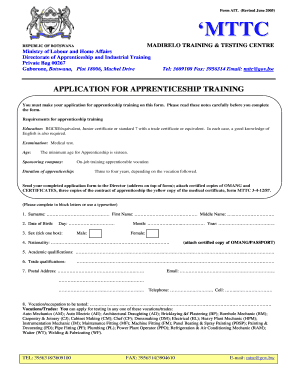
What is Apprenticeship form for computer training?

An Apprenticeship form for computer training is a document that individuals interested in pursuing computer training programs need to fill out. This form includes personal information, educational background, and relevant experience to assess the applicant's eligibility for the training program.

What are the types of Apprenticeship form for computer training?

There are several types of Apprenticeship forms for computer training, including:

Application form for specific computer training programs
Registration form for apprenticeship programs
Evaluation form for assessing skills and knowledge

How to complete Apprenticeship form for computer training

Completing an Apprenticeship form for computer training is a straightforward process. Here are the steps you need to follow:

01
Gather all necessary information and documents required for the form
02
Fill out the form accurately and completely
03
Review the form for any errors or missing information
04
Submit the form either online or in person as instructed

pdfFiller is a powerful online tool that empowers users to create, edit, and share documents online. With unlimited fillable templates and advanced editing features, pdfFiller is the perfect solution for completing Apprenticeship forms for computer training efficiently.
Video Tutorial How to Fill Out Apprenticeship form for computer training

Thousands of positive reviews can’t be wrong

Read more or give pdfFiller a try to experience the benefits for yourself
5.0
Very helpful in wrestling with PDF.
Very helpful in wrestling with PDF… Very helpful in wrestling with PDF documents. The software allows moving around the type and signing, which is nice.
A R
5.0
Great product We use this on an annual basis to prepare our tax docs for our Chu...
Great product We use this on an annual basis to prepare our tax docs for our Church employees. Great service and they are always willing to help even when its a user error. thank you
Rebecca Garcia
5.0
Flawless Customer Service There was a slight issue with a payment plan I'd signe...
Flawless Customer Service There was a slight issue with a payment plan I'd signed up with - and by the time I'd made a coffee - it was resolved. Flawless.
Steven Duffield
5.0
I have found pdffiller far more.
I have found pdffiller far more… I have found pdffiller far more intuitive and easy to use compared to the online Adobe applications. Not to mention far better value for money.
R Davis

Questions & answers

How to Create a Training Form Figure Out What the Training Is For. Different kinds of training can be processed as not everything is for the employees only. Choose a Template and Set the Format. Avoid Making Things Complicated. Divide the Form into Parts. Edit Seriously.
4 Steps to Create your Training Evaluation Form Introduction. Just like all other business documents, a perfect form starts with an insightful introduction. Create a Questionnaire. The second and probably the most crucial fragment of a training evaluation form are the queries. Create a Rating System. Overall Suggestion Box.
A simple training request form is used by employees to request training from managers. It is typically used to receive approval to attend an off-site training event.
How to Make an Apprenticeship Contract Agreement Have the Apprentice Place in His/Her Basic Information. State the Purpose of the Apprenticeship. State the Duration in which the Apprentice will be Employed. Their Working Conditions. The Rules and Regulations these Apprentices should Follow. Accident an Incident Reports.
A training feedback form is an evaluation form that allows students to take a survey of a specific class or course and submit feedback to the instructor or training provider.
A training registration form is a document used by employers to schedule training sessions and collect details from employees. To create a training registration form, simply add your logo, update the form fields, and customize the form to fit your company's training schedule.