Nhif Login Employer




What is Nhif login employer?
Nhif login employer is a portal designed for employers to access and manage their National Hospital Insurance Fund (NHIF) accounts. It allows employers to make contributions, view payment history, update employee information, and generate reports easily.
What are the types of Nhif login employer?
There are two main types of Nhif login employer accounts:
Regular Employer Account
Premium Employer Account
How to complete Nhif login employer
Completing Nhif login employer is simple and straightforward. Follow these steps:
01
Visit the Nhif login employer portal website
02
Enter your login credentials (username and password)
03
Navigate to the desired section (contribution, payment history, employee information, etc.)
04
Make necessary changes or updates
05
Save your changes and log out
pdfFiller empowers users to create, edit, and share documents online. Offering unlimited fillable templates and powerful editing tools, pdfFiller is the only PDF editor users need to get their documents done.
Video Tutorial How to Fill Out Nhif login employer
Thousands of positive reviews can’t be wrong
Read more or give pdfFiller a try to experience the benefits for yourself
Questions & answers
How can I register my NHIF online for employees?
How To Register For NHIF Online On your browser, got to the NHIF online portal. Click here to got to the NHIF online portal. Select 'select self employed' ... Select the type of identification. ... Fill the form. ... Upload your documents. ... Upload the marriage certificate. ... Save. ... Recieve SMS confirmation.
How can I register my NHIF employer code?
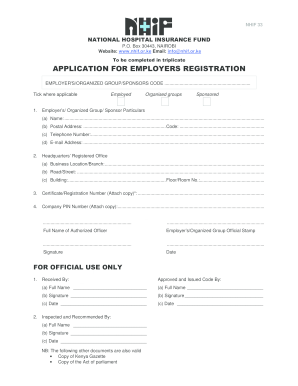
How can I register as an employer in NHIF? Go to the Employer registration online portal. Fill in the company details. Attach a copy of the certificate of company registration. Attach a copy of your company pin certificate. Click to confirm the details.
How do I log into my NHIF portal?
On your browser, go to NHIF Self-care Online Portal. Enter your ID number. The national health insurer will send an OTP via SMS to your registered number. Input OTP then verify.
How do I register for Nhifonline?
How to register for NHIF online Go to: NHIF registration portal. Click Self Employed. Enter your National ID/Passport/Alien ID. Fill in all other form fields. Attach a Scanned Copy of Your ID or passport. Attach Passport size Photo. If married, attach your spouse's Marriage Certificate. Click to Confirm.
How can I get NHIF employer code?
Apply for authenticated branch registration documents. D. Obtain authenticated branch registration documents. D. ... Approval of branch registration application. D. Payment of registration fees. D. Obtain Certificate of compliance. D. ... Apply for company PIN. language. Obtain company PIN. language. ... Apply for director's PIN.
How do I register my employer for NHIF online?
How to register as an Employer online –NHIF Go to the Employer registration online portal. Fill in the company details. Attach a copy of the certificate of company registration. Attach a copy of your company pin certificate. Click to confirm the details.
How can I check my employer NHIF status online?
1. How to check NHIF account status online on the official site Get to NHIF's official website. Sign in to the self-service online portal using your NHIF card numbers, email address and phone number. Create your own password which you will be using to log in using the online portal. Log into the portal.
How do I log into NHIF online?
How to register for the NHIF online self-service Open the NHIF self-service portal on your browser. Click on the create account tab. Choose individual member registration. Fill in your personal details including your name, National ID No, email, and mobile number.
How can I register NHIF online with my phone?
For new members , you can dial *155# on any phone toll free and register as an NHIF member. After registration you will get NHIF memebr number by SMS. You will now be able to access NHIF selfcare services which include Payment of Monthly contributions, Payment of Penalties and Arrears.
How do I register my company for NHIF?
How to register as an Employer online –NHIF Go to the Employer registration online portal. Fill in the company details. Attach a copy of the certificate of company registration. Attach a copy of your company pin certificate. Click to confirm the details.
Can I open NHIF account online?
You can self register using the NHIF USSD or Mobile Phone Apps. The Requirements are National ID Number, Date of Birth , Mobile Phone Number .