Online Notarization in Pierre, SD For Free

Drop document here to upload
Select from device
Up to 100 MB for PDF and up to 25 MB for DOC, DOCX, RTF, PPT, PPTX, JPEG, PNG, JFIF, XLS, XLSX or TXT

Last updated on Oct 10, 2026

Online Notarization in Pierre, SD

Start notarizing documents online in Pierre, SD, with pdfFiller's easy-to-use service.

What is Online Notarization?

Online notarization refers to the process of notarizing documents using digital tools and remote communication. Unlike traditional notarization, which requires physical presence, online notarization allows you to complete the process from anywhere with an internet connection. This method is particularly beneficial for small businesses that need quick and efficient notarization services. In Pierre, SD, online notarization is legally valid, making it a reliable option for your document needs.

Why Use Online Notarization?

Choosing online notarization offers several advantages. First, the speed of the notarization process is significantly enhanced, allowing you to complete transactions quickly. Additionally, you can access the service from any device, whether you are at home or on the go. For small and medium-sized businesses, this method is cost-effective, eliminating the need for travel and saving time. Most importantly, there is no requirement for physical presence, making it easier to manage your documents.

How to Access the Notarization Feature

  • Log in to your pdfFiller account on your desktop or mobile device.
  • Navigate to the dashboard where your documents are displayed.
  • Locate the document row menu for the document you wish to notarize.
  • Select the option for online notarization from the menu.

Steps for Online Notarization

  • Select the document you need to notarize from your pdfFiller account.
  • Enter the details of all signers involved in the notarization process.
  • Complete the identity verification process as required.
  • Join the live video session with the notary to finalize the notarization.

Identity Verification for Notarization

For online notarization, identity verification is a crucial step. Accepted identification includes government-issued IDs such as driver's licenses and passports. This verification typically occurs before the notarization process begins, ensuring that all parties are properly identified. Failing to complete this verification can result in the notarization being invalidated, so it's essential to have the correct documents ready.

State Availability for Online Notarization

Online notarization is available in several states, including South Dakota. In Pierre, SD, specific regulations apply to the types of documents that can be notarized online. It's important to check state-specific pages for detailed information on these regulations and the types of documents allowed for online notarization.

Common Document Types for Notarization

Many types of documents can be notarized online, including lease agreements and quitclaim deeds. The type of document plays a significant role in the notarization process, especially for real estate transactions. Other legal documents, such as affidavits and powers of attorney, are also eligible for online notarization, making it a versatile option for various needs.

Tracking Your Notarization Status

To monitor your notarization requests, access the Sent folder in your pdfFiller account. This folder will display the status of your submitted requests, including any notifications for completed notarizations. Tracking your notarization status is important to ensure that all your documents are processed in a timely manner.

Notarization vs E-Signature

Understanding the differences between notarization and e-signatures is important for document management. Notarization involves a notary public certifying the authenticity of a signature, which carries legal significance. In contrast, e-signatures are often used for agreements that do not require notarization. Knowing when to use each method can help you navigate your document needs more effectively.

Next Steps for Your Notarization Needs

Integrating online notarization into your broader document workflows is essential for efficiency. By utilizing pdfFiller's features, you can streamline your entire document management process. Explore related features within pdfFiller to enhance your workflows and start using the online notarization service today.

Try most popular PDF tools

Discover a full set of tools to handle any document task.

Edit PDFs

Make quick PDF edits online.

Sign

Add legally binding signatures.

Merge

Combine multiple PDFs.

Request signatures

Send a document for signing.

Convert

Transform PDFs into other formats.

Rearrange

Change the order of pages.

Share

Send PDFs for review or editing.

Compress

Reduce PDF file sizes.

How to print, fax, or notarize a document

1. Upload or open your document

Print, fax, notarize, and store — all in one place

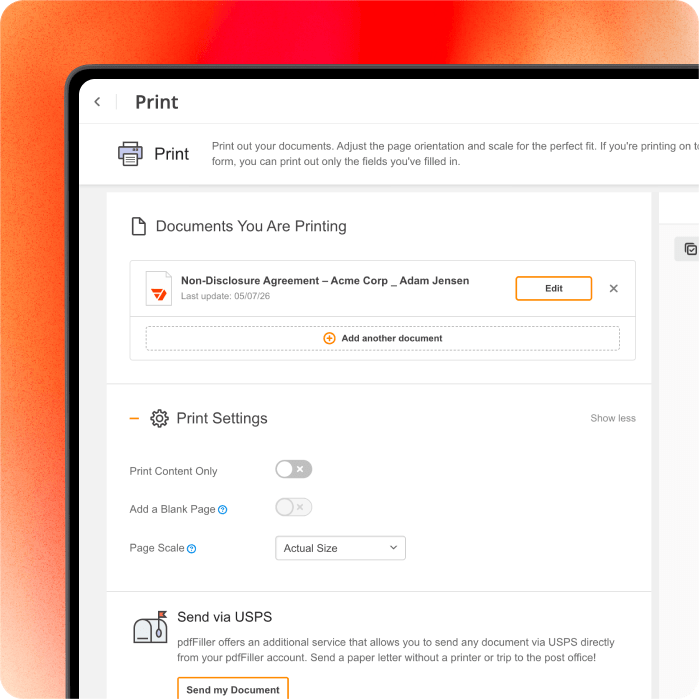
  • Print any document from anywhere Upload your PDF and send it to any printer — at the office, at home, or at a local print shop — directly from your pdfFiller account. No downloading, no formatting issues. Your document comes out exactly as it looks on screen.
  • Send a fax without a fax machine Some industries still run on fax — healthcare, legal, insurance, government. pdfFiller lets you send and receive faxes directly from your browser. Upload the document, enter the number, and it's gone. No hardware, no dedicated fax line, no extra subscription.
  • Get documents notarized online Notarization no longer means booking an appointment and driving across town. Connect with a commissioned notary online, complete the session by video, and get your document notarized in minutes — legally valid, fully digital.
  • Sign before you send Add your signature, initials, or date stamp directly inside your document—then print, fax, or share it. Sign a contract before faxing it to the bank, or add initials to a lease before sending it to a client. Draw, type, or upload once, then reuse it across any document.
  • Pull from any cloud, save back instantly Connect Google Drive, Dropbox, Box, or OneDrive and work with files directly — no downloading, no re-uploading. Pull a document, fill it, sign it, fax it, and save it back to the same folder it came from.

Who needs this?

Explore how professionals across industries use pdfFiller to edit PDFs.

Healthcare

Patient forms, referral requests, insurance claims — healthcare runs on paperwork that needs to move fast and stay compliant. Print intake forms directly from your account, fax referrals to specialists without a fax machine, and get consent forms notarized online without scheduling an in-person appointment. HIPAA-compliant storage keeps every document secure.

  • Patient intake and registration forms
  • Referral letters and specialist requests
  • Insurance claims and prior authorization forms
  • Consent forms requiring notarization
Healthcare
  • G2 — Users Most Likely To Recommend
  • G2 — Grid Leader in Small-Business
  • G2 — High Performer
  • G2 — Regional Leader
  • G2 — Easiest To Do Business With
  • G2 — Best Meets Requirements
  • G2 — Best Support

pdfFiller scores top ratings on review platforms

pdfFiller is rated 4.6 out of 5 stars across 1,000+ G2 reviews.

great experience, expedient, extremely helpful time saver.
Ronald C. W
This app has been a lifesaver. I have recently started a position as an Administrative Assistant and the abilities within this program make my job hassle-free. It makes filling in PDFs and requesting e-signatures as efficient as possible.
T Turner
The very best document management platform I have ever experienced.
Michael T. B
I love the software - sometimes get frustrated with filling in the textportions.
Courtney S
Great Site Great Site. Works Excellent!!
Jamel Hall
At first I just needed it for one form but now I'm finding more creative ways for it to help my business
Sarah

Print, fax, notarize, and store PDFs without the back-and-forth

No extra tools, no wasted time.

pdfFiller workspace for creating, filling and managing PDF forms

PDF editing is just the beginning

More than a PDF editor

What’s New in pdfFiller: AI, Editing, eSignatures & Document Management

Discover the latest pdfFiller features and new features designed to make document work easier for small businesses, teams, freelancers, and individuals. In this full feature walkthrough, you’ll see how to create, edit, fill, manage, store, and eSign documents for everyday workflows like resumes, contracts, HR forms, applications, invoices, onboarding paperwork, and more — all in one place.

FAQs

If you can't find what you're looking for, please contact us anytime!

The process for Online Notarization in Pierre, SD involves using a secure platform to connect with a licensed notary public via video conferencing. First, ensure you have a valid form of identification ready. Next, log into a reliable online notarization service, such as pdfFiller, and upload the document you need notarized. The notary will verify your identity and witness your signature in real-time. For a smooth experience, check that your internet connection is stable and that you have all necessary documents prepared in advance.

In Pierre, SD, a variety of documents can be notarized online, including contracts, affidavits, and powers of attorney. However, certain documents, such as wills and real estate deeds, may have specific requirements that necessitate in-person notarization. To ensure compliance, always check with your notary or the online notarization platform, like pdfFiller, to confirm which documents are eligible for online notarization. Additionally, having digital copies of your documents ready can expedite the notarization process.

Online Notarization in Pierre, SD is highly secure when conducted through reputable platforms that utilize advanced security protocols. Services like pdfFiller employ encryption and secure video conferencing to protect your personal information. It's crucial to choose a platform that complies with state regulations and offers features like identity verification and audit trails. For added security, ensure that your internet connection is private and that you are using a secure device during the notarization process.

Using pdfFiller for Online Notarization in Pierre, SD offers numerous benefits, including convenience, efficiency, and cost-effectiveness. Users can manage all their document needs—from editing PDFs to eSigning—on a single platform. This integration streamlines the notarization process, allowing you to complete transactions without needing to visit a physical location. Additionally, pdfFiller's user-friendly interface and robust customer support enhance the overall experience, making it an ideal choice for remote professionals and legal teams.

Yes, there are legal limitations for Online Notarization in Pierre, SD. While many documents can be notarized online, specific types, such as certain real estate documents or wills, may require in-person notarization due to state laws. It's essential to consult with a legal professional or your notary to understand these limitations. Moreover, ensure that the online notarization service you choose complies with South Dakota's regulations to avoid any legal complications.

To ensure your online notarization is valid in Pierre, SD, use a notary public who is licensed and authorized to perform online notarizations. Platforms like pdfFiller provide access to certified notaries who follow state regulations. Additionally, confirm that the notarization includes all required elements, such as the notary's signature, seal, and a digital certificate. Keeping a record of the notarization session can also serve as proof of validity, which is crucial for future reference.

To participate in Online Notarization in Pierre, SD, you need a device with a camera and microphone, such as a computer, tablet, or smartphone. A stable internet connection is also essential for seamless video conferencing with the notary. Platforms like pdfFiller are compatible across various devices, ensuring accessibility for all users. For the best experience, ensure your software is up to date and familiarize yourself with the online notarization platform before your appointment.

What businesses achieve with pdfFiller

Discover how you can benefit too.

I tell my employees that if you need to have stuff filled out, hey, check out pdfFiller, that's what I use. Yes, I would and I do recommend it.

Hope Discovery ABA Services

One tool. Every document task.

One workflow shouldn’t take five tools

Start free trial