
Last updated on
Oct 2, 2026

Get the free Lesson 11.1 End Marks Worksheet
We are not affiliated with any brand or entity on this form

Fill out
Complete the form online in a simple drag-and-drop editor.

eSign
Add your legally binding signature or send the form for signing.

Share
Share the form via a link, letting anyone fill it out from any device.

Export
Download, print, email, or move the form to your cloud storage.
Why pdfFiller is the best tool for your documents and forms


End-to-end document management
From editing and signing to collaboration and tracking, pdfFiller has everything you need to get your documents done quickly and efficiently.
Accessible from anywhere
pdfFiller is fully cloud-based. This means you can edit, sign, and share documents from anywhere using your computer, smartphone, or tablet.
Secure and compliant
pdfFiller lets you securely manage documents following global laws like ESIGN, CCPA, and GDPR. It's also HIPAA and SOC 2 compliant.
What is End Marks Worksheet
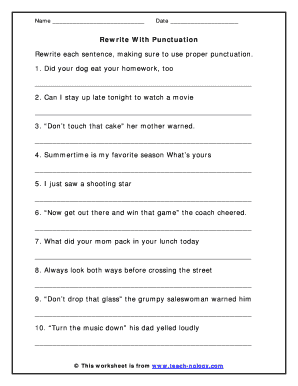
The Lesson 11.1 End Marks Worksheet is an educational document used by students to practice adding correct punctuation marks and abbreviations.
pdfFiller scores top ratings on review platforms




Who needs End Marks Worksheet?
Explore how professionals across industries use pdfFiller.

End Marks Worksheet is needed by:
-
Students seeking to improve their grammar skills
-
Teachers needing supplementary classroom materials
-
Tutors offering targeted grammar exercises
-
Homeschooling parents looking for structured practice sheets
-
Educators planning punctuation and grammar assessments
Comprehensive Guide to End Marks Worksheet
What is the Lesson 11.1 End Marks Worksheet?
The Lesson 11.1 End Marks Worksheet is a targeted educational resource designed to enhance students' understanding of punctuation and abbreviations. This worksheet defines the essential role of practicing punctuation through interactive sentence exercises and curated word lists. By using this punctuation practice worksheet, students can engage in meaningful learning experiences that contribute to their writing skills.
Purpose and Benefits of the Lesson 11.1 End Marks Worksheet
This worksheet plays a crucial role in helping learners master punctuation, a vital component of effective writing. Students benefit from its focused format, which serves as an effective grammar exercise PDF. Engaging with the Lesson 11.1 End Marks Worksheet reinforces essential skills that are foundational to a broader grammar and writing curriculum.
Key Features of the Lesson 11.1 End Marks Worksheet
The effectiveness of the Lesson 11.1 End Marks Worksheet lies in its thoughtful features, enriching the learning experience. Key elements include:
-
Fillable sections that enhance user engagement and participation.
-
A variety of exercises tailored to accommodate different learning styles.
-
Clear instructions and examples that facilitate comprehension.
Who Needs the Lesson 11.1 End Marks Worksheet?
The Lesson 11.1 End Marks Worksheet is designed for a diverse audience. It serves:
-
Students across various academic levels seeking punctuation practice.
-
Teachers in search of effective teaching resources focused on grammar.
-
Parents who wish to support their children's learning at home.
How to Fill Out the Lesson 11.1 End Marks Worksheet Online
To effectively complete the Lesson 11.1 End Marks Worksheet online, follow these steps:
-
Access the worksheet on pdfFiller and open it for editing.
-
Utilize tips for completing exercises to improve accuracy.
-
Save and download the filled worksheet as a PDF document.
Common Errors and How to Avoid Them
Users of the Lesson 11.1 End Marks Worksheet may encounter common pitfalls. Frequent errors include:
-
Incorrect punctuation and abbreviation usage.
-
Failure to double-check answers before submission.
-
Overlooking available resources for additional help or clarification.
Security and Compliance for the Lesson 11.1 End Marks Worksheet
When using the Lesson 11.1 End Marks Worksheet on pdfFiller, users can trust in comprehensive security measures. Key aspects include:
-
256-bit encryption ensuring data security.
-
HIPAA and GDPR compliance for user safety.
-
A transparent privacy policy protecting users’ personal information.
How to Download and Save the Completed Lesson 11.1 End Marks Worksheet
Finalizing and retaining your work on the Lesson 11.1 End Marks Worksheet is simple. Follow these instructions:
-
Download the completed worksheet as a PDF document.
-
Explore options for saving it in various formats, if available.
-
Organize or print the completed worksheet for school use.
Get Started with the Lesson 11.1 End Marks Worksheet Today!
Using pdfFiller for your educational worksheet needs offers several advantages. With user-friendly features, it facilitates seamless document management, making the learning experience engaging and efficient. Explore the platform to optimize your writing practice with the Lesson 11.1 End Marks Worksheet.
How to fill out the End Marks Worksheet
-
1.Access pdfFiller and log in to your account. If you do not have an account, create one for free to use the platform's features.
-
2.In the search bar, type 'Lesson 11.1 End Marks Worksheet' to locate the specific worksheet you need. Click on the document title to open it.
-
3.Once the worksheet is open, review the exercises provided. You'll see blank spaces next to sentences where you can add the necessary punctuation marks.
-
4.Click on each blank space to select it. You can use pdfFiller's text tools to enter your answers directly in each designated area. Make sure to add the correct punctuation marks as required by the exercises.
-
5.As you work through the worksheet, ensure that you have the appropriate materials, such as a grammar book or online resources, to reference when deciding on punctuation and abbreviations.
-
6.After filling out all sections of the worksheet, review your answers for accuracy. Double-check each sentence to ensure you’ve added the correct punctuation marks and abbreviations.
-
7.Once you are satisfied with your answers, look for the save option in the top menu of pdfFiller. You can save your progress and come back later if needed.
-
8.To download your completed worksheet, select the download option and choose your preferred format, such as PDF or Word. You can also print directly from pdfFiller if you need a physical copy.
-
9.If required, submit your worksheet electronically through your classroom portal or email it to your teacher by using the share option.

Who can use the Lesson 11.1 End Marks Worksheet?
The Lesson 11.1 End Marks Worksheet is designed for students, teachers, and tutors involved in grammar education and punctuation practice. It is suitable for various educational settings.
What is the purpose of the Lesson 11.1 End Marks Worksheet?
This worksheet serves to help students practice adding end marks and using abbreviations, thereby enhancing their grammar and writing skills as part of a broader curriculum.
Do I need to notarize the completed worksheet?
No, notarization is not required for the Lesson 11.1 End Marks Worksheet, as it is an educational tool rather than a legal document.
How can I access the Lesson 11.1 End Marks Worksheet?
You can access the worksheet through pdfFiller by searching for its title. The platform allows you to easily fill, save, and manage your educational documents.
Are there any specific instructions for filling out the worksheet?
You should read each exercise carefully, filling in the spaces with the correct punctuation and abbreviations as required. Utilize available resources if needed to ensure accuracy.
How do I submit the completed worksheet?
Once you have completed the worksheet, you can either download it for print submission or share it electronically through your preferred method, such as email or your school's submission portal.
What should I do if I make a mistake on the worksheet?
If you notice mistakes after filling out the worksheet, use pdfFiller’s editing tools to correct your answers. Review your responses before saving or submitting your final version.
Related Forms





Related Catalogs
Get the latest insights from our blog


If you believe that this page should be taken down, please follow our DMCA take down process
here
.
This form may include fields for payment information. Data entered in these fields is not covered by PCI DSS compliance.