
Last updated on
Oct 19, 2026

AZ Organizational Data Form 2015-2026 free printable template
pdfFiller is not affiliated with any government organization

Fill out
Complete the form online in a simple drag-and-drop editor.

eSign
Add your legally binding signature or send the form for signing.

Share
Share the form via a link, letting anyone fill it out from any device.

Export
Download, print, email, or move the form to your cloud storage.
Why pdfFiller is the best tool for your documents and forms


End-to-end document management
From editing and signing to collaboration and tracking, pdfFiller has everything you need to get your documents done quickly and efficiently.
Accessible from anywhere
pdfFiller is fully cloud-based. This means you can edit, sign, and share documents from anywhere using your computer, smartphone, or tablet.
Secure and compliant
pdfFiller lets you securely manage documents following global laws like ESIGN, CCPA, and GDPR. It's also HIPAA and SOC 2 compliant.
What is AZ Organizational Data Form
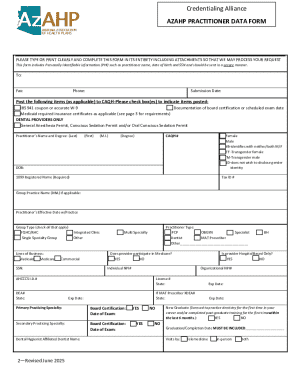
The Credentialing Alliance Organizational Data Form is a healthcare document used by providers to submit organizational information for credentialing with Arizona health plans.
pdfFiller scores top ratings on review platforms




Who needs AZ Organizational Data Form?
Explore how professionals across industries use pdfFiller.

AZ Organizational Data Form is needed by:
-
Healthcare providers in Arizona
-
Medical facilities seeking credentialing
-
Administrators managing provider applications
-
Insurance companies requiring provider data
-
Healthcare compliance officers
-
Medicaid and Medicare service applicants
Comprehensive Guide to AZ Organizational Data Form
What is the Credentialing Alliance Organizational Data Form?
The Credentialing Alliance Organizational Data Form serves a vital function in the healthcare sector by enabling healthcare providers to submit comprehensive organizational information essential for credentialing with various health plans in Arizona. This form requires detailed information, including facility details and lines of business, which facilitates efficient communication and processing between providers and insurers.
Key information required on the form includes provider facility details, lines of business, insurance coverages, and primary contacts. This data collection is crucial for healthcare providers seeking to obtain necessary approvals and establish partnerships with health plans.
Purpose and Benefits of the Credentialing Alliance Organizational Data Form
This form is specifically designed to streamline the credentialing process with health plans operating in Arizona. By ensuring that all necessary information is accurately provided upfront, it leads to quicker approval times and more efficient communication pathways between healthcare providers and health plans.
The advantages for healthcare providers include reduced turnaround times for credentialing applications and an increase in the likelihood of successful approvals. Providers benefit from a simplified application experience that minimizes back-and-forth with health plans, allowing them to focus on patient care rather than administrative burdens.
Key Features of the Credentialing Alliance Organizational Data Form
The Credentialing Alliance Organizational Data Form contains multiple blank fields and checkboxes that guide users in completing the document accurately. Features of the form include sections requiring providers to fill in essential data such as '1099 Registered Name (Required)' and 'Facility Name/DBA (if applicable)'.
Additionally, the form emphasizes the importance of attaching supporting documents, which may include IRS 941 forms and accreditation certificates, to ensure comprehensive applications. Accurate documentation is critical to prevent delays in the credentialing process.
Who Needs the Credentialing Alliance Organizational Data Form?
The Credentialing Alliance Organizational Data Form is essential for various target users, including healthcare providers and facilities looking to establish credentials with Arizona health plans. This requirement applies to any entity offering medical services seeking to enroll in government programs or commercial health plans.
Eligibility criteria specify that both independent practitioners and healthcare facilities must submit the form to comply with credentials requirements set by health plans. This ensures that all providers meet essential quality and safety standards.
How to Fill Out the Credentialing Alliance Organizational Data Form Online (Step-by-Step)
To successfully complete the Credentialing Alliance Organizational Data Form online using pdfFiller, follow these step-by-step instructions:
-
Access the form on the pdfFiller platform.
-
Begin filling in required fields such as facility details, provider information, and lines of business.
-
Attach any necessary documents, such as IRS forms and licenses, via the platform's upload feature.
-
Review the form for accuracy, ensuring all sections are correctly completed.
-
Utilize the e-sign feature to sign the document electronically before submitting.
-
Submit your completed form via the desired method (online, email, or mail).
Common Errors and How to Avoid Them While Completing the Credentialing Alliance Organizational Data Form
While completing the Credentialing Alliance Organizational Data Form, providers often encounter a few common errors. Frequent mistakes include incomplete fields, missing attachments, and inaccuracies in submitted data. These errors can lead to delays or outright rejections of the application.
To minimize these issues, consider employing the following tips:
-
Carefully read instructions provided on each section of the form.
-
Double-check entries for accuracy before submission.
-
Ensure all required documents are included with the application.
How to Submit the Credentialing Alliance Organizational Data Form
Submitting the Credentialing Alliance Organizational Data Form is straightforward and can be done through several methods. Providers can opt to submit the form online via pdfFiller, send it through email, or mail a physical copy to the relevant health plan.
It is crucial to include all necessary attachments when submitting the form, as failure to do so may result in processing delays or additional requests for information that prolong the approval timeline.
What Happens After You Submit the Credentialing Alliance Organizational Data Form?
After submitting the Credentialing Alliance Organizational Data Form, providers enter the processing and approval stage. The approval timeline may vary but is typically communicated to the provider following submission.
Healthcare providers can track the status of their application through the health plan's provided channels and will receive written confirmation regarding the effective date of their credentials once approved. This confirmation plays a vital role in establishing the provider's ability to work with various health plans.
Security and Compliance for the Credentialing Alliance Organizational Data Form
Security is paramount when handling sensitive information, particularly in healthcare. Using pdfFiller for the Credentialing Alliance Organizational Data Form ensures robust security measures, including 256-bit encryption and compliance with industry standards like HIPAA and GDPR.
These security protocols protect sensitive data throughout the submission process, providing peace of mind to healthcare providers as they manage their credentialing applications.
Realize the Advantages of Using pdfFiller for the Credentialing Alliance Organizational Data Form
Utilizing pdfFiller for the Credentialing Alliance Organizational Data Form greatly enhances the ease of use and efficiency. The platform offers user-friendly features, including e-signing capabilities and form templates, which expedite the completion of necessary paperwork.
By leveraging pdfFiller, providers can navigate the credentialing process with confidence, ensuring they meet health plan requirements quickly and with minimal hassle.
How to fill out the AZ Organizational Data Form
-
1.Access the Credentialing Alliance Organizational Data Form by visiting pdfFiller and searching for the form using its title.
-
2.Open the form in pdfFiller's editing interface, where you can easily fill out the required fields.
-
3.Gather the necessary information beforehand, including your organization’s legal name, facility name, business line details, and contact information.
-
4.Utilize the blank fields and checkboxes as indicated in the form—for example, input the '1099 Registered Name' and 'Facility Name/DBA if applicable.'
-
5.Carefully read and follow the on-screen instructions provided within pdfFiller, ensuring that each field is filled out accurately.
-
6.After entering all the required information, review the form for completeness and correctness, ensuring all attachments are accounted for as required.
-
7.Finalize the form by using pdfFiller's options to save your work, or directly download the form for submission.
-
8.Submit the form through the appropriate channel specified by your health plan, whether by email, mail, or online upload, using pdfFiller features.

Who is eligible to use the Credentialing Alliance Organizational Data Form?
The form is intended for healthcare providers and organizations seeking credentialing with health plans in Arizona. This includes outpatient surgical centers, hospitals, and private practices.
What supporting documents are required with the form?
You must submit various attachments, including an IRS 941 coupon or W9 form, accreditation certificates, and liability insurance certificates, along with the completed Credentialing Alliance Organizational Data Form.
How do I know if my form is processed in time?
Once submitted, processing times may vary, so it's important to confirm with the respective health plan. Typically, they provide written confirmation of the effective date after approval.
What common mistakes should I avoid when filling out the form?
Be careful to fill out all required fields accurately and completely. Common errors include omitting necessary attachments, providing incorrect contact information, and not following submission instructions.
Can I submit the form electronically?
Yes, depending on the specific health plan's requirements. Ensure you check their guidelines for submission, which may include electronic options through a secure portal or email.
What happens if I submit the form late?
Late submissions may delay your credentialing process, potentially affecting your ability to participate in health plan networks. Always check deadlines and aim to submit as early as possible.
How can I track the status of my submission?
Tracking the status may depend on the health plan's policies. Typically, after submission, you can reach out to their credentialing department for updates.
Related Forms



Get the latest insights from our blog


If you believe that this page should be taken down, please follow our DMCA take down process
here
.
This form may include fields for payment information. Data entered in these fields is not covered by PCI DSS compliance.