
Last updated on
Nov 9, 2026

AK CIV-825 2009-2026 free printable template
pdfFiller is not affiliated with any government organization

Fill out
Complete the form online in a simple drag-and-drop editor.

eSign
Add your legally binding signature or send the form for signing.

Share
Share the form via a link, letting anyone fill it out from any device.

Export
Download, print, email, or move the form to your cloud storage.
Why pdfFiller is the best tool for your documents and forms


End-to-end document management
From editing and signing to collaboration and tracking, pdfFiller has everything you need to get your documents done quickly and efficiently.
Accessible from anywhere
pdfFiller is fully cloud-based. This means you can edit, sign, and share documents from anywhere using your computer, smartphone, or tablet.
Secure and compliant
pdfFiller lets you securely manage documents following global laws like ESIGN, CCPA, and GDPR. It's also HIPAA and SOC 2 compliant.
What is AK CIV-825
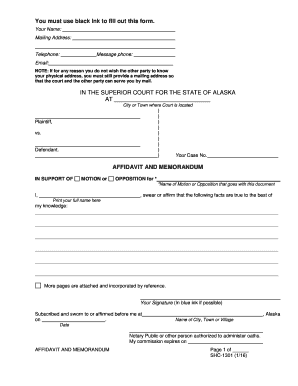
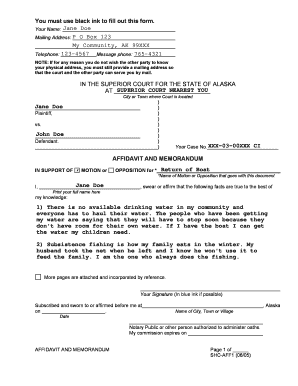
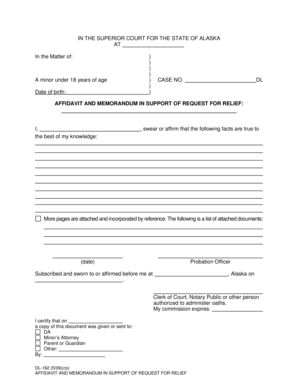
The Affidavit in Support of Motion is a legal document used by individuals in Alaska to provide sworn statements in support of or opposition to a motion in court.
pdfFiller scores top ratings on review platforms




Who needs AK CIV-825?
Explore how professionals across industries use pdfFiller.

AK CIV-825 is needed by:
-
Individuals involved in legal proceedings in Alaska
-
People making affidavits to support motions
-
Clerks of Court or Notary Public administering oaths
-
Lawyers and legal professionals preparing court documents
-
Parties in a court case requiring sworn statements
Comprehensive Guide to AK CIV-825
What is the Affidavit in Support of Motion?
The Affidavit in Support of Motion, integral to the Alaska court affidavit system, serves as a sworn statement used to support or oppose motions in court. This legal document requires the affiant to assert the truthfulness of its contents under oath. Situations where this affidavit is commonly utilized include custody disputes, divorce proceedings, and other civil matters arising within Alaska's judicial framework.
Purpose and Benefits of the Affidavit in Support of Motion
This affidavit is essential for both plaintiffs and defendants as it bolsters or challenges motions filed in court. It provides the court with reliable, sworn testimony, often influencing decision-making. Legal implications are considerable; submitting a motion support affidavit not only enhances the validity of the claims but also may expedite proceedings, which can be crucial in time-sensitive cases.
Key Features of the Affidavit in Support of Motion
-
Required fields include the affiant's name, address, and telephone number.
-
The affidavit mandates a signature of the affiant and must include the date of signing.
-
Notarization is a critical component; the document must be signed in the presence of an authorized official.
Who Needs the Affidavit in Support of Motion?
The individuals or entities that require this affidavit typically include persons involved in litigation, such as claimants or defendants. The roles are clearly defined: the Person Making this Affidavit must provide truthfully sworn testimony, while the Clerk of Court or Notary Public is responsible for authenticating the document. Filing the affidavit is necessary in cases where a written statement of facts is crucial to the ongoing legal process.
How to Fill Out the Affidavit in Support of Motion Online (Step-by-Step)
-
Access the affidavit form through pdfFiller.
-
Begin filling out required fields, starting with your name and contact information.
-
Continue by detailing the facts supporting your motion in the statement section.
-
Review all entered information to ensure accuracy before submission.
-
Follow prompts to save or submit the completed affidavit online.
How to Sign or Notarize the Affidavit in Support of Motion
The signing and notarization of the affidavit are fundamental to its validity. Users must understand the differences between digital and wet signature requirements, particularly when submitting documents electronically. Notarization can be accomplished by designated personnel who are authorized to administer oaths, ensuring the affidavit’s acceptance in the legal system.
Submission Methods for the Affidavit in Support of Motion
-
Affidavits can be submitted in person at the appropriate courthouse.
-
Online submission methods are available for convenience and speed.
-
Mailing the completed affidavit is another option, but users should confirm the postal address and timeline to avoid delays.
Common Errors and How to Avoid Them When Filing the Affidavit
-
Double-checking that all required fields are filled is essential.
-
Users often forget to obtain notarization; ensure this step is not skipped.
-
Misleading or incomplete information can lead to validation issues; review your entry thoroughly.
Security and Compliance for the Affidavit in Support of Motion
Using pdfFiller for your affidavit ensures that sensitive information is handled securely. The platform operates under stringent compliance standards, including HIPAA and GDPR, employing measures like 256-bit encryption to protect user data. Such reliability is crucial when managing legal documents that require confidentiality.
Elevate Your Filing Experience with pdfFiller
pdfFiller simplifies the process of completing your Affidavit in Support of Motion by offering a user-friendly interface and cloud access. The platform’s features allow for easy editing and signing, ensuring a seamless experience from start to finish. Begin filling out your affidavit today with pdfFiller for a hassle-free legal filing process.
How to fill out the AK CIV-825
-
1.Access the Affidavit in Support of Motion on pdfFiller by searching for the form in the search bar or navigating through the legal forms section.
-
2.Open the form in the pdfFiller interface to view available fields and options for input.
-
3.Before filling out the form, gather necessary information such as your name, address, telephone number, and other relevant details needed for the affidavit.
-
4.Start completing the form by entering your personal information into the designated fields such as 'Name', 'Daytime Telephone No.', and 'Mailing Address'.
-
5.Ensure you fill in the date, and make sure to carefully read the statements before checking the box for 'I do solemnly swear or affirm'.
-
6.Sign the document in the field labeled 'Signature of Person Making this Affidavit', and print your name where indicated.
-
7.If applicable, have the Clerk of Court, Notary Public, or authorized person complete their section of the form, including their signature.
-
8.Review the completed affidavit for any errors or missing information before finalizing.
-
9.Once satisfied, you can save the form on pdfFiller, download a copy, or submit it directly based on your requirements.

Who can submit the Affidavit in Support of Motion?
The affidavit can be submitted by individuals involved in legal cases in Alaska, typically by the person making the affidavit, and must be sworn in by an authorized official like a Clerk of Court or Notary Public.
Is the Affidavit in Support of Motion time-sensitive?
Yes, the affidavit is time-sensitive as it is often used to support or oppose motions in ongoing court cases. Ensure timely completion and submission aligned with court deadlines.
What supporting documents are required with the affidavit?
While specific supporting documents may vary, generally, you may need to provide identification and any existing documents relevant to the motion you are supporting or opposing.
How can I avoid common mistakes when filling out the affidavit?
To avoid mistakes, ensure all fields are filled out clearly and completely. Read the instructions thoroughly, check for typos, and confirm that your signature and the notary section are properly completed.
How long does it take to process the affidavit after submission?
Processing times can vary. Typically, once submitted, it may take several days to a few weeks, depending on the court's schedule and caseload. Always check with the specific court for more precise timelines.
Can I submit the affidavit electronically?
Submission methods depend on the court's policies. Many courts now accept electronic submissions, but it is essential to confirm with the respective court whether they accept forms submitted electronically.
Is notarization required for the Affidavit in Support of Motion?
Yes, notarization is required. The affidavit must be sworn before a Clerk of Court, Notary Public, or another authorized individual to ensure its validity as a sworn statement.




Get the latest insights from our blog


If you believe that this page should be taken down, please follow our DMCA take down process
here
.
This form may include fields for payment information. Data entered in these fields is not covered by PCI DSS compliance.