
Last updated on
Nov 23, 2026
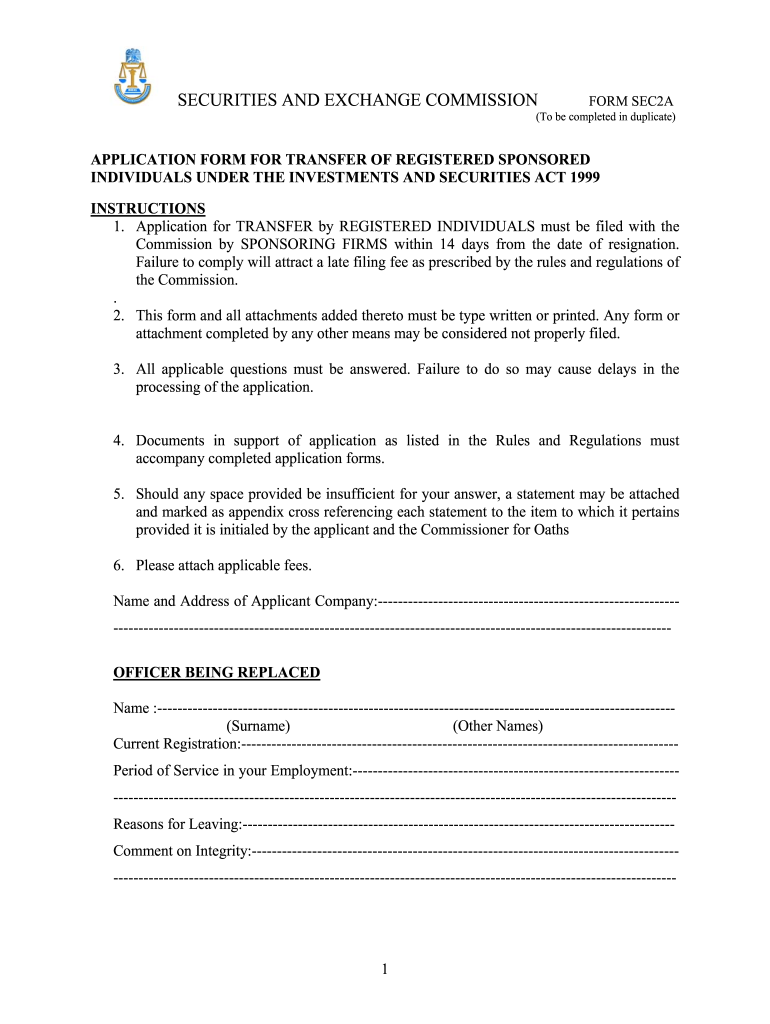
NG SEC2A free printable template
pdfFiller is not affiliated with any government organization

Fill out
Complete the form online in a simple drag-and-drop editor.

eSign
Add your legally binding signature or send the form for signing.

Share
Share the form via a link, letting anyone fill it out from any device.

Export
Download, print, email, or move the form to your cloud storage.
Why pdfFiller is the best tool for your documents and forms


End-to-end document management
From editing and signing to collaboration and tracking, pdfFiller has everything you need to get your documents done quickly and efficiently.
Accessible from anywhere
pdfFiller is fully cloud-based. This means you can edit, sign, and share documents from anywhere using your computer, smartphone, or tablet.
Secure and compliant
pdfFiller lets you securely manage documents following global laws like ESIGN, CCPA, and GDPR. It's also HIPAA and SOC 2 compliant.
What is NG SEC2A
The SEC2A Transfer Application Form is a business document used by sponsoring firms to apply for the transfer of registered individuals under the Investments and Securities Act 1999.
pdfFiller scores top ratings on review platforms




Who needs NG SEC2A?
Explore how professionals across industries use pdfFiller.

NG SEC2A is needed by:
-
Sponsoring firms managing registered individuals
-
Directors responsible for officiating transfers
-
Company secretaries coordinating documentation
-
Commissioners for oaths notarizing the form
-
Compliance officers ensuring regulatory adherence
-
Legal professionals advising businesses
Comprehensive Guide to NG SEC2A
Understanding the SEC2A Transfer Application Form
The SEC2A form serves as an application for transferring registered sponsored individuals, playing a critical role for businesses as mandated by the Investments and Securities Act 1999. Timely submission of this application—within 14 days after an individual's resignation—is essential to ensure compliance with regulatory requirements. Failing to submit the form on time may lead to complications in the transfer process.
Key Features of the SEC2A Transfer Application Form
The SEC2A form features several key components that facilitate its use:
-
Required signatures from the Director, Company Secretary, and Commissioner for Oaths.
-
Sections including blank fields for user input and checkboxes for selection.
-
A notarization requirement, ensuring the authenticity of the document.
These features help to streamline the filling and submission processes while ensuring that all necessary information is collected.
Who Needs to Submit the SEC2A Transfer Application Form?
The responsibility for submitting the SEC2A form primarily lies with sponsoring firms. Registered individuals, who are officers affected by a transfer, are also involved in the process, especially if a replacement is necessary. To successfully complete this form submission, the involved officers must meet specific eligibility criteria outlined by regulatory standards.
How to Fill Out the SEC2A Transfer Application Form Online
Filling out the SEC2A form online can be achieved through a straightforward process:
-
Access the SEC2A form using pdfFiller.
-
Gather all necessary information beforehand, including names and registration details.
-
Complete the form digitally within the platform.
Ensuring accuracy is vital; double-check all entries to prevent errors that could delay processing.
Filling Instructions for the SEC2A Transfer Application Form
To complete the SEC2A transfer application effectively, users should adhere to several filling instructions:
-
Provide detailed information in each form field as specified.
-
Be aware of common errors, such as omissions or incorrect entries.
-
Utilize a field-by-field checklist to ensure every section is appropriately addressed.
This methodical approach will minimize mistakes and improve the likelihood of acceptance by regulatory authorities.
How to Sign and Notarize the SEC2A Transfer Application Form
Understanding the signing and notarization requirements for the SEC2A form is crucial:
-
Recognize the difference between digital signatures and wet signatures.
-
Follow clear instructions on where to get the form notarized to ensure it meets legal standards.
-
The Commissioner for Oaths plays a pivotal role in verifying signatures on the form.
Complying with these requirements helps affirm the document's legitimacy and compliance with legal standards.
Submission Methods for the SEC2A Transfer Application Form
Users have multiple methods for submitting the SEC2A transfer application form:
-
Submit online through the designated platform.
-
Mail the completed form to the appropriate regulatory body.
Consider any associated fees, deadlines, and processing times, which vary by submission method.
What Happens After You Submit the SEC2A Transfer Application Form?
Once the SEC2A form has been submitted, users can expect several follow-up actions:
-
Tracking the status of the submitted application to stay informed.
-
Understanding the possible outcomes, which include approval, rejection, or the need for amendments.
-
If amendments are necessary, follow the stated procedures to correct or update the SEC2A form.
Being prepared for these outcomes can enhance the efficiency of the overall process.
Why Choose pdfFiller for Your SEC2A Transfer Application?
Choosing pdfFiller for your SEC2A transfer application offers distinct advantages:
-
The platform makes designing and completing the form online simple and efficient.
-
Security features include encryption and compliance with regulatory standards.
-
User testimonials highlight success stories from those who have benefited from the platform.
These aspects make pdfFiller a trusted choice for managing document needs.
Get Started with Your SEC2A Transfer Application Today
Users are encouraged to begin the SEC2A form filling process using pdfFiller. Experience the advantages of efficiently completing the form online, coupled with a secure and hassle-free user experience. Accessing pdfFiller's tools for filling out the SEC2A form ensures a streamlined and reliable process.
How to fill out the NG SEC2A
-
1.Begin by accessing the SEC2A Transfer Application Form on pdfFiller by searching for its name in the search bar or using a direct link.
-
2.Once opened, familiarize yourself with the form layout, which includes various fields that require detailed information.
-
3.Gather necessary information about the current registered individual, including their full name, registration details, and reasons for the transfer.
-
4.Proceed to fill out the fields designated for the substitute officer's details using accurate and up-to-date information.
-
5.Utilize the checkboxes provided to indicate the required fields as per the instructions of the form.
-
6.After entering all mandatory information, review the form for any errors or missing data to ensure completeness.
-
7.Clearly sign the form in the designated areas along with the company secretary and commissioner for oaths.
-
8.Finalize the form by utilizing pdfFiller's options to save, download in your preferred format, or submit the form electronically.

Who is eligible to submit the SEC2A Transfer Application Form?
The SEC2A Transfer Application Form can be submitted by sponsoring firms whose registered individuals are undergoing transfer, accompanied by required signatures from a director, company secretary, and a commissioner for oaths.
Is there a deadline for submitting the SEC2A form?
Yes, the SEC2A Transfer Application Form must be submitted within 14 days of the departure of the registered individual to ensure compliance with regulations under the Investments and Securities Act 1999.
How do I submit the SEC2A Transfer Application Form?
You can submit the SEC2A form electronically through pdfFiller or print it for physical submission. Ensure all required parties have signed before sending the completed form to the appropriate regulatory agency.
What supporting documents are required for the SEC2A form?
Typically, you will need identification documents for both the individual being replaced and the substitute. Supporting documentation may also include resignation letters and any relevant correspondence from the sponsoring firms.
What are common mistakes to avoid when filling out the SEC2A form?
Common mistakes include incomplete sections, missing signatures from required parties, and providing incorrect registration details. Always double-check all information before finalizing the form.
How long does processing the SEC2A transfer application usually take?
Processing times can vary. It is advisable to allow sufficient time, typically several weeks, for the regulatory body to review and process the SEC2A form after submission.
What should I do if my SEC2A form is rejected?
If your SEC2A form is rejected, you should carefully review the reasons provided for the rejection, correct any issues, and resubmit the form as soon as possible along with any additional required documentation.
Related Forms



Get the latest insights from our blog


If you believe that this page should be taken down, please follow our DMCA take down process
here
.
This form may include fields for payment information. Data entered in these fields is not covered by PCI DSS compliance.