
Last updated on
Nov 9, 2026
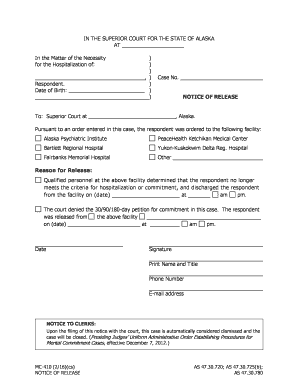
AK MC-610 2014-2026 free printable template
pdfFiller is not affiliated with any government organization

Fill out
Complete the form online in a simple drag-and-drop editor.

eSign
Add your legally binding signature or send the form for signing.

Share
Share the form via a link, letting anyone fill it out from any device.

Export
Download, print, email, or move the form to your cloud storage.
Why pdfFiller is the best tool for your documents and forms


End-to-end document management
From editing and signing to collaboration and tracking, pdfFiller has everything you need to get your documents done quickly and efficiently.
Accessible from anywhere
pdfFiller is fully cloud-based. This means you can edit, sign, and share documents from anywhere using your computer, smartphone, or tablet.
Secure and compliant
pdfFiller lets you securely manage documents following global laws like ESIGN, CCPA, and GDPR. It's also HIPAA and SOC 2 compliant.
What is AK MC-610
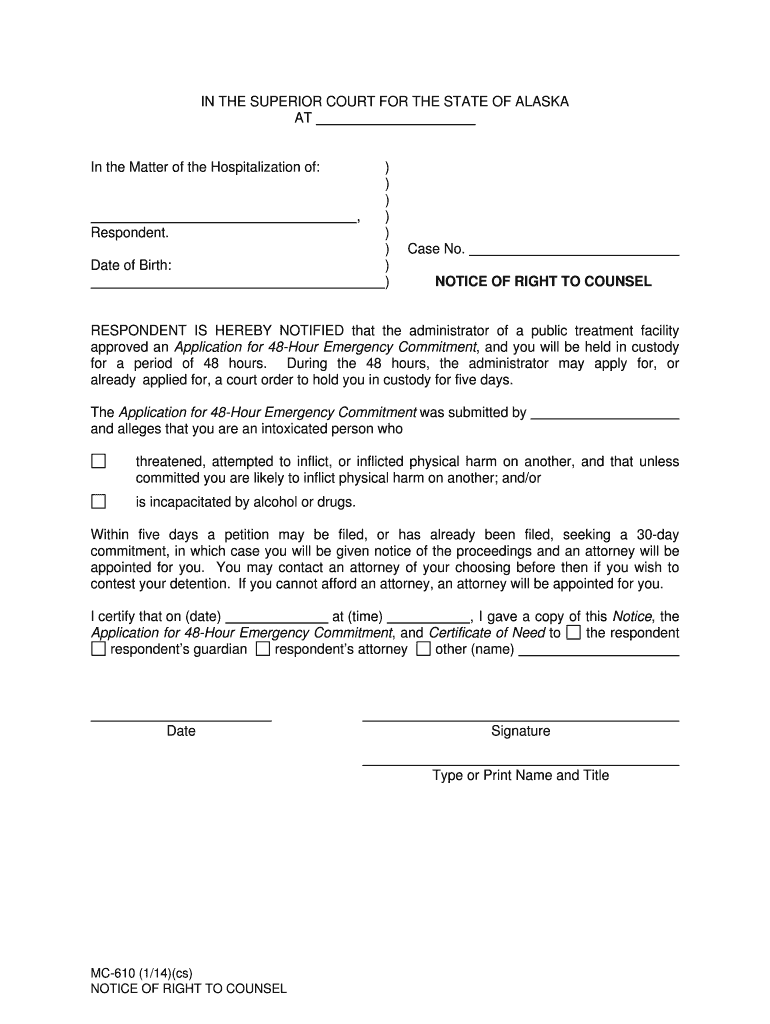
The Alaska Notice of Right to Counsel is a legal document used by respondents in Alaska to inform them of their right to legal counsel during a 48-hour emergency commitment process.
pdfFiller scores top ratings on review platforms




Who needs AK MC-610?
Explore how professionals across industries use pdfFiller.

AK MC-610 is needed by:
-
Respondents undergoing emergency mental health evaluations
-
Attorneys representing clients in commitment hearings
-
Administrators managing legal procedures in courts
-
Mental health professionals involved in commitment cases
-
Guardians of individuals facing emergency commitments
-
Legal aid organizations assisting low-income clients
Comprehensive Guide to AK MC-610
What is the Alaska Notice of Right to Counsel?
The Alaska Notice of Right to Counsel is a legal document designed to inform respondents of their right to legal representation during emergency commitment procedures. This form is particularly significant as it serves as a safeguard within the legal system, ensuring that individuals understand their rights in urgent situations requiring mental health evaluations. Utilizing an Alaska legal notice template, it offers clarity and structure for the respondents involved.
Purpose and Benefits of the Alaska Notice of Right to Counsel
The primary purpose of the Alaska Notice of Right to Counsel is to protect the rights of individuals subjected to mental health commitment processes. This form outlines essential rights, including the right to an attorney, thus ensuring that respondents are not deprived of legal assistance during critical periods. Benefits of using this form include enhanced awareness of legal rights and improved outcomes during commitment hearings.
Key Features of the Alaska Notice of Right to Counsel
The Alaska Notice of Right to Counsel includes various features essential for effective completion and submission. Key features include:
-
Multiple fillable fields, such as 'Date of Birth', 'Case No.', and 'Signature'.
-
Specific sections delineating the responsibilities and requirements for involved parties.
-
Requirements for signatures from the administrator, ensuring accountability.
This document stands out as a well-structured Alaska emergency commitment form that guides respondents and administrators seamlessly through the legal requirements.
Who Needs the Alaska Notice of Right to Counsel?
This form is essential for various parties involved in the commitment process. Individuals who must utilize the Alaska Notice of Right to Counsel include:
-
The respondent, who is the individual subject to the commitment.
-
The administrator, responsible for completing and signing the form.
-
The attorney, who may provide legal representation to the respondent if required.
By involving all relevant parties, the process ensures proper adherence to legal protocols within the Alaska court document framework.
How to Fill Out the Alaska Notice of Right to Counsel Online (Step-by-Step)
Filling out the Alaska Notice of Right to Counsel online can be straightforward if approached methodically. Follow these steps:
-
Access the fillable form through a reliable platform.
-
Input essential information, including 'Date of Birth' and 'Case No.'.
-
Complete the necessary fields accurately.
-
Review all entered information for accuracy before proceeding.
-
Ensure required signatures are obtained.
These steps are designed to facilitate a smooth experience when using the Alaska Notice of Right to Counsel as a fillable form.
Digital Signature vs. Wet Signature Requirements for the Alaska Notice of Right to Counsel
When submitting the Alaska Notice of Right to Counsel, understanding the signature requirements is crucial. The form can be submitted with either a digital signature or a traditional wet signature. Digital signatures offer convenience and speed, while wet signatures may be necessary in specific legal contexts. It is essential to comply with either method to ensure validity when filing this Alaska legal notice template.
Where to Submit the Alaska Notice of Right to Counsel
Submitting the Alaska Notice of Right to Counsel involves specific procedures. The form must be filed at designated locations which can include various Alaska court facilities. Be mindful of:
-
Deadlines associated with the commitment process.
-
Additional required documents and supporting materials that must accompany the form.
Following the correct submission protocols is vital to ensure compliance with legal regulations pertaining to Alaska court document.
Common Errors and How to Avoid Them When Filing the Alaska Notice of Right to Counsel
Many individuals encounter common mistakes while completing the Alaska Notice of Right to Counsel. Frequent errors can include:
-
Incomplete or inaccurate personal information.
-
Missing signatures that can invalidate the form.
To avoid these pitfalls, it is advisable to double-check all entries against a review and validation checklist prior to submission. Taking these precautions is vital when using the Alaska mental health commitment form.
Security and Compliance for the Alaska Notice of Right to Counsel
Handling sensitive legal documents like the Alaska Notice of Right to Counsel demands strict security measures. Ensuring compliance with guidelines, particularly those set by HIPAA and GDPR, is essential for protecting personal data. pdfFiller employs robust security protocols, including 256-bit encryption and SOC 2 Type II compliance, providing users with peace of mind while managing these documents.
Experience Hassle-Free Completion with pdfFiller
Users can enjoy a smooth experience completing the Alaska Notice of Right to Counsel through pdfFiller. This platform offers various features, such as:
-
eSigning that facilitates quick approval.
-
Document management tools for better organization.
Leveraging pdfFiller’s capabilities can simplify the process of filling out, signing, and submitting this essential legal form.
How to fill out the AK MC-610
-
1.Access the Alaska Notice of Right to Counsel form by visiting pdfFiller and searching for the form title or using provided templates.
-
2.Once opened in pdfFiller, familiarize yourself with the interface, where you'll find editable fields indicated by blue outlines.
-
3.Before starting, gather all necessary information such as the respondent's name, date of birth, case number, and current time, ensuring you have any required documentation at hand.
-
4.Begin filling out the form by clicking on each field, starting with the respondent's information, and then proceed to fill in other fields like date and case number.
-
5.Ensure you check relevant options, such as indicating if the respondent has a guardian or attorney by selecting the appropriate checkboxes.
-
6.After completing all fields, take a moment to review the information entered for accuracy, making sure no fields are left incomplete.
-
7.Once everything is finalized, use the save feature on pdfFiller to save your progress or choose the download option to save a copy to your device.
-
8.If you wish to submit the form electronically, follow the instructions provided by pdfFiller for submission methods, ensuring all necessary parties receive the document.

Who is eligible to use the Alaska Notice of Right to Counsel?
Any respondent undergoing a 48-hour emergency commitment in Alaska is eligible to use this form. It informs them of their legal rights and options regarding representation.
What deadlines should I be aware of when filing this form?
The form must be completed promptly during the emergency commitment process, usually required within the first 48 hours to ensure the respondent is aware of their rights.
How should I submit the completed Alaska Notice of Right to Counsel?
Once completed, you may submit the form to the relevant court or agency handling the emergency commitment. Electronic submission options may vary based on jurisdiction, so check local guidelines.
What supporting documents are needed with this form?
Typically, no additional supporting documents are required when submitting the Notice of Right to Counsel. However, having documentation related to the respondent's mental health evaluation may be beneficial.
What common mistakes should I avoid when filling out this form?
Common mistakes include leaving fields blank, misidentifying the type of respondent, and overlooking required signatures from administrators. Always double-check all entries for correctness.
How long does it take to process the Alaska Notice of Right to Counsel?
The processing time can vary, but it is typically reviewed alongside the emergency commitment hearings, which occur within the 48-hour timeframe following the response.
Can I get assistance with filling out this form?
Yes, assistance is available through legal aid organizations, attorneys, or mental health advocates knowledgeable about the emergency commitment process and legal rights in Alaska.
Related Forms


Get the latest insights from our blog


If you believe that this page should be taken down, please follow our DMCA take down process
here
.
This form may include fields for payment information. Data entered in these fields is not covered by PCI DSS compliance.