
Last updated on
Oct 19, 2026

form Centers Medical Report Intake Form free printable template
pdfFiller is not affiliated with any government organization

Fill out
Complete the form online in a simple drag-and-drop editor.

eSign
Add your legally binding signature or send the form for signing.

Share
Share the form via a link, letting anyone fill it out from any device.

Export
Download, print, email, or move the form to your cloud storage.
Why pdfFiller is the best tool for your documents and forms


End-to-end document management
From editing and signing to collaboration and tracking, pdfFiller has everything you need to get your documents done quickly and efficiently.
Accessible from anywhere
pdfFiller is fully cloud-based. This means you can edit, sign, and share documents from anywhere using your computer, smartphone, or tablet.
Secure and compliant
pdfFiller lets you securely manage documents following global laws like ESIGN, CCPA, and GDPR. It's also HIPAA and SOC 2 compliant.
What is form Centers Medical Report Intake Form
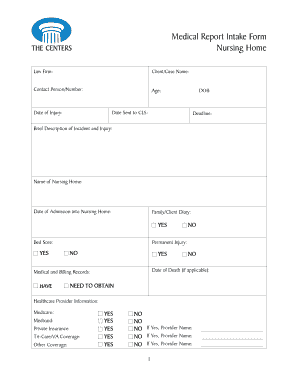
The Medical Report Intake Form is a legal document used by law firms to collect detailed client information for product liability cases.
pdfFiller scores top ratings on review platforms




Who needs form Centers Medical Report Intake Form?
Explore how professionals across industries use pdfFiller.

Form Centers Medical Report Intake Form is needed by:
-
Law firms handling product liability claims
-
Clients seeking legal representation for injuries
-
Insurance companies reviewing claims
-
Healthcare providers involved in patient treatment
-
Legal assistants preparing intake documents
Comprehensive Guide to form Centers Medical Report Intake Form
What is the Medical Report Intake Form?
The Medical Report Intake Form is crucial for law firms handling product liability cases. It serves to collect detailed client information, including personal details, injury specifics, and necessary medical records. This form requires a client’s signature and may involve associated fees, ensuring that all legal formalities are adhered to.
By utilizing a structured legal intake form template, law firms can streamline the process of gathering comprehensive client data, which is vital for effective case management.
Purpose and Benefits of the Medical Report Intake Form
This form plays an essential role in enhancing the workflow of law firms and improving client experiences. It aids in gathering comprehensive client and medical information, enabling efficient case analysis. By utilizing a product liability form, law firms can organize case details systematically, which contributes to optimal case outcomes.
For clients, the use of a client medical information form can lead to better chances of securing compensation or support from responsible parties. It promotes clarity in communication between clients and their legal representatives.
Key Features of the Medical Report Intake Form
The Medical Report Intake Form is designed with user-friendly features that facilitate ease of completion. Essential fillable fields include sections for client details, injury descriptions, and health coverage information. Additionally, the form allows for customization through checkboxes and blank fields.
-
Fillable fields to capture vital information effectively
-
Attached documents required for complete submission
-
Customizable options with checkboxes
Who Needs the Medical Report Intake Form?
This form is primarily intended for clients involved in product liability cases who must provide accurate details of their injuries. Additionally, law firms and insurance companies might require the form to ensure they have all pertinent information for case evaluation. Various scenarios, including accidents involving defective products, warrant the use of this form to maintain precise records.
How to Fill Out the Medical Report Intake Form Online (Step-by-Step)
Completing the Medical Report Intake Form digitally is straightforward. Below are the steps to follow for a successful submission:
-
Start by entering client details, including name and contact information.
-
Provide comprehensive injury descriptions and relevant health coverage information.
-
Ensure all fields are filled out completely to avoid delays.
-
Utilize pdfFiller for a smooth and secure filling experience, including options for eSigning.
Common Errors and How to Avoid Them
When filling out the Medical Report Intake Form, clients should be aware of common mistakes that could impede the process. Common pitfalls include missing signatures, incomplete fields, or incorrectly submitted documents. To prevent these issues, it is advisable to verify information thoroughly before submission and review all entries for accuracy.
-
Check for missing signatures
-
Ensure all fields are complete
Required Documents and Supporting Materials
For successful submission of the Medical Report Intake Form, several documents need to be attached. Essential materials include medical records, employment documentation, and photographs of injuries. Each document serves a critical role in evaluating the case effectively.
-
Medical records
-
Employment records
-
Photographs of injuries
Security and Compliance When Filling Out the Medical Report Intake Form
Handling sensitive information is a priority when completing the Medical Report Intake Form. Clients can rest assured knowing that compliance with security standards, such as HIPAA and GDPR, is upheld. Encryption measures are employed to protect documents throughout the process, emphasizing the importance of privacy for both clients and firms.
Feeling Confident About Your Medical Report Intake Form Submission
Using pdfFiller can greatly enhance your experience while completing the Medical Report Intake Form. The platform’s cloud-based accessibility and eSigning options simplify the entire process. By taking advantage of these features, clients can ensure their form is filled out securely and accurately, facilitating better case management outcomes.
How to fill out the form Centers Medical Report Intake Form
-
1.Access the Medical Report Intake Form on pdfFiller by searching its title in the document library or entering the shared link.
-
2.Once the form is open, navigate through the fillable fields easily using your mouse or keyboard.
-
3.Before starting, gather essential information such as client details, injury specifics, and any relevant medical records to ensure a smooth filling process.
-
4.Complete the required fields including the law firm name, contact information, age, date of injury, and details of the incident.
-
5.Check any applicable insurance options, including Medicare or Medicaid, and provide the provider names if relevant.
-
6.After filling out the form, review all entries carefully to ensure accuracy and completeness.
-
7.Once satisfied, save your progress on pdfFiller by clicking the save icon or automatically saving as you go.
-
8.Download the completed form as a PDF or choose to submit it electronically, if required, using the provided submission options.

Who is eligible to use the Medical Report Intake Form?
This form is primarily designed for clients seeking legal representation in product liability cases and law firms handling these claims.
What supporting documents are needed when filling out this form?
You will need to provide medical records, employment records, photographs of injuries, and any other documentation relevant to your case.
Is there a deadline for submitting the Medical Report Intake Form?
While specific deadlines may vary depending on the case, it is crucial to submit this form as soon as possible to avoid delays in your legal proceedings.
What are common mistakes to avoid when completing this form?
Common mistakes include leaving fields blank, providing incorrect information, and failing to attach required documents. Review instructions carefully to avoid these errors.
Can this form be submitted electronically?
Yes, the Medical Report Intake Form can be submitted electronically through pdfFiller, provided your law firm has that option enabled.
How long does it take to process the Medical Report Intake Form?
Processing times may vary by law firm, but typically you can expect a response within a week after submission. Check with your firm for specific timelines.
Is notarization required for this form?
No, notarization is not required for the Medical Report Intake Form. However, be sure to sign where indicated to validate the document.
Related Forms


Get the latest insights from our blog


If you believe that this page should be taken down, please follow our DMCA take down process
here
.
This form may include fields for payment information. Data entered in these fields is not covered by PCI DSS compliance.