
Last updated on
Nov 10, 2026
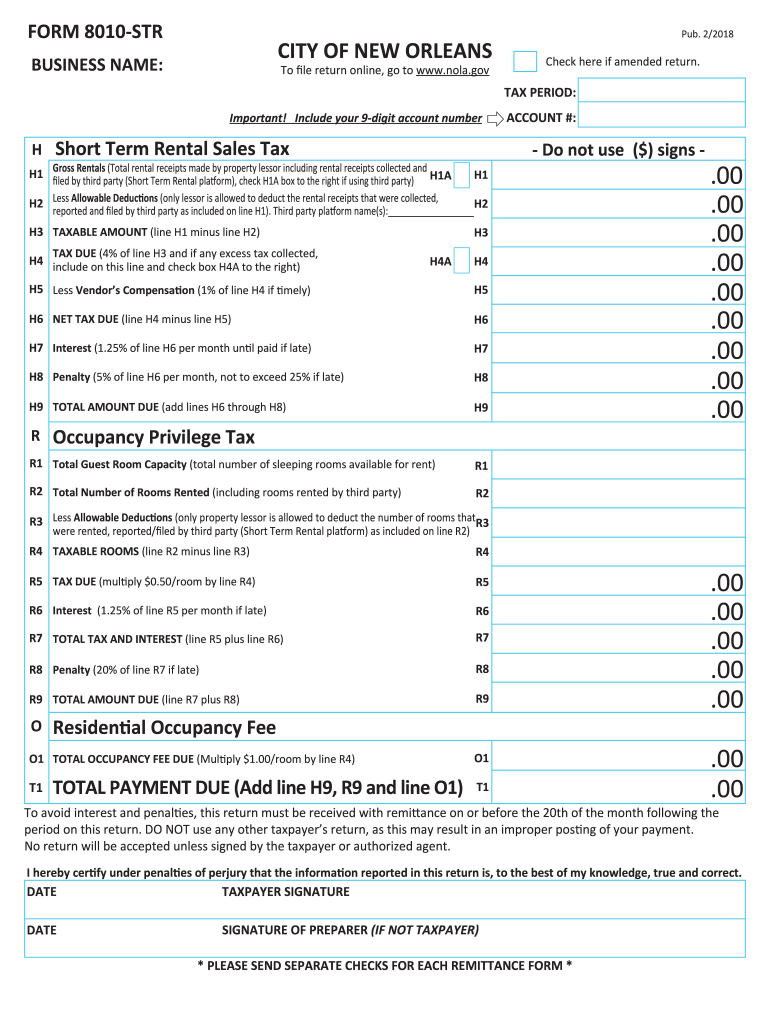
LA Form 8010-STR - City of New Orleans 2018-2026 free printable template
pdfFiller is not affiliated with any government organization

Fill out
Complete the form online in a simple drag-and-drop editor.

eSign
Add your legally binding signature or send the form for signing.

Share
Share the form via a link, letting anyone fill it out from any device.

Export
Download, print, email, or move the form to your cloud storage.
Why pdfFiller is the best tool for your documents and forms


End-to-end document management
From editing and signing to collaboration and tracking, pdfFiller has everything you need to get your documents done quickly and efficiently.
Accessible from anywhere
pdfFiller is fully cloud-based. This means you can edit, sign, and share documents from anywhere using your computer, smartphone, or tablet.
Secure and compliant
pdfFiller lets you securely manage documents following global laws like ESIGN, CCPA, and GDPR. It's also HIPAA and SOC 2 compliant.
What is LA Form 8010-STR - City of New Orleans
The City of New Orleans Short Term Rental Tax Form is a tax document used by property lessors to report and pay short-term rental sales tax, occupancy privilege tax, and residential occupancy fees.
pdfFiller scores top ratings on review platforms




Who needs LA Form 8010-STR - City of New Orleans?
Explore how professionals across industries use pdfFiller.

LA Form 8010-STR - City of New Orleans is needed by:
-
Property lessors in New Orleans
-
Agents managing short-term rentals
-
Rental property owners in Louisiana
-
Taxpayers obligated to report rentals
-
Business operators offering short-term occupancy
-
Financial professionals assisting clients with tax forms
Comprehensive Guide to LA Form 8010-STR - City of New Orleans
What is the City of New Orleans Short Term Rental Tax Form?
The City of New Orleans Short Term Rental Tax Form is a crucial document used by property lessors to report and pay applicable taxes on short-term rentals. This form primarily serves to ensure compliance with local tax obligations, thus playing an essential role in the governance of rental properties in the New Orleans area.
Property lessors in New Orleans must understand the significance of the form as it helps streamline their tax reporting process. The form covers various types of taxes, including sales tax, occupancy privilege tax, and residential occupancy fees, which are all critical components of the local taxation system.
Purpose and Benefits of the City of New Orleans Short Term Rental Tax Form
Completing the City of New Orleans Short Term Rental Tax Form is vital for compliance with local tax regulations. By accurately filling out this rental tax form 8010-str, property owners can ensure they are adhering to all financial obligations, thus avoiding potential legal repercussions.
Using this form offers several benefits, such as simplifying the tax reporting process for businesses and individual property owners. Timely submissions are particularly important, as they help prevent penalties and facilitate lawful operation within the rental market.
Who Needs the City of New Orleans Short Term Rental Tax Form?
The primary users of the City of New Orleans Short Term Rental Tax Form include property lessors and their authorized agents. Authorized agents may comprise property management firms or individuals responsible for the property's rental activities.
Taxpayers and their agents share certain responsibilities regarding form submission. It is essential for both parties to ensure the accuracy and completeness of the information provided to avoid complications down the line.
How to Fill Out the City of New Orleans Short Term Rental Tax Form Online (Step-by-Step)
Filling out the City of New Orleans Short Term Rental Tax Form online is straightforward with tools like pdfFiller. To begin the process, follow these steps:
-
Access the pdfFiller platform and search for the City of New Orleans Short Term Rental Tax Form.
-
Fill in the required information in each core section, which includes gross rentals, allowable deductions, and taxable amounts.
-
Review each field's purpose to ensure you are providing the correct data.
-
Double-check for accuracy before final submission.
Utilizing these tips can make the process more efficient and reduce the risk of errors.
Common Errors and How to Avoid Them While Filing the City of New Orleans Short Term Rental Tax Form
During the completion of the City of New Orleans occupancy tax form, taxpayers often encounter a few common mistakes. Frequent errors include miscalculating gross rentals or overlooking allowable deductions.
To avoid these pitfalls, consider validating the form data before submission. This not only ensures accurate reporting but also impacts deductions and taxable amounts positively.
When and How to Submit the City of New Orleans Short Term Rental Tax Form
Understanding submission deadlines is crucial, especially the requirement to submit the form by the 20th of the month following the applicable tax period. After completing the form, there are several submission methods available:
-
Online submission through pdfFiller.
-
Mailing the completed form to the appropriate tax office.
-
In-person submission at designated offices.
It’s important to note what follows after submission; taxpayers will receive confirmation and have the ability to track their submission status.
Security and Compliance When Using pdfFiller for the City of New Orleans Short Term Rental Tax Form
When handling sensitive tax information, security becomes paramount. pdfFiller implements robust security measures that comply with regulations like HIPAA and GDPR, aiming to protect users' data.
By employing pdfFiller's platform, users can take advantage of secure document management tools, ensuring that their important information remains safe throughout the process.
Why Choose pdfFiller for Your City of New Orleans Short Term Rental Tax Form?
Choosing pdfFiller for completing your tax form offers numerous advantages. Features such as easy editing, eSigning, and secure document management significantly enhance the user experience.
Additionally, the platform’s user-friendly interface provides resources that streamline the process, making form completion more efficient and less stressful.
Sample Completed City of New Orleans Short Term Rental Tax Form
For those unsure about the completion process, a sample or template of a filled-out form serves as a valuable reference. Reviewing a completed form can clarify the correct submission of various fields, assisting users in understanding necessary details.
This guidance can be immensely helpful during the actual filling process, leading to increased accuracy and compliance.
Take the Next Step with pdfFiller
By utilizing pdfFiller for your City of New Orleans Short Term Rental Tax Form, users can take advantage of a variety of features designed to enhance document management. Exploring these tools, such as efficient editing and secure submission, reinforces the benefits of a streamlined and user-friendly experience.
How to fill out the LA Form 8010-STR - City of New Orleans
-
1.Access pdfFiller and search for 'City of New Orleans Short Term Rental Tax Form' in the document search bar.
-
2.Once the form appears, click on it to open the fillable PDF in an interactive workspace.
-
3.Before starting, gather all necessary information such as total gross rentals, allowable deductions, and any other details required on the form.
-
4.Begin filling out the form by clicking on each field. Use the 'H1 Gross Rentals' field for total rental income.
-
5.For allowable deductions, navigate to 'H2 Less Allowable Deductions' and enter the corresponding amounts.
-
6.In the 'H3 Taxable Amount' field, calculate and input the amounts subjected to tax after deductions.
-
7.Ensure you fill in all sections accurately. Use the instruction guide embedded within pdfFiller for assistance if needed.
-
8.After all fields are complete, review the form carefully to check for any errors or omissions.
-
9.Once confirmed, use the options in pdfFiller to save your work, download a copy for your records, or submit it directly if electronic submission is allowed.
-
10.Be sure to submit the form by the 20th of the month following your tax period to avoid penalties.

Who is eligible to file the City of New Orleans Short Term Rental Tax Form?
Property lessors, or individuals authorized to act on their behalf, such as agents or business managers, are eligible to file this form.
When is the submission deadline for the short-term rental tax form?
The submitted form must be filed by the 20th of the month following the end of the tax reporting period to avoid penalties.
How can I submit the City of New Orleans Short Term Rental Tax Form?
You can submit the form electronically through platforms like pdfFiller, or print it out to mail it to the designated tax authority in New Orleans.
What supporting documents are required with this tax form?
Typically, you may need proof of gross rental income and any evidence for allowable deductions, but specific requirements can vary, so review the form instructions carefully.
What are common mistakes to avoid when filling out this tax form?
Ensure that all fields are accurately completed, double-check calculations for gross rentals and deductions, and make sure the form is signed by the appropriate party.
How long does it take to process the short-term rental tax form?
Processing time may vary based on the volume of submissions, but typically, you can expect it to take several weeks, especially during peak tax season.
Are there any fees associated with filing the short-term rental tax form?
While the form itself may not have a filing fee, associated taxes calculated based on the form must be paid. Ensure you check the latest tax rates for accuracy.
Related Forms



Get the latest insights from our blog


If you believe that this page should be taken down, please follow our DMCA take down process
here
.
This form may include fields for payment information. Data entered in these fields is not covered by PCI DSS compliance.