
Last updated on
Nov 21, 2026
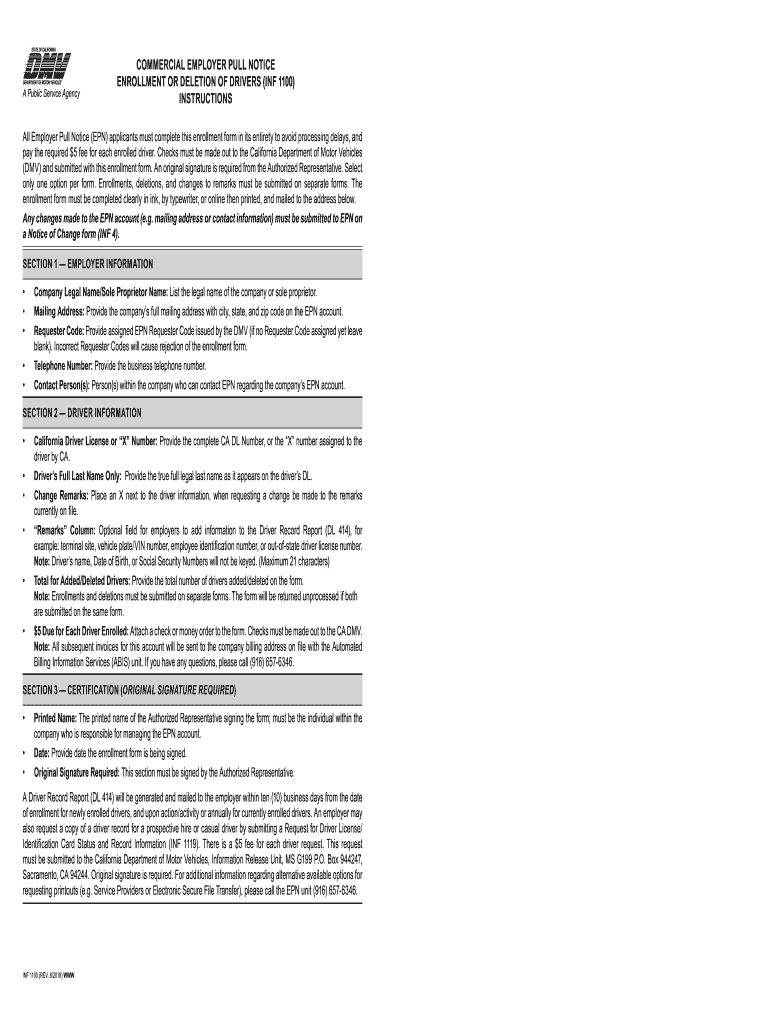
CA INF 1100 2018-2026 free printable template
pdfFiller is not affiliated with any government organization

Fill out
Complete the form online in a simple drag-and-drop editor.

eSign
Add your legally binding signature or send the form for signing.

Share
Share the form via a link, letting anyone fill it out from any device.

Export
Download, print, email, or move the form to your cloud storage.
Why pdfFiller is the best tool for your documents and forms


End-to-end document management
From editing and signing to collaboration and tracking, pdfFiller has everything you need to get your documents done quickly and efficiently.
Accessible from anywhere
pdfFiller is fully cloud-based. This means you can edit, sign, and share documents from anywhere using your computer, smartphone, or tablet.
Secure and compliant
pdfFiller lets you securely manage documents following global laws like ESIGN, CCPA, and GDPR. It's also HIPAA and SOC 2 compliant.
What is CA INF 1100
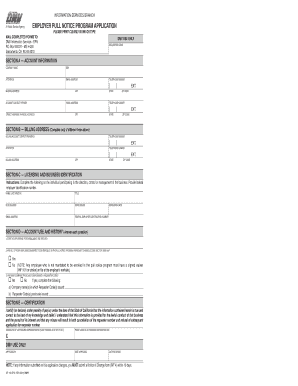
The California Commercial Employer Pull Notice Form is a business document used by employers to enroll or delete drivers in the Employer Pull Notice (EPN) program, enabling access to driver records.
pdfFiller scores top ratings on review platforms




Who needs CA INF 1100?
Explore how professionals across industries use pdfFiller.

CA INF 1100 is needed by:
-
California employers who need to enroll drivers in the EPN program
-
Businesses requiring access to employee driver records
-
HR departments managing employee driving qualifications
-
Transportation companies with driver personnel
-
Legal representatives submitting documents on behalf of employers
-
Employers in industries requiring consistent driver monitoring
Comprehensive Guide to CA INF 1100
What is the California Commercial Employer Pull Notice Form?
The California Commercial Employer Pull Notice Form, known as INF 1100, is an essential tool used by employers enrolled in the Employer Pull Notice (EPN) program. This form allows businesses to access pertinent driver records, ensuring compliance with state regulations. By utilizing the California DMV EPN form, employers can fulfill legal obligations while promoting workplace safety.
This form is crucial for maintaining adherence to state laws, helping employers streamline their driver oversight processes.
Purpose and Benefits of the California Commercial Employer Pull Notice Form
The California Commercial Employer Pull Notice Form offers numerous advantages for employers. It facilitates the enrollment or deletion of drivers within the EPN program, enabling businesses to manage their driver records efficiently. By accessing up-to-date driver information, employers can prioritize safety and compliance in their operations.
Additionally, using this form simplifies the overall management of driver records, ensuring that businesses remain informed and proactive regarding their employees' driving qualifications.
Who Needs the California Commercial Employer Pull Notice Form?
This form is essential for various employers within California. It is particularly relevant for businesses that operate commercial vehicles or have employees who drive as part of their job duties. Authorized representatives must complete the form, ensuring proper documentation and accountability.
Different types of businesses, including trucking companies, delivery services, and logistics firms, can greatly benefit from enrollment in the EPN program, thus making the use of this form imperative.
How to Fill Out the California Commercial Employer Pull Notice Form Online (Step-by-Step)
Filling out the California Commercial Employer Pull Notice Form online involves several straightforward steps:
-
Visit the California DMV website and locate the EPN form.
-
Enter the 'Company Legal Name' accurately in the designated field.
-
Provide the 'California Driver License Number' for each driver being enrolled or deleted.
-
Ensure the form is signed by an authorized representative.
-
Review the completed form for accuracy and completeness before submission.
These steps are crucial for avoiding delays and ensuring a smooth submission process.
Submitting the California Commercial Employer Pull Notice Form
Once the California Commercial Employer Pull Notice Form is completed, submission can occur through various methods. Employers can submit the form online or physically to the California Department of Motor Vehicles (DMV).
It is important to note that a fee of $5 applies per enrolled driver, which must be paid at the time of submission. Tracking submission status and understanding processing times are critical for employers seeking to verify their enrollment in the EPN program.
Common Errors and How to Avoid Them When Using the California Commercial Employer Pull Notice Form
When completing the California Commercial Employer Pull Notice Form, users may encounter several common errors that can lead to rejection or processing delays. Some prevalent mistakes include:
-
Inaccurate or incomplete company name entries.
-
Missing authorized representative signatures.
-
Incorrect driver license numbers.
To minimize these issues, follow best practices such as double-checking all entries and using a validation checklist to confirm that all required fields are fully and accurately completed.
Importance of Security and Compliance When Handling the California Commercial Employer Pull Notice Form
Data security and compliance are paramount when submitting the California Commercial Employer Pull Notice Form. Employers must ensure that sensitive information is handled correctly, employing measures like 256-bit encryption to protect data integrity. Compliance with regulations such as HIPAA and GDPR further reinforces the importance of privacy in managing driver records.
Additionally, businesses should implement guidelines for securely retaining records, safeguarding both employer and employee information against unauthorized access.
Utilizing pdfFiller for Efficient Completion of the California Commercial Employer Pull Notice Form
pdfFiller enhances the user experience when completing the California Commercial Employer Pull Notice Form. With features such as editing, eSigning, and cloud-based storage, users can manage their documents effortlessly. The platform's user-friendly interface allows for smooth form completion without the need for downloads, making it a preferred choice for handling business forms.
Employers can leverage these capabilities to streamline their form management processes and improve efficiency.
Sample or Example of a Completed California Commercial Employer Pull Notice Form
Providing a visual reference, a completed California Commercial Employer Pull Notice Form can greatly aid users who are unfamiliar with its layout and requirements. This sample illustrates key fields, such as the 'Company Legal Name' and 'California Driver License Number', highlighting the importance of accurate information.
By reviewing a correctly filled form, users can better understand the format and the specific details needed in each section to ensure proper submissions.
How to fill out the CA INF 1100
-
1.Access pdfFiller and search for the California Commercial Employer Pull Notice Form (INF 1100) using the search bar.
-
2.Open the form, which will display the fillable fields, checkboxes, and instructions clearly on your screen.
-
3.Before filling in the form, gather necessary information including the company legal name, California Driver License numbers, and the original signatures of authorized representatives.
-
4.Begin filling in the form by entering your company legal name in the designated field, ensuring accuracy to match official records.
-
5.Input each driver's information, including their California Driver License or 'X' number in the provided blank fields.
-
6.Use the checkboxes as instructed to indicate whether you are enrolling or deleting drivers from the EPN program.
-
7.Review all entries for any incorrect or incomplete fields to avoid common mistakes.
-
8.Finalize the form by ensuring the original signature is included where marked, fulfilling submission requirements.
-
9.Once completed, save your work on pdfFiller, then download the finalized form for submission to the California DMV, or submit electronically if that option is available.

Who is eligible to use the California Commercial Employer Pull Notice Form?
Employers based in California are eligible to use the California Commercial Employer Pull Notice Form. You must have drivers that you wish to enroll or delete from the EPN program to access their driver records.
What are the fees associated with the Employer Pull Notice Form?
There is a nominal fee of $5 per enrolled driver when submitting the California Commercial Employer Pull Notice Form. Be prepared to include payment along with your submission.
How do I submit the completed form?
The completed California Commercial Employer Pull Notice Form should be submitted to the California Department of Motor Vehicles (DMV). Ensure you follow any specific guidelines provided for submission.
What are common mistakes to avoid when filling out the form?
Common mistakes include leaving required fields blank, incorrect entry of driver information, and failing to include signatures. Double-check your entries before submission.
What supporting documents are needed for the form?
Generally, you will need the California Driver License numbers of the enrolled drivers as well as the legal name of your company. No additional documents are typically required.
How long does processing take after submission?
Processing time for the California Commercial Employer Pull Notice Form can vary. It's advisable to check with the California DMV for specific timelines based on current processing volumes.
Can I access the form online?
Yes, you can easily access the California Commercial Employer Pull Notice Form online through platforms like pdfFiller, where it is available for filling and submission.
Related Forms





Related Catalogs
Get the latest insights from our blog


If you believe that this page should be taken down, please follow our DMCA take down process
here
.
This form may include fields for payment information. Data entered in these fields is not covered by PCI DSS compliance.