
Last updated on
Oct 31, 2026
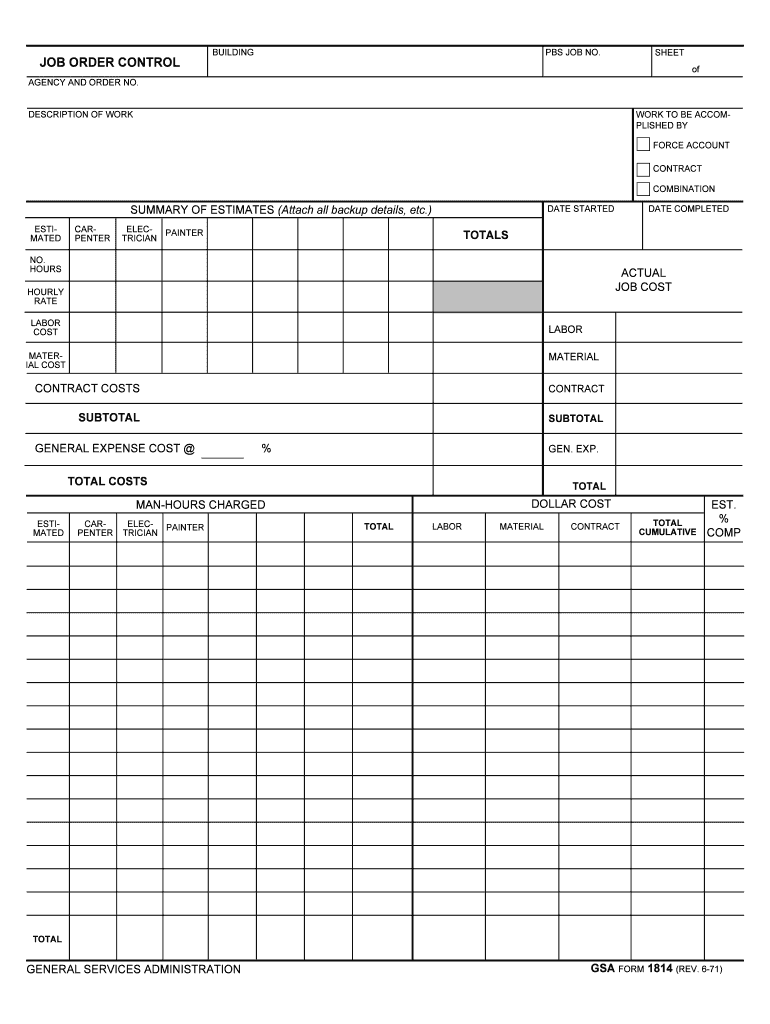
GSA Form 1814 1971-2026 free printable template
pdfFiller is not affiliated with any government organization

Fill out
Complete the form online in a simple drag-and-drop editor.

eSign
Add your legally binding signature or send the form for signing.

Share
Share the form via a link, letting anyone fill it out from any device.

Export
Download, print, email, or move the form to your cloud storage.
Why pdfFiller is the best tool for your documents and forms


End-to-end document management
From editing and signing to collaboration and tracking, pdfFiller has everything you need to get your documents done quickly and efficiently.
Accessible from anywhere
pdfFiller is fully cloud-based. This means you can edit, sign, and share documents from anywhere using your computer, smartphone, or tablet.
Secure and compliant
pdfFiller lets you securely manage documents following global laws like ESIGN, CCPA, and GDPR. It's also HIPAA and SOC 2 compliant.
What is GSA Form 1814
The GSA Form 1814 Job Cost Sheet is a document used by government agencies to track and summarize costs associated with specific jobs or projects, including labor, material, and contract expenses.
pdfFiller scores top ratings on review platforms




Who needs GSA Form 1814?
Explore how professionals across industries use pdfFiller.

GSA Form 1814 is needed by:
-
Government agencies managing projects
-
Contractors handling federal jobs
-
Finance officers within government departments
-
Project managers overseeing operations
-
Auditors reviewing project expenditures
-
Legal teams ensuring compliance with government regulations
Comprehensive Guide to GSA Form 1814
What is the GSA Form 1814 Job Cost Sheet?
The GSA Form 1814 serves as a vital job cost sheet utilized by government agencies for recording and summarizing project costs. This form is essential for documenting various financial elements of a project, including labor, materials, and contract expenses. By employing the GSA Form 1814, agencies can accurately track and manage costs associated with their projects, ensuring that financial resources are used efficiently.
As part of the broader framework for government expense tracking, the GSA Form 1814 assists in maintaining transparency and accountability within public sector projects. Its significance lies in the structure it provides for capturing comprehensive cost information, which can be critical for project evaluations and audits.
Purpose and Benefits of the GSA Form 1814 Job Cost Sheet
The primary purpose of the GSA Form 1814 is to enhance the tracking capabilities of labor, material, and contract costs incurred during a project. This structured approach benefits government agencies by improving financial oversight and accountability. By documenting costs systematically, agencies can ensure adherence to budget estimations and reduce financial discrepancies.
Moreover, utilizing the GSA Form 1814 streamlines project management processes by offering a clear framework for evaluating expenses against projected budgets. This leads to better resource allocation and improved decision-making throughout the project lifecycle.
Key Features of the GSA Form 1814 Job Cost Sheet
The GSA Form 1814 is characterized by several essential features that facilitate effective cost management. Key sections of the form include 'JOB ORDER CONTROL,' 'DESCRIPTION OF WORK,' and detailed tables for inputting labor and material costs, ensuring comprehensive data collection.
The fillable format of the GSA Form 1814 significantly enhances user experience, allowing easier updates and modifications to entries. Additionally, its user-friendly structure promotes accuracy and organization during the completion process, aiding in clear communication of project expenses.
Eligibility Criteria for Using the GSA Form 1814 Job Cost Sheet
The GSA Form 1814 is specifically designed for use by personnel within government agencies tasked with project management and financial oversight. Typically, individuals responsible for cost reporting or project accounting within these organizations will complete the form.
While there are no stringent requirements, users should follow guidelines set forth by their respective agencies to ensure consistency and compliance in using the GSA Form 1814.
How to Fill Out the GSA Form 1814 Job Cost Sheet Online
Filling out the GSA Form 1814 online is straightforward and can be accomplished in a few simple steps:
-
Access the form through a suitable platform like pdfFiller.
-
Input details into the 'JOB ORDER CONTROL' section, including the project number and description.
-
Populate the labor section with specifics such as worker hours and rates.
-
Fill in the material costs, ensuring accurate descriptions and quantities.
-
Review the summary section to confirm all entries are reflected correctly.
Common errors in completing this form can usually occur in data entry or omission of critical information. Utilizing features available in pdfFiller can help reduce these mistakes by enabling users to check for completeness before final submission.
When and How to Submit the GSA Form 1814 Job Cost Sheet
Submission of the GSA Form 1814 must occur within designated deadlines set by respective government agencies. Common methods for delivery include electronic submission through platforms like pdfFiller or traditional postal delivery.
To avoid penalties associated with late submissions, it is crucial to familiarize oneself with specific filing timelines and adhere to them rigorously. Utilizing the GSA Form 1814 enables enhanced efficiency in government expense tracking, ensuring that necessary documentation arrives timely.
Security and Compliance for the GSA Form 1814 Job Cost Sheet
When handling the GSA Form 1814, data privacy and security are paramount. Compliance with regulations, such as HIPAA and GDPR, ensures that financial information is handled responsibly. Using pdfFiller for form completion offers several security measures, including 256-bit encryption to safeguard sensitive data.
By employing a platform that prioritizes confidentiality and security, users of the GSA Form 1814 can proceed with confidence that their submissions meet regulatory standards and maintain data integrity.
Common Errors and How to Avoid Them When Using the GSA Form 1814
Identifying common pitfalls can greatly enhance the accuracy of the GSA Form 1814. Typical mistakes include:
-
Omitting key entries in the labor or material sections.
-
Incorrectly calculating totals or estimates.
-
Failing to cross-check against project budgets.
To avoid these errors, users should take the time to thoroughly review all fields before submission. Leveraging the error-checking features available in pdfFiller can assist in ensuring all necessary information is present and correct.
Sample or Example of a Completed GSA Form 1814 Job Cost Sheet
A visual reference of a completed GSA Form 1814 can greatly assist users in understanding how to fill out the form correctly. Each section is designed to clearly reflect information pertinent to cost management, and observing a completed example can clarify expectations for individual entries.
Reviewing a sample can also provide insight into common practices for project cost summaries, helping users ensure they accurately represent their projects' financial details when completing the form.
Effortlessly Complete the GSA Form 1814 Job Cost Sheet with pdfFiller
pdfFiller stands out as an efficient solution for completing the GSA Form 1814. Its intuitive interface simplifies the complex process of form filling, allowing users to manage their submissions easily.
With features like eSigning and secure cloud storage, pdfFiller not only enhances user experience but also ensures that all documents are handled safely. Engage with pdfFiller today to streamline your form-filling process and achieve efficient project cost tracking.
How to fill out the GSA Form 1814
-
1.Access pdfFiller and search for 'GSA Form 1814 Job Cost Sheet' using the site’s search functionality.
-
2.Open the form by clicking on it in the search results to access the fillable fields.
-
3.Familiarize yourself with the layout of the form. Identify sections such as 'JOB ORDER CONTROL' and 'DESCRIPTION OF WORK'.
-
4.Gather any necessary documentation and data related to the project’s labor, materials, and contract costs before starting.
-
5.Start filling out the form by clicking into each field to enter required information, such as job order numbers, descriptions, labor hours, and material costs.
-
6.Utilize pdfFiller's features to highlight and mark required fields as you fill them in to avoid missing any critical information.
-
7.After completion, review the filled sections to ensure accuracy and completeness. Make sure totals are properly calculated in the tables provided.
-
8.Use the 'Save' function to keep a copy of the completed form on pdfFiller for your records.
-
9.Choose to download or print the form directly from pdfFiller once finalized.
-
10.If required, submit the form electronically through the relevant government portal or send it via email, adhering to any specific submission guidelines outlined by your agency.

Who is eligible to use the GSA Form 1814?
The GSA Form 1814 is primarily intended for use by federal government agencies and contractors engaged in projects that require detailed cost tracking, labor records, and material expenditure summaries.
What information is needed to complete the form?
Before starting the GSA Form 1814, gather information related to the job, including job order numbers, descriptions of work performed, hours worked, material costs, and contractor details to ensure accurate completion.
What is the process for submitting the completed form?
Once completed, the GSA Form 1814 can typically be submitted via email or through your agency's designated submission portal. Ensure to check for specific submission instructions from your department.
Are there any common mistakes to avoid when filling out this form?
Common mistakes include missing required fields, incorrect total calculations, and failing to provide all necessary supporting documentation. Double-check your entries before finalizing the submission.
How long does processing take after submission?
Processing times for the GSA Form 1814 can vary based on agency workload and specific project requirements. It's advisable to follow up with the relevant department if you do not receive confirmation in a reasonable time frame.
Is notarization required for this form?
No, the GSA Form 1814 does not require notarization. It is primarily used for internal records and tracking within government agencies.
Related Forms


Get the latest insights from our blog


If you believe that this page should be taken down, please follow our DMCA take down process
here
.
This form may include fields for payment information. Data entered in these fields is not covered by PCI DSS compliance.