
Last updated on
Oct 31, 2026
GSA Form 2522 1994-2026 free printable template
pdfFiller is not affiliated with any government organization

Fill out
Complete the form online in a simple drag-and-drop editor.

eSign
Add your legally binding signature or send the form for signing.

Share
Share the form via a link, letting anyone fill it out from any device.

Export
Download, print, email, or move the form to your cloud storage.
Why pdfFiller is the best tool for your documents and forms


End-to-end document management
From editing and signing to collaboration and tracking, pdfFiller has everything you need to get your documents done quickly and efficiently.
Accessible from anywhere
pdfFiller is fully cloud-based. This means you can edit, sign, and share documents from anywhere using your computer, smartphone, or tablet.
Secure and compliant
pdfFiller lets you securely manage documents following global laws like ESIGN, CCPA, and GDPR. It's also HIPAA and SOC 2 compliant.
What is GSA Form 2522
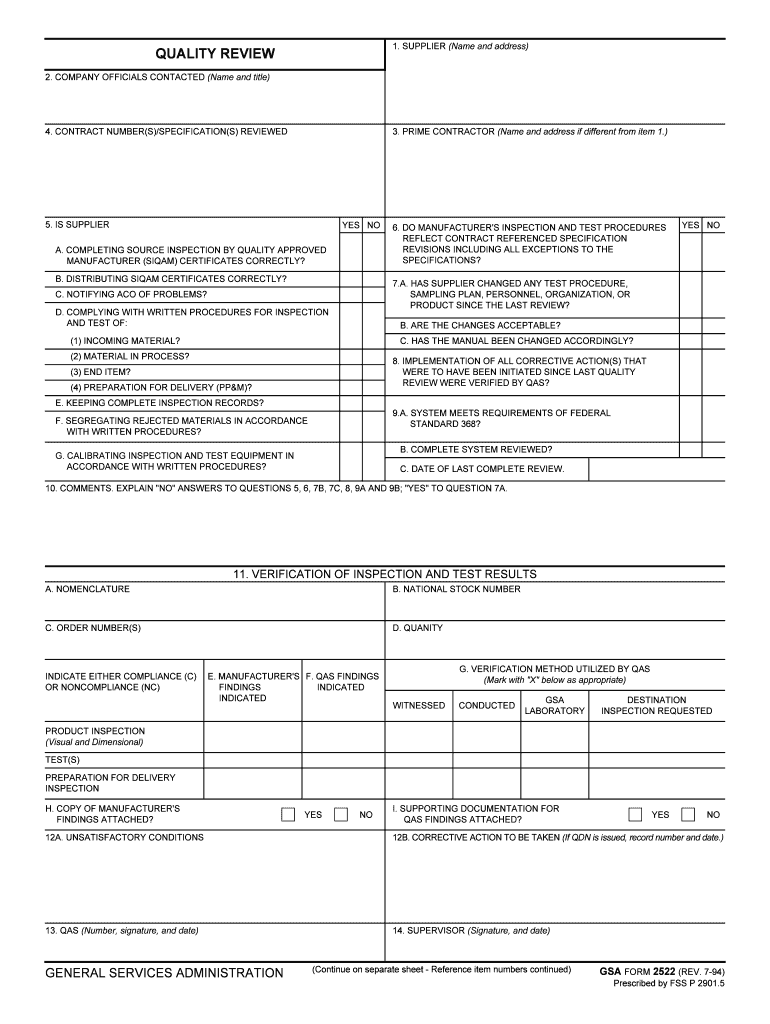
The GSA Form 2522 is a quality review document used by the General Services Administration (GSA) to audit and evaluate the compliance of a supplier's quality system.
pdfFiller scores top ratings on review platforms




Who needs GSA Form 2522?
Explore how professionals across industries use pdfFiller.

GSA Form 2522 is needed by:
-
Quality Assurance Specialists responsible for supplier compliance.
-
Supervisors overseeing vendor interactions and contract audits.
-
Contract managers needing to ensure quality standards are met.
-
Vendors participating in GSA contracts.
-
Regulatory compliance officers ensuring adherence to quality standards.
Comprehensive Guide to GSA Form 2522
What is the GSA Form 2522 Quality Review?
The GSA Form 2522 is a crucial quality review document utilized by the General Services Administration (GSA) to audit suppliers' quality systems. This form plays an essential role in quality audits, ensuring that suppliers meet compliance standards set forth by the GSA. A quality review typically examines various aspects of a supplier's operations to assess their adherence to required quality benchmarks and guidelines.
Understanding the intent and structure of the GSA Form 2522 is vital for both suppliers and auditors. By using this form, the GSA is able to provide a systematic approach to evaluating the quality assurance processes of businesses involved in government contracts.
Purpose and Benefits of the GSA Form 2522 Quality Review
The GSA Form 2522 Quality Review serves multiple purposes for suppliers and auditors alike. It facilitates the assessment of supplier quality systems, making it easier to identify areas that require improvement. By maintaining compliance with GSA standards, suppliers can enhance their reputation and operational efficiency.
-
Helps evaluate the effectiveness of supplier quality assurance processes.
-
Ensures compliance with essential GSA standards, improving overall supplier credibility.
-
Fosters business success through enhanced quality assurance measures.
Key Features of the GSA Form 2522 Quality Review
The GSA Form 2522 includes specific components that aid in the quality review process. Notable sections encompass supplier information, detailed inspection procedures, and compliance checkboxes designed for thorough evaluations. Signature requirements from the Quality Assurance Specialist (QAS) and Supervisors are critical to validate the review.
-
Sections for supplier details, inspection processes, and compliance assessments.
-
Signature fields necessary for QAS and Supervisor validation.
-
Fillable fields and customizable options to fit various auditing needs.
Who Needs the GSA Form 2522 Quality Review?
The GSA Form 2522 is essential for various roles within a company. Primarily, it is needed by Quality Assurance Specialists (QAS) and Supervisors who are responsible for conducting and documenting quality reviews. Additionally, businesses, especially those engaged in government contracts, must use this form as part of their compliance strategies.
Stakeholders involved in quality assessments, including upper management and compliance officers, also benefit from utilizing this form to ensure overall quality and adherence to standards.
How to Fill Out the GSA Form 2522 Quality Review Online (Step-by-Step)
Completing the GSA Form 2522 online can be streamlined using pdfFiller. Follow these steps to ensure accuracy in the submission process:
-
Access the GSA Form 2522 template on pdfFiller.
-
Carefully fill in the supplier information and inspection procedures sections.
-
Check compliance with the relevant guidelines by using checkboxes provided.
-
Obtain signatures from required roles, namely QAS and Supervisor.
-
Review the form for any errors or incomplete fields prior to submission.
Using digital editing features helps enhance convenience and accuracy, making form filling simpler and more efficient.
Submission Methods and Requirements for the GSA Form 2522 Quality Review
After completing the GSA Form 2522, users need to understand the various submission methods available. Options include both digital submission via pdfFiller and traditional print methods.
-
Digital submissions require no additional documents, while print submissions may include supporting materials as specified.
-
Review the submission requirements to ensure all necessary documents are included.
-
Be aware of processing times and any applicable fees when submitting the form.
Security and Compliance for the GSA Form 2522 Quality Review
Ensuring data security during the handling of the GSA Form 2522 is paramount. When using pdfFiller, robust security measures are in place, including 256-bit encryption. Compliance with HIPAA, GDPR, and SOC standards reassures users of the privacy and protection of sensitive supplier information.
It is essential to prioritize security throughout the quality review process, protecting both organizational data and supplier details.
Common Errors and How to Avoid Them When Submitting the GSA Form 2522 Quality Review
Properly filling out and submitting the GSA Form 2522 requires attention to detail to avoid common errors. Frequent mistakes may include incomplete fields or missing signatures, which can delay the review process.
-
Double-check all filled sections for completeness before submission.
-
Utilize a validation checklist to ensure all requirements are met.
-
Take time to review each checkbox and field for accuracy.
Utilizing pdfFiller for the GSA Form 2522 Quality Review
pdfFiller significantly enhances the experience of filling out the GSA Form 2522 with its user-friendly features. Users can edit text, eSign documents, and securely share completed forms without the need for downloading software.
Leveraging pdfFiller's capabilities aids in effective document management, ensuring that the GSA Form 2522 is completed efficiently and securely.
How to fill out the GSA Form 2522
-
1.To access the GSA Form 2522 on pdfFiller, go to the site and enter the form name in the search bar.
-
2.Once located, click to open the form in the pdfFiller editor.
-
3.Familiarize yourself with the layout, noting the sections for supplier details, compliance checkboxes, and signature fields.
-
4.Before starting, gather necessary information such as supplier details, contract numbers, and inspection results.
-
5.Begin filling out the form by entering the supplier's name and address in the designated fields.
-
6.Utilize the checkboxes to indicate compliance status and add comments in the corresponding sections as needed.
-
7.After completing all required fields, review your entries for accuracy and completeness.
-
8.Make sure both the Quality Assurance Specialist (QAS) and Supervisor sign and date the form in their respective fields.
-
9.Once finalized, click on the save or download options to keep a copy of the filled form on your device.
-
10.You can also choose to submit the form directly through pdfFiller if preferred.

What are the eligibility requirements for using the GSA Form 2522?
The GSA Form 2522 is intended for use by vendors under GSA contracts. Individuals filling this form should be associated with the quality assurance process and have knowledge of the supplier’s quality system.
Are there deadlines associated with submitting the GSA Form 2522?
While specific deadlines may depend on contract agreements, it is advisable to submit the GSA Form 2522 promptly after an audit to ensure compliance and maintain agreement standards.
What is the best way to submit the GSA Form 2522 after filling it out?
After completing the GSA Form 2522, you can submit it through pdfFiller if your organization allows electronic submissions. Alternatively, print and mail it according to your contract specifications.
What supporting documents might be required with the GSA Form 2522?
Along with the GSA Form 2522, you may need to provide documentation such as previous audit reports, quality control records, and contractual agreements to justify compliance.
What common mistakes should I avoid while completing the GSA Form 2522?
Ensure that all required fields are filled out completely and accurately. Avoid leaving checkboxes blank where a yes or no answer is necessary, and double-check signature requirements from both QAS and Supervisor.
How long does it take to process the GSA Form 2522?
Processing times for the GSA Form 2522 may vary based on the reviewing entity. It's best to allow adequate time for review post-submission, typically ranging from a few days to several weeks.
What if I need to make changes after submitting the GSA Form 2522?
If changes are needed after submission, contact the entity that requires the form immediately. They may allow amendments or require resubmission of an updated form.
Related Forms




Get the latest insights from our blog



If you believe that this page should be taken down, please follow our DMCA take down process
here
.
This form may include fields for payment information. Data entered in these fields is not covered by PCI DSS compliance.