
Last updated on
Oct 31, 2026
GSA Form 3162 1983-2026 free printable template
pdfFiller is not affiliated with any government organization

Fill out
Complete the form online in a simple drag-and-drop editor.

eSign
Add your legally binding signature or send the form for signing.

Share
Share the form via a link, letting anyone fill it out from any device.

Export
Download, print, email, or move the form to your cloud storage.
Why pdfFiller is the best tool for your documents and forms


End-to-end document management
From editing and signing to collaboration and tracking, pdfFiller has everything you need to get your documents done quickly and efficiently.
Accessible from anywhere
pdfFiller is fully cloud-based. This means you can edit, sign, and share documents from anywhere using your computer, smartphone, or tablet.
Secure and compliant
pdfFiller lets you securely manage documents following global laws like ESIGN, CCPA, and GDPR. It's also HIPAA and SOC 2 compliant.
What is GSA Form 3162
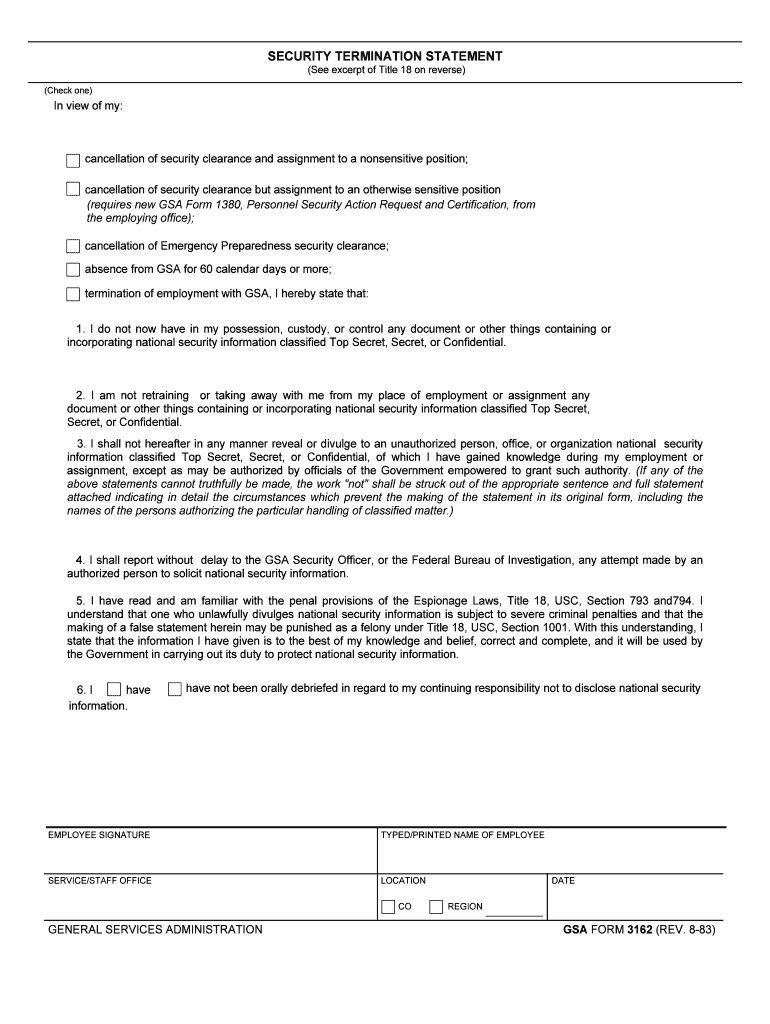
The GSA Form 3162 Security Termination Statement is a document used by employees of the General Services Administration (GSA) to certify non-disclosure of classified national security information upon termination of their security clearance or employment.
pdfFiller scores top ratings on review platforms




Who needs GSA Form 3162?
Explore how professionals across industries use pdfFiller.

GSA Form 3162 is needed by:
-
Employees of the General Services Administration (GSA)
-
Government contractors handling classified information
-
Personnel requiring security clearance termination
-
Human resources departments managing employee exits
-
Compliance officers ensuring security protocols
Comprehensive Guide to GSA Form 3162
What is the GSA Form 3162 Security Termination Statement?
The GSA Form 3162, known as the Security Termination Statement, serves a crucial role in certifying that employees will not disclose any classified national security information upon termination of their security clearance or employment. This form is essential for protecting sensitive information and ensuring adherence to national security protocols.
By completing this form, individuals confirm that they do not possess or will not disclose classified documents, which is vital for maintaining the integrity of national security operations.
Purpose and Benefits of the GSA Form 3162 Security Termination Statement
This form is particularly important for employees upon termination of their security clearance or employment, as it protects national security interests. It also clarifies the responsibilities of employees regarding the handling of classified information.
Submitting the GSA Form 3162 helps to ensure that sensitive data remains secure and that employees acknowledge their obligations, thereby reinforcing national security measures.
Who Needs the GSA Form 3162 Security Termination Statement?
The GSA Form 3162 must be completed by employees who have held a security clearance. This requirement notably impacts various job roles within the General Services Administration, where handling classified information is part of their responsibilities.
Key roles may include positions in security operations, data management, and any other roles with access to sensitive information.
How to Fill Out the GSA Form 3162 Security Termination Statement Online
Filling out the GSA Form 3162 online is a straightforward process, following these steps:
-
Access the fillable PDF version of the GSA Form 3162.
-
Enter your personal information as required.
-
Complete the sections regarding classified document retention and disclosure.
-
Review your entries for accuracy before submission.
This method allows for convenient completion and reduces the likelihood of errors that may occur when filling out a paper form.
Field-by-Field Instructions for Completing the GSA Form 3162
Filling out the GSA Form 3162 involves specific fields that must be detailed correctly. Here’s how to approach it:
-
Provide personal identification details accurately.
-
Clearly declare any classified documents you have retained.
-
Confirm the understanding of non-disclosure obligations.
To avoid common errors, double-check each field before finalizing the form. This diligence helps in ensuring compliance and avoids potential delays in processing.
How to Sign the GSA Form 3162 Security Termination Statement
Signing the GSA Form 3162 can be done through various options. Employees may choose between a digital signature or a conventional wet signature, depending on their preference and requirements.
It is essential to understand that the signed form may or may not require notarization based on specific compliance guidelines, emphasizing the importance of the signature as a commitment to abide by national security regulations.
Where to Submit the GSA Form 3162 Security Termination Statement
Once completed, the GSA Form 3162 must be submitted through designated channels. Submission options can include:
-
Emailing the completed form to the appropriate department.
-
Mailing it to the given address for security clearance termination statements.
Be mindful of any deadlines associated with the submission to ensure timely processing of your termination statement.
Security and Compliance for the GSA Form 3162
When managing the GSA Form 3162, security and compliance are of utmost importance. Organizations must ensure that sensitive information is handled with care, adhering to privacy and data protection regulations.
Understanding compliance requirements and implementing proper record retention policies will help protect both employee data and national security interests.
Using pdfFiller to Complete the GSA Form 3162
pdfFiller simplifies the process of completing the GSA Form 3162. With features such as editing, signing, and document management, users can efficiently navigate through the form.
Utilizing pdfFiller's secure platform not only streamlines the completion process but also provides peace of mind regarding the handling of sensitive documents.
Sample of a Completed GSA Form 3162 Security Termination Statement
For a better understanding of how to complete the form, refer to a sample of a filled GSA Form 3162. This visual guide provides clarity on how to interpret the information and assist users in accurately filling out their own forms.
By examining a completed example, individuals can better understand the expectations and requirements involved in submitting their Security Termination Statement.
How to fill out the GSA Form 3162
-
1.To access and open the GSA Form 3162 on pdfFiller, visit the pdfFiller website and search for 'GSA Form 3162' in the template library.
-
2.Once located, click on the form link to open it in the online editor.
-
3.Before starting, gather necessary information like your security clearance details and any classified documents you may have retained.
-
4.Begin filling out the form by entering your name, employee ID, and termination date in the designated fields.
-
5.Use checkboxes to confirm that you do not possess any classified information or documents.
-
6.Ensure you provide an accurate statement regarding your compliance with non-disclosure obligations.
-
7.Draw your signature at the end of the form using the signature feature in pdfFiller.
-
8.After completing the form, review all information for accuracy and completeness, checking each field for any errors.
-
9.Once satisfied, save your filled form within your pdfFiller account for easy access later.
-
10.Download the completed form in your desired format or submit it directly to your HR department through the pdfFiller submission options.

Who is required to submit the GSA Form 3162?
All employees of the General Services Administration (GSA) who are terminating their security clearance or employment must complete and submit the GSA Form 3162.
What documents do I need to complete the GSA Form 3162?
Gather your security clearance information and any active classified documents that may require disclosure. This ensures you're providing accurate information when completing the form.
How should I submit the GSA Form 3162 after filling it out?
You can submit the GSA Form 3162 directly to your HR department via email or their designated submission platform if required. Ensure you follow any specific submission guidelines provided by your organization.
Are there deadlines for submitting the GSA Form 3162?
Yes, it is important to submit the GSA Form 3162 promptly upon termination of your employment or security clearance. Check with your HR department for specific deadlines.
What are common mistakes to avoid when filling out the GSA Form 3162?
Ensure that all fields are accurately filled and double-check the signature section. A common error is forgetting to list any retained classified documents or failing to sign the form.
How long does it take to process the GSA Form 3162?
Processing times for the GSA Form 3162 may vary by department, but typically you can expect a response within a few business days. Contact your HR department for specific timelines.
Do I need to notarize the GSA Form 3162?
No, the GSA Form 3162 does not require notarization. However, you must ensure it is signed by the employee completing the form.
Related Forms





Get the latest insights from our blog


If you believe that this page should be taken down, please follow our DMCA take down process
here
.
This form may include fields for payment information. Data entered in these fields is not covered by PCI DSS compliance.