
Last updated on
Oct 30, 2026
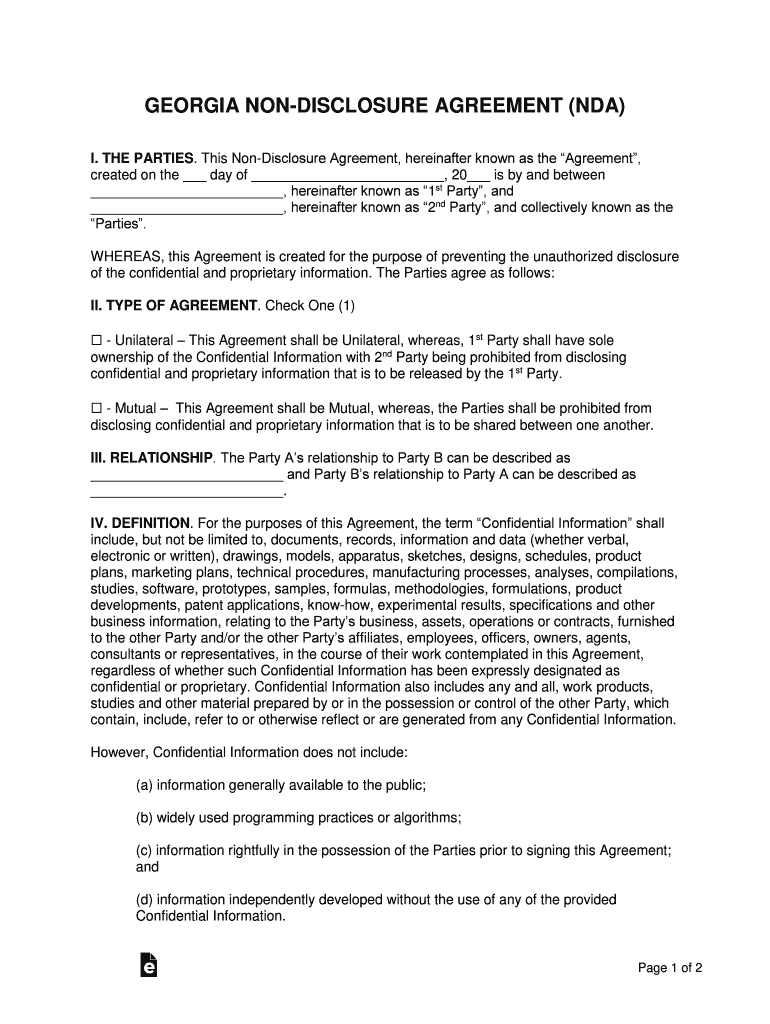
GA Non-Disclosure Agreement free printable template
pdfFiller is not affiliated with any government organization

Fill out
Complete the form online in a simple drag-and-drop editor.

eSign
Add your legally binding signature or send the form for signing.

Share
Share the form via a link, letting anyone fill it out from any device.

Export
Download, print, email, or move the form to your cloud storage.
Why pdfFiller is the best tool for your documents and forms


End-to-end document management
From editing and signing to collaboration and tracking, pdfFiller has everything you need to get your documents done quickly and efficiently.
Accessible from anywhere
pdfFiller is fully cloud-based. This means you can edit, sign, and share documents from anywhere using your computer, smartphone, or tablet.
Secure and compliant
pdfFiller lets you securely manage documents following global laws like ESIGN, CCPA, and GDPR. It's also HIPAA and SOC 2 compliant.
What is GA Non-Disclosure Agreement
The Georgia Non-Disclosure Agreement (NDA) is a legal document used by businesses and individuals to protect confidential information from unauthorized disclosure.
pdfFiller scores top ratings on review platforms




Who needs GA Non-Disclosure Agreement?
Explore how professionals across industries use pdfFiller.

GA Non-Disclosure Agreement is needed by:
-
Businesses looking to protect proprietary information in Georgia
-
Freelancers who need to share sensitive data with clients
-
Contractors who require confidentiality provisions in agreements
-
Companies entering partnerships in Georgia
-
Entrepreneurs sharing trade secrets with potential investors
Comprehensive Guide to GA Non-Disclosure Agreement
What is the Georgia Non-Disclosure Agreement (NDA)?
The Georgia Non-Disclosure Agreement (NDA) is a legal document designed to prevent the unauthorized disclosure of confidential information between parties. This agreement serves to protect sensitive data that may be shared during various business interactions. It can be structured as either a unilateral agreement, where only one party discloses information, or a mutual agreement, where both parties share confidential information.
Under Georgia law, the NDA is recognized as a binding contract, which ensures that both parties are legally obligated to maintain confidentiality. Using a Georgia NDA template can help parties formalize their confidentiality expectations in a clear and enforceable manner.
Purpose and Benefits of the Georgia Non-Disclosure Agreement (NDA)
The primary purpose of the Georgia NDA is to establish a legal framework that emphasizes the importance of confidentiality in business relationships. By entering into an NDA, parties can foster trust and ensure that proprietary information remains protected.
Some key benefits of utilizing a Georgia Non-Disclosure Agreement include:
-
Legal protection against unauthorized disclosures
-
Facilitation of open communication in business negotiations
-
Enhanced relationships and trust-building between partners
This agreement is typically employed during various situations such as business negotiations, partnerships, or when sharing sensitive project details.
Who Needs the Georgia Non-Disclosure Agreement (NDA)?
The Georgia NDA is a vital tool for several parties, including businesses, freelancers, and consultants. These entities often find themselves in situations where sharing confidential information is necessary yet requires legal protection.
Some common scenarios that necessitate an NDA include:
-
Discussions between employers and employees regarding sensitive projects
-
Information exchanges between business partners
-
Negotiations with potential investors or clients
By identifying these relationship dynamics, parties can determine when it is crucial to implement a Georgia Non-Disclosure Agreement.
How to Fill Out the Georgia Non-Disclosure Agreement (NDA) Online (Step-by-Step)
Completing the Georgia NDA online is a straightforward process that ensures all necessary information is accurately provided. Follow these steps to fill out the form:
-
Access the fillable Georgia NDA template online.
-
Fill in your relationship details, ensuring all fields are populated accurately.
-
Review the sections that require a signature, including the date fields.
-
Finalize the document by signing electronically through the online platform.
Pay close attention to critical fields like the parties' names and the specifics of the confidentiality obligation to ensure compliance and enforceability.
Common Errors and How to Avoid Them When Completing the NDA
When filling out a Non-Disclosure Agreement, several common mistakes can undermine its effectiveness. Recognizing these pitfalls can aid in a smoother completion process.
Some typical errors include:
-
Forgetting to include necessary signatures
-
Omitting essential details about the confidential information
-
Failing to date the agreement appropriately
To avoid these issues, utilize a verification checklist after completion to confirm the accuracy of the provided information.
Digital Signature vs. Wet Signature for the Georgia NDA
Understanding the signing requirements for the Georgia NDA is vital for ensuring its validity. In Georgia, digital signatures are legally recognized, which streamlines the signing process.
To eSign using pdfFiller, follow these steps:
-
Open the completed NDA document in the pdfFiller platform.
-
Navigate to the signature field and choose the digital signing option.
-
Follow the prompts to complete and save your eSignature.
There may be instances where a wet signature is preferred or necessary, particularly when dealing with parties that require a hard copy for their records.
How to Download and Save the Georgia Non-Disclosure Agreement (NDA) PDF
After completing your Non-Disclosure Agreement, obtaining a copy in PDF format is essential for your records. The download process allows for several options, ensuring you can secure your legal documents precisely how you prefer.
Follow these instructions to save your completed NDA:
-
Select the desired file format during the download process.
-
Ensure the document is saved securely on your personal or business device.
-
Organize your files effectively to avoid loss of important legal documents.
Maintaining an organized system for your NDAs will help protect your confidentiality agreements.
Where to Submit the Georgia Non-Disclosure Agreement (NDA)
After completing the Georgia NDA, knowing how and where to submit it is crucial. The submission process can vary based on the relationships and agreements in question.
Common submission methods include:
-
Submitting the NDA in-person to business partners or clients
-
Emailing the document directly to the concerned parties
Be aware that some scenarios may involve submission fees, depending on the parties involved and the nature of the engagement.
Security and Compliance for the Georgia Non-Disclosure Agreement (NDA)
Addressing concerns about security and compliance is essential when managing confidential agreements. Using a platform like pdfFiller ensures that your documents are safeguarded by robust security measures.
Key features include:
-
256-bit encryption for secure document handling
-
Compliance with industry regulations such as HIPAA and GDPR
Once the NDA is completed, it is vital to understand your responsibility in managing, storing, and protecting the confidential information outlined within.
Get Started with Your Georgia Non-Disclosure Agreement Today
Utilizing pdfFiller simplifies the process of creating, editing, and signing your Georgia Non-Disclosure Agreement. The platform is designed for user-friendliness, enabling you to secure your confidential information effortlessly.
With its comprehensive features, pdfFiller empowers you to take proactive steps in protecting your sensitive data while ensuring ease of use and robust security throughout the process.
How to fill out the GA Non-Disclosure Agreement
-
1.To access the Georgia Non-Disclosure Agreement on pdfFiller, navigate to the pdfFiller website and log in to your account. Use the search bar to find the specific form by typing 'Georgia Non-Disclosure Agreement'.
-
2.Once you find the form, click on it to open. Familiarize yourself with the pdfFiller interface - you will see fields that need to be filled in, checkboxes for selections, and signature lines.
-
3.Gather all necessary information before you start filling out the form. This includes the names of both parties, the nature of the confidential information, and any specific obligations that need to be included.
-
4.Start filling in the required fields. Click on each field to enter the appropriate information. Use the text tool for typing and checkboxes for your selections regarding the type of agreement (unilateral or mutual).
-
5.Ensure you complete any signature lines for both parties. Use the signature tool to add electronic signatures, and check the date fields to ensure they are filled in with the correct date.
-
6.After you have filled out the form, it is important to review all entries for accuracy. Ensure names are spelled correctly, and all necessary sections are completed.
-
7.When your review is done, click on the 'Save' button to retain your changes. You can also opt to download the completed NDA or submit it directly to the other party through email.
-
8.Finally, consider keeping a copy stored in pdfFiller for future reference or use. This ensures you can access the agreement anytime it’s needed in your business dealings.

Who can use the Georgia Non-Disclosure Agreement?
This NDA can be used by any individual or business entity in Georgia that needs to protect the confidentiality of sensitive information shared during business transactions.
Is there a need to notarize the Georgia NDA?
No, the Georgia Non-Disclosure Agreement does not require notarization. However, both parties' signatures are necessary for the agreement to be legally binding.
Can this NDA be modified after signing?
Yes, the Georgia NDA can be modified after signing if both parties agree to the new terms. It's recommended to document any changes in writing.
What happens if the NDA is breached?
If the NDA is breached, the non-breaching party may seek legal recourse for damages resulting from the unauthorized disclosure of confidential information.
Are there specific deadlines for using this NDA?
While there are no specific deadlines, parties should sign the NDA before sharing any sensitive information to ensure legal protection.
Where should I store the completed NDA?
It’s advisable to store the completed Georgia Non-Disclosure Agreement securely, either in a digital format on a trusted cloud service or in a physical file for easy access.
What common mistakes should be avoided while completing the NDA?
Common mistakes include leaving fields blank, using incorrect names, failing to specify all confidential information, and not having both parties sign before exchanging sensitive data.
Related Forms
Related Catalogs
Get the latest insights from our blog


If you believe that this page should be taken down, please follow our DMCA take down process
here
.
This form may include fields for payment information. Data entered in these fields is not covered by PCI DSS compliance.