
Last updated on
Oct 19, 2026
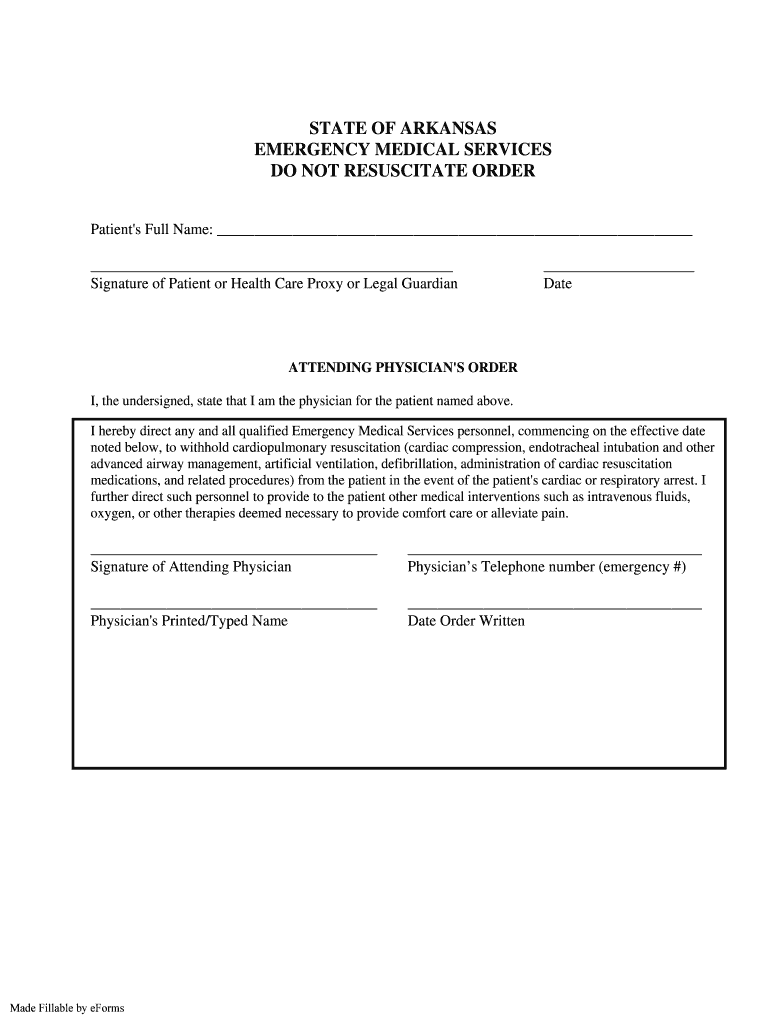
AR Do Not Resuscitate free printable template
pdfFiller is not affiliated with any government organization

Fill out
Complete the form online in a simple drag-and-drop editor.

eSign
Add your legally binding signature or send the form for signing.

Share
Share the form via a link, letting anyone fill it out from any device.

Export
Download, print, email, or move the form to your cloud storage.
Why pdfFiller is the best tool for your documents and forms


End-to-end document management
From editing and signing to collaboration and tracking, pdfFiller has everything you need to get your documents done quickly and efficiently.
Accessible from anywhere
pdfFiller is fully cloud-based. This means you can edit, sign, and share documents from anywhere using your computer, smartphone, or tablet.
Secure and compliant
pdfFiller lets you securely manage documents following global laws like ESIGN, CCPA, and GDPR. It's also HIPAA and SOC 2 compliant.
What is AR Do Not Resuscitate
The Arkansas Do Not Resuscitate Order is a healthcare form used by patients or their proxies to instruct emergency personnel to withhold resuscitation in case of cardiac or respiratory arrest.
pdfFiller scores top ratings on review platforms




Who needs AR Do Not Resuscitate?
Explore how professionals across industries use pdfFiller.

AR Do Not Resuscitate is needed by:
-
Patients in Arkansas wishing to determine their resuscitation preferences.
-
Health care proxies or legal guardians responsible for patients' medical decisions.
-
Attending physicians who will document and sign the DNR order.
-
Emergency medical services personnel who require clear advance directives.
-
Hospitals that must maintain accurate patient care records.
-
Healthcare facilities needing compliance with patient wishes.
Comprehensive Guide to AR Do Not Resuscitate
What is the Arkansas Do Not Resuscitate Order?
The Arkansas Do Not Resuscitate (DNR) Order is a legal document designed to instruct emergency medical services to withhold cardiopulmonary resuscitation in the event of cardiac or respiratory arrest. This form is crucial in ensuring medical personnel understand and respect the patient’s preferences regarding life-sustaining treatments. By indicating the patient’s wishes, the DNR order guides healthcare providers in offering comfort care and pain alleviation as per the individual’s instructions.
Why Use the Arkansas Do Not Resuscitate Order?
Having an Arkansas DNR form in place provides several benefits during medical emergencies. First, it guarantees that a patient’s wishes are respected, reducing the likelihood of unwanted interventions. Additionally, understanding the legal implications helps protect both the patient and healthcare providers from potential conflicts regarding end-of-life care. Holding a DNR can also provide peace of mind for patients and their families, knowing that their preferences are documented and will be honored.
Key Features of the Arkansas Do Not Resuscitate Order
The Arkansas DNR order contains essential components that must be addressed for the document to be valid. Key features include:
-
Fillable fields to include critical patient information.
-
Required signatures from the patient, healthcare proxy, and the attending physician.
-
Specific instructions regarding comfort care options.
These elements are vital to ensure the form complies with state regulations and accurately reflects the patient’s wishes.
Who Should Complete the Arkansas Do Not Resuscitate Order?
The Arkansas DNR form should be completed by patients, healthcare proxies, or legal guardians who are authorized to make medical decisions. It is crucial that these individuals understand their roles and responsibilities in signing the document. The attending physician also plays a key role in this process, as their signature is necessary to validate the order. This collaborative effort ensures that all parties involved are informed about eligibility and decision-making authority.
How to Fill Out the Arkansas Do Not Resuscitate Order Online
Completing the Arkansas DNR form online can be done easily by following these steps:
-
Access the fillable version of the form.
-
Provide the necessary patient information in the designated fields.
-
Ensure all required signatures and dates are included before submitting.
-
Utilize pdfFiller’s tools for e-signing if needed.
By following these steps, users can efficiently manage the completion of the DNR order from their devices.
Submission and Delivery of the Arkansas Do Not Resuscitate Order
After filling out the Arkansas DNR form, the next step is to submit it properly. The completed document should be delivered to appropriate healthcare facilities as specified. Users should be aware of any deadlines associated with filing the form and check for any potential fees related to submission. Monitoring the status of the submission can also provide reassurance that the document has been received and processed accordingly.
Common Errors and How to Avoid Them in the Arkansas Do Not Resuscitate Order
When completing the Arkansas DNR Order, users often make mistakes that can invalidate the form. Common errors include:
-
Missing signatures from required individuals.
-
Incorrect or incomplete patient information.
To avoid these mistakes, it is essential to review the form thoroughly before submission and ensure compliance with Arkansas state requirements regarding DNR orders.
Security and Privacy for the Arkansas Do Not Resuscitate Order
Ensuring the security and privacy of sensitive information is paramount when completing the Arkansas DNR form. pdfFiller employs 256-bit encryption and adheres to regulations, including HIPAA and GDPR, to protect user data. During the form filling and storage process, robust data protection practices are implemented, providing users with peace of mind regarding the confidentiality of their healthcare documents.
Real-Life Application: A Sample Arkansas Do Not Resuscitate Order
Providing a reference point, a sample filled-out Arkansas DNR form can assist users in understanding how to complete their own documents. This example highlights crucial sections and includes explanations to clarify any uncertainties. By using the sample as a guide, individuals can more confidently fill out their own DNR orders.
Utilizing pdfFiller for Your Arkansas Do Not Resuscitate Order
pdfFiller simplifies the process of completing and managing the Arkansas DNR form. With features designed to enhance the user experience, including eSigning and cloud storage, pdfFiller provides a convenient platform for handling important healthcare documents. The security measures in place ensure that users can complete their forms with ease while maintaining the confidentiality of their sensitive information.
How to fill out the AR Do Not Resuscitate
-
1.To access the form on pdfFiller, visit the pdfFiller website and search for 'Arkansas Do Not Resuscitate Order'.
-
2.Once you find the form, click on it to open it in the editor interface.
-
3.Review the sections and prepare any necessary information, such as the patient's full name and contact details.
-
4.Use the PDF editor’s fields to input the required information, filling in sections like the patient’s full name and the date.
-
5.Locate the signature fields for both the patient or their healthcare proxy/legal guardian and the attending physician.
-
6.Ensure all necessary boxes are checked for comfort care instructions, if applicable.
-
7.After completing the form, carefully review each section for accuracy, making sure all signatures are present.
-
8.Once satisfied with the form, use the save option to download a copy to your device or submit it directly through pdfFiller if required.

Who is eligible to complete the Arkansas Do Not Resuscitate Order?
Patients in Arkansas or their designated health care proxies or legal guardians are eligible to complete the Arkansas Do Not Resuscitate Order. It requires signatures from both the patient or proxy and the attending physician.
What information is required to complete this form?
To complete the Arkansas Do Not Resuscitate Order, you will need the patient's full name, signature, date, and the signatures of the health care proxy and the attending physician. Ensure all details are accurate and complete.
Where do I submit the completed DNR order?
The completed Arkansas Do Not Resuscitate Order should be discussed with your healthcare provider and may need to be submitted to the relevant healthcare facilities or emergency medical services to ensure it is recognized in emergencies.
Are there any common mistakes I should avoid?
Common mistakes include failing to obtain all required signatures, not checking necessary comfort care options, or submitting an incomplete form. Review the completed form thoroughly to avoid these issues.
What should I do if the form is not accepted?
If the Arkansas Do Not Resuscitate Order is not accepted, check for any missing signatures or required information. Consult with your healthcare provider or legal advisor for additional steps to ensure the form meets all requirements.
Is notarization required for this form?
No, notarization is not required for the Arkansas Do Not Resuscitate Order. However, signatures from the patient or their proxy and the attending physician are mandatory for it to be valid.
How can I ensure my DNR order is honored by emergency medical personnel?
To ensure your Arkansas Do Not Resuscitate Order is honored during emergencies, provide copies to your healthcare provider and keep a copy accessible, such as on your refrigerator or with your medical records.
Related Forms




Get the latest insights from our blog


If you believe that this page should be taken down, please follow our DMCA take down process
here
.
This form may include fields for payment information. Data entered in these fields is not covered by PCI DSS compliance.