
Last updated on
Nov 9, 2026

AK DMV 821 2015-2026 free printable template
pdfFiller is not affiliated with any government organization

Fill out
Complete the form online in a simple drag-and-drop editor.

eSign
Add your legally binding signature or send the form for signing.

Share
Share the form via a link, letting anyone fill it out from any device.

Export
Download, print, email, or move the form to your cloud storage.
Why pdfFiller is the best tool for your documents and forms


End-to-end document management
From editing and signing to collaboration and tracking, pdfFiller has everything you need to get your documents done quickly and efficiently.
Accessible from anywhere
pdfFiller is fully cloud-based. This means you can edit, sign, and share documents from anywhere using your computer, smartphone, or tablet.
Secure and compliant
pdfFiller lets you securely manage documents following global laws like ESIGN, CCPA, and GDPR. It's also HIPAA and SOC 2 compliant.
What is AK DMV 821
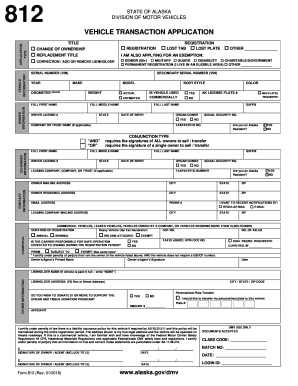
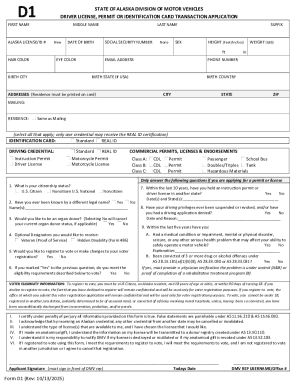
The Alaska Vehicle Transaction Application is a government form used by vehicle owners in Alaska to transfer license plates, request new plates, or amend vehicle registration details.
pdfFiller scores top ratings on review platforms




Who needs AK DMV 821?
Explore how professionals across industries use pdfFiller.

AK DMV 821 is needed by:
-
Registered vehicle owners in Alaska
-
Individuals requesting new license plates
-
Drivers needing to transfer vehicle ownership
-
People looking to change vehicle registration details
-
Alaska residents replacing lost license plates
-
Those updating vehicle information with the DMV
Comprehensive Guide to AK DMV 821
What is the Alaska Vehicle Transaction Application?
The Alaska Vehicle Transaction Application, known as Form 821, serves a critical role in vehicle transactions across Alaska. This form is essential for processes such as transferring license plates, replacing lost plates, and changing vehicle registration. Additionally, it is crucial that the registered owner provides their signature on the application to validate the transaction.
Purpose and Benefits of the Alaska Vehicle Transaction Application
The primary purpose of the Alaska Vehicle Transaction Application is to facilitate seamless vehicle registration and transactions for vehicle owners. Utilizing this form helps avoid potential legal issues or penalties related to improper vehicle registration. Timely processing of the application by the Alaska Division of Motor Vehicles ensures that vehicle owners can efficiently manage their responsibilities.
Who Needs the Alaska Vehicle Transaction Application?
The Alaska Vehicle Transaction Application is designed for various individuals. Vehicle owners in Alaska looking to transfer plates or amend their registration will find this form vital. New residents needing to register their vehicles and owners of vehicles with lost or damaged plates are also required to use this application.
How to Fill Out the Alaska Vehicle Transaction Application Online (Step-by-Step)
Completing the Alaska Vehicle Transaction Application online is straightforward with the following steps:
-
Access the application form and ensure you have your vehicle identification number (VIN) ready.
-
Fill in the current license plate number as instructed on the form.
-
Select the appropriate options, such as "Transfer my license plate to another vehicle."
-
Review all entered information for accuracy before submission to avoid mistakes.
-
Submit the completed form as directed to finalize the process.
Common Errors and How to Avoid Them When Completing the Application
To ensure a successful application submission, be mindful of the following common errors:
-
Leaving fields incomplete or entering an incorrect VIN.
-
Failing to include necessary documentation, such as proof of insurance and owner signatures.
-
Not validating information before submission which can lead to processing delays.
Submission Methods and Delivery of the Alaska Vehicle Transaction Application
You can submit the Alaska Vehicle Transaction Application using several methods:
-
Online submission through the Alaska DMV website.
-
Mailing the completed form to the respective DMV office.
-
In-person submission at a local DMV office.
Be aware of the expected processing times and confirm the receipt of your application to ensure it is being handled efficiently.
Security and Compliance for the Alaska Vehicle Transaction Application
When using pdfFiller to complete the Alaska Vehicle Transaction Application, rest assured about document security. The platform employs 256-bit encryption and adheres to HIPAA and GDPR compliance standards. Protecting your sensitive information while filling out the form is paramount, and pdfFiller offers features that ensure document integrity throughout the editing and signing processes.
How pdfFiller Can Assist You with the Alaska Vehicle Transaction Application
pdfFiller can significantly streamline your experience with the Alaska Vehicle Transaction Application. Its cloud-based platform allows for easy editing, eSigning, and sharing of forms without the need for additional downloads. Utilizing pdfFiller enhances convenience and accessibility, ensuring an efficient form completion and submission process.
What Happens After You Submit the Alaska Vehicle Transaction Application
After submitting the Alaska Vehicle Transaction Application, you can typically expect a processing timeline that varies. It is vital to keep track of your application's status and know how to amend any errors if needed. If you encounter issues during processing, having the proper procedures in place to report these problems will help resolve them swiftly.
Real Success Stories: How Users Benefited from the Alaska Vehicle Transaction Application
Many users have found success through the Alaska Vehicle Transaction Application. Testimonials highlight positive experiences in navigating the form completion process. Users often emphasize the benefits of successfully submitting the application and the supportive customer service provided by pdfFiller, which enhances user confidence in the process.
How to fill out the AK DMV 821
-
1.To access the Alaska Vehicle Transaction Application, visit pdfFiller and search for the form by name or form number (Form 821).
-
2.Once you locate the form, click on it to open it in the pdfFiller editor. Ensure your browser allows pop-ups to avoid issues while editing.
-
3.Before starting the form, gather necessary information such as your vehicle's VIN, current license plate number, proof of insurance, and any existing plate design details.
-
4.Begin filling in the fields on the form interface. Use pdfFiller's tools to input your information, selecting options from available checkboxes or typing in blank fields.
-
5.As you fill in the form, keep an eye on the instructions and guidance provided in the pdfFiller toolbar to help you complete each section correctly.
-
6.After entering all required information, review the form carefully. Make sure that all information is accurate and complete to avoid processing delays.
-
7.Once reviewed, you can save your progress by clicking the save icon or download the completed form in your preferred file format for submission.
-
8.To submit the form, follow the pdfFiller instructions for sending it to the Alaska Division of Motor Vehicles, which may include electronic submission options or printing and mailing.

Who is eligible to complete the Alaska Vehicle Transaction Application?
Any registered owner of a vehicle in Alaska can complete the Alaska Vehicle Transaction Application. This form is specifically for individuals who need to transfer their vehicle registration or license plates.
What supporting documents are needed to submit this form?
Before starting, gather the vehicle's VIN, current license plate number, and proof of insurance. These documents are essential to complete your application accurately.
How do I submit the completed Alaska Vehicle Transaction Application?
You can submit the completed form by mailing it to the Alaska Division of Motor Vehicles, or in some cases, you can take it to a DMV office for processing. Double-check the submission guidelines on the form.
Is there a deadline for submitting the Alaska Vehicle Transaction Application?
While there may not be a strict deadline, it is best to submit your application timely to avoid delays in vehicle registration or legality issues. Check with the DMV for specific processing times.
What are common mistakes to avoid when filling out this form?
Ensure you fill in all required fields accurately, especially the VIN and license plate number. Missing or incorrect details can lead to application delays or rejections.
How long does it take to process the Alaska Vehicle Transaction Application?
Processing times can vary, but typically, it takes a few weeks to receive confirmation from the Alaska DMV after submission. Check their website for updates or changes in processing.
Can I fill out the Alaska Vehicle Transaction Application online?
You could use pdfFiller to fill out the application online. Follow their steps to access the form electronically for ease of completion.
Related Forms




Get the latest insights from our blog



If you believe that this page should be taken down, please follow our DMCA take down process
here
.
This form may include fields for payment information. Data entered in these fields is not covered by PCI DSS compliance.