
Last updated on
Nov 6, 2026

Get the free Affidavit Attesting to the Mailing of Papers or Documents
We are not affiliated with any brand or entity on this form

Fill out
Complete the form online in a simple drag-and-drop editor.

eSign
Add your legally binding signature or send the form for signing.

Share
Share the form via a link, letting anyone fill it out from any device.

Export
Download, print, email, or move the form to your cloud storage.
Why pdfFiller is the best tool for your documents and forms


End-to-end document management
From editing and signing to collaboration and tracking, pdfFiller has everything you need to get your documents done quickly and efficiently.
Accessible from anywhere
pdfFiller is fully cloud-based. This means you can edit, sign, and share documents from anywhere using your computer, smartphone, or tablet.
Secure and compliant
pdfFiller lets you securely manage documents following global laws like ESIGN, CCPA, and GDPR. It's also HIPAA and SOC 2 compliant.
What is Mailing Affidavit
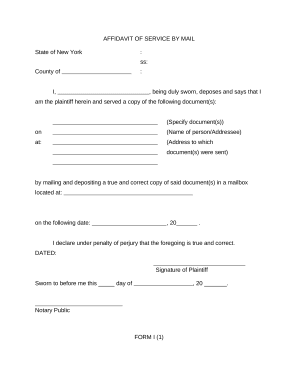
The Affidavit Attesting to the Mailing of Papers or Documents is a legal form used by individuals to provide sworn testimony verifying that specific documents were mailed to a designated recipient.
pdfFiller scores top ratings on review platforms




I wish it wasn't so expensive...I'm still on the free trial right now but this app is great. Maybe offer like a college student pricing? I know us kids in college cant pay $40 a month for it
Works well, just need to take the time to learn process. It's good you offer the free trial period to do just that.
You guys have made my life so much easier for forms.
So easy and quick! Love how quick this program loads, allows me to erase, rotate a document that scanned upside down. Nice clean quality print.
This is a wonderful software to use
This is a wonderful software to use. No more paper-printing and scanning in. I just do everything electronically, it saves the environment as well as a lot of time.
PDF filler is a great product and is user friendly
Who needs Mailing Affidavit?
Explore how professionals across industries use pdfFiller.

Mailing Affidavit is needed by:
-
Individuals preparing legal documents.
-
Affiants needing to validate document delivery.
-
Notaries public facilitating sworn statements.
-
Lawyers requiring proof of documentation.
-
Court officials overseeing legal filings.
Comprehensive Guide to Mailing Affidavit
What is the Affidavit Attesting to the Mailing of Papers or Documents?
An affidavit attesting to the mailing of papers or documents is a legal affidavit form used primarily to provide sworn testimony that specific documents were sent via mail to a designated recipient. This form serves as a crucial legal document, affirming the mailing process undertaken by the affiant. It is vital for securing legal interests, as it delivers evidence of document dispatch.
The main purpose of this affidavit is to confirm that the documents were mailed correctly, safeguarding against potential disputes regarding the non-receipt of important legal communications. By providing a legal affirmation, it strengthens the credibility of the sender's claims in any legal context.
Purpose and Benefits of Using the Affidavit Attesting to the Mailing of Papers or Documents
The affidavit serves an important legal function by providing official testimony concerning the mailing of documents. This is particularly significant in legal proceedings where proof of sending documents is essential to uphold the integrity of the process. The affidavit mailing documents also ensures that all parties involved acknowledge the delivery status of crucial correspondence.
Using this affidavit offers several advantages, including:
-
Establishment of a definitive mailing record.
-
Legal protection against claims of non-delivery.
-
Documentation that supports the affiant's assertions in court.
Key Features of the Affidavit Attesting to the Mailing of Papers or Documents
The form comes with specific required elements that must be filled out precisely. Key fields include the description of the documents mailed, the mailing date, and the recipient's address. Moreover, the document necessitates notarization, confirming that the affiant's signature is valid and verifiable by a notary public.
An effective notarized affidavit template must clearly indicate the roles of both the affiant and the notary, ensuring that the responsibilities are well defined. This clarity derives from the explicit instructions included within the form, such as where to describe the documents or specify the addressee's information.
Who Needs the Affidavit Attesting to the Mailing of Papers or Documents?
This affidavit is necessary for a variety of individuals and entities that engage in legal or formal correspondence. Common scenarios include attorneys sending pleadings or notices, businesses sending contracts, and individuals submitting court documents. Each of these situations may require an affidavit to substantiate the mailing process.
Generally, anyone involved in legal proceedings, such as plaintiffs, defendants, or witnesses, may need this affidavit to support their case. It acts as an essential legal affidavit form to ensure proper documentation of important communications.
How to Fill Out the Affidavit Attesting to the Mailing of Papers or Documents Online (Step-by-Step)
Filling out the affidavit online is a straightforward process. Here’s a step-by-step guide:
-
Access the digital form through the specified platform.
-
Enter the document description in the designated field.
-
Fill in the recipient's name and address accurately.
-
Specify the date when the documents were mailed.
-
Review all entered information for accuracy.
-
Sign the form where indicated, before submitting it for notarization.
Submitting and Notarizing the Affidavit Attesting to the Mailing of Papers or Documents
After completing the affidavit, the submission process involves selecting the appropriate method based on local regulations. Users must be mindful of any deadlines associated with submitting the affidavit, ensuring timely delivery for legal compliance.
Notarization is a critical step in the process. To notarize the affidavit, the affiant must present identification to the notary public, who will then witness the signing of the document. This verification step adds an additional layer of authenticity, confirming that the information is correct and truly reflects the affiant's declaration.
Common Errors and How to Avoid Them When Filing the Affidavit
When completing the affidavit, it is easy to encounter common errors that could lead to complications. Some frequent mistakes include:
-
Inaccurate recipient information.
-
Failure to notarize the document.
-
Omitting essential details regarding the mailing date or document description.
To avoid these errors, always double-check all fields before finalizing the affidavit and ensure you understand each section clearly. Utilizing a sworn affidavit template can provide guidance and structure.
Security and Compliance for the Affidavit Attesting to the Mailing of Papers or Documents
Handling legal affidavits necessitates a strong emphasis on document security and privacy. It is crucial to store and transmit these sensitive documents securely to prevent unauthorized access. pdfFiller employs robust security measures, including 256-bit encryption, to assure users that their documents are protected.
Compliance with regulations such as HIPAA and GDPR is also essential when dealing with legal documents, contributing to a secure environment for all users involved in completing the affidavit.
Additional Resources for Completing Your Affidavit Attesting to the Mailing of Papers or Documents
Users seeking to complete their affidavits can benefit from additional resources and tools provided by pdfFiller. These include access to related forms or templates that streamline the affidavit process and legal guidelines that explain the obligations associated with affidavits.
Utilizing these resources can enhance understanding and ensure completeness when preparing legal documents.
Simplifying Your Document Management with pdfFiller
pdfFiller simplifies document management by offering features designed for efficient handling of affidavits. Users can take advantage of the platform's pdf editor to easily fill out, sign, and manage their affidavits with ease. The benefits of digital editing and document storage allow for quick access and organization, fostering a more effective workflow.
How to fill out the Mailing Affidavit
-
1.Access pdfFiller and log into your account or create a new account if you don't have one. Search for 'Affidavit Attesting to the Mailing of Papers or Documents' in the template library.
-
2.Click on the form to open it in the pdfFiller editor. Familiarize yourself with the layout and features available in the interface.
-
3.Gather the necessary information before filling out the form, including details about the documents mailed, the date of mailing, and the recipient's complete address.
-
4.Begin by filling in the required fields, such as describing the documents you mailed. Use the prompts provided to ensure you include all necessary information.
-
5.Next, provide the recipient's address accurately to avoid any issues with the claimed receipt of documents. Utilize the form's typing and formatting tools to maintain clarity.
-
6.Once you have completed all fields, take a moment to review the information provided. Ensure that everything is accurate and up to date, paying special attention to any instructions given.
-
7.After reviewing, proceed to finalize your form. You may add any necessary signatures directly within pdfFiller, using its signature tool.
-
8.Save your form once you've completed it by selecting the save option. Choose a suitable format for saving, including PDF or another preferred format.
-
9.If required, download the completed form to your device for submission or print a hard copy to submit by mail. Alternatively, explore options to directly submit the form using pdfFiller's submission tools.

Who needs to sign the Affidavit Attesting to the Mailing of Papers or Documents?
Both the affiant, who verifies the mailing, and a notary public, who validates the affidavit, are required to sign this document.
Is notarization required for this affidavit?
Yes, notarization is mandatory for the Affidavit Attesting to the Mailing of Papers or Documents to ensure authenticity and legal validity.
What documents must accompany this affidavit?
Typically, none are required; however, it is advisable to retain copies of the documents mentioned in the affidavit for personal records.
How can I submit the completed affidavit?
You can submit the completed affidavit by mailing it to the designated recipient or electronically if allowed. Check local laws for specific submission requirements.
What mistakes should I avoid when completing this affidavit?
Ensure all information is accurate, complete fields without leaving any blank, and verify the recipient's address to avoid processing delays.
Are there any deadlines for submitting this affidavit?
Deadlines vary depending on the legal context. Ensure to check any specifics relevant to your situation or consult with a legal professional.
How long does it take for the affidavit to be processed?
Processing times can vary based on the recipient or jurisdiction; consult your notary public or local court for typical timelines.
Related Forms





Related Catalogs
Get the latest insights from our blog


If you believe that this page should be taken down, please follow our DMCA take down process
here
.
This form may include fields for payment information. Data entered in these fields is not covered by PCI DSS compliance.