
Last updated on
Oct 31, 2026

Get the free Acceptance of Resignation from an Employee
We are not affiliated with any brand or entity on this form

Fill out
Complete the form online in a simple drag-and-drop editor.

eSign
Add your legally binding signature or send the form for signing.

Share
Share the form via a link, letting anyone fill it out from any device.

Export
Download, print, email, or move the form to your cloud storage.
Why pdfFiller is the best tool for your documents and forms


End-to-end document management
From editing and signing to collaboration and tracking, pdfFiller has everything you need to get your documents done quickly and efficiently.
Accessible from anywhere
pdfFiller is fully cloud-based. This means you can edit, sign, and share documents from anywhere using your computer, smartphone, or tablet.
Secure and compliant
pdfFiller lets you securely manage documents following global laws like ESIGN, CCPA, and GDPR. It's also HIPAA and SOC 2 compliant.
What is Resignation Acceptance
The Acceptance of Resignation from an Employee is a formal document used by employers to officially accept an employee's resignation and acknowledge their contributions.
pdfFiller scores top ratings on review platforms




Haven't put the app to the test fully but so fare my experience has been excellent.
Incredibly helpful for creating worksheets for my students
It is great to be able to do this online
Been great, easy to work and add documents!!
Has done what I needed it to do for my different forms. Saves me a lot of time
Great program. It did everything I needed and more. Some of the best customer service I've ever experienced, right at the time I"ve been having a problem. Copies of online chat sent to my email to remind me of how to deal with issues in the future. I'd rate these folks an A plus.
I needed to turn regular electronic forms into fillable ones and submit electronically, with a signature and by a deadline, during the pandemic. I was early and complete with this program!
Who needs Resignation Acceptance?
Explore how professionals across industries use pdfFiller.

Resignation Acceptance is needed by:
-
Human Resource Managers
-
Business Owners
-
Employers in various industries
-
Employees preparing to resign
-
Legal professionals reviewing employment documentation
-
Administrative staff managing employee records
Comprehensive Guide to Resignation Acceptance
What is the Acceptance of Resignation from an Employee?
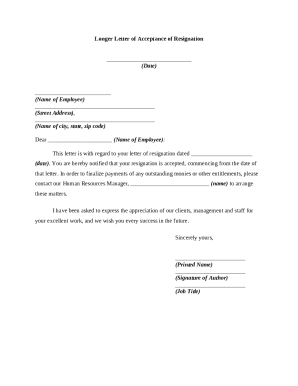
The acceptance of resignation from an employee is a formal document that acknowledges the termination of an employee’s position within an organization. This form is crucial in ensuring that both the employee and employer have a clear understanding of the end of employment. It typically includes key details such as the employee’s name, job title, and address, and it is signed by the employer to confirm acceptance.
By utilizing an acceptance of resignation form, organizations can maintain professionalism and support positive relationships even as employees depart. This practice not only helps clarify the employment status but also serves to document the employee's contributions during their tenure.
Purpose and Benefits of the Acceptance of Resignation from an Employee
The acceptance of resignation from an employee is vital for several reasons. First, it ensures clear communication between parties regarding the termination of employment. This clarity is essential for both the organization and the departing employee, as it delineates expectations for the notice period and any final responsibilities.
-
It serves as a record for legal and administrative purposes, protecting both the employer and employee.
-
The document formally acknowledges the contributions of the employee, fostering goodwill in professional relationships.
Moreover, having a resignation acceptance template readily available simplifies the documentation process for human resources personnel.
Key Features of the Acceptance of Resignation from an Employee
This acceptance form contains several key components that users should be familiar with. One of the primary features is the collection of fillable fields that include the employee’s name, job title, and address. These details are essential for accurately documenting the resignation.
-
The employer's signature is a finalizing element of the form, confirming acceptance of the resignation.
-
Instructions for filling out the form are provided to prevent errors in completion.
Understanding these components helps users effectively navigate the acceptance of resignation process.
Who Needs the Acceptance of Resignation from an Employee?
The acceptance of resignation form is necessary for various stakeholders within an organization. Employers, especially in industries with higher turnover rates, must efficiently manage employee resignations. Human resources personnel play a pivotal role in ensuring proper documentation during termination processes.
-
Employees who have submitted a resignation letter may require formal acknowledgment of the acceptance.
-
This form is beneficial in maintaining records of Employee status changes for compliance purposes.
How to Fill Out the Acceptance of Resignation from an Employee Online (Step-by-Step)
Filling out the acceptance of resignation form online can be straightforward when following these steps:
-
Access the form on the provided platform.
-
Fill in the required fields, including the employee’s name, job title, and address.
-
Ensure the employer’s signature is included to finalize the document.
Providing accurate and complete information is essential to prevent delays in the acceptance process. Visual aids or screenshots can enhance understanding of the form's navigation.
Common Errors and How to Avoid Them When Completing the Acceptance of Resignation Form
While completing the resignation acceptance form, users may encounter common pitfalls. Missing fields or providing incorrect signatures can lead to complications, so being thorough is crucial.
-
Double-checking all information before submission can prevent many issues.
-
Using clear and professional language enhances the form’s appearance and effectiveness.
How to Sign the Acceptance of Resignation from an Employee
Signing the acceptance of resignation form can be done through different methods, each reflecting the current practices in the workplace. Digital signatures provide a convenient option, while traditional wet signatures remain common in many organizations.
-
Understanding legal implications is important in determining the appropriate method of signing.
-
Including the author's signature is vital for the formal acceptance of the resignation.
Submitting the Acceptance of Resignation from an Employee
After filling out the form, the next step is submission. Employers can choose various submission methods, including email, physical mail, or through a designated internal system.
-
Be mindful of any deadlines to ensure timely acceptance.
-
Tracking submissions is important for record-keeping and follow-up.
How pdfFiller Conveniently Assists with the Acceptance of Resignation from an Employee
pdfFiller provides an excellent platform for users to manage the acceptance of resignation process efficiently. It offers features for form filling, editing, and eSigning, all within a secure environment.
-
The platform is designed for ease of use, allowing straightforward completion of this specific form.
-
Security measures, including 256-bit encryption, ensure sensitive documents are handled safely.
Next Steps After Submitting the Acceptance of Resignation from an Employee
Once the acceptance of resignation form has been submitted, users can expect several next steps. Confirmation of the submission typically follows, along with indications of any processing times.
-
Guidance on how to amend or correct issues may be provided if discrepancies arise.
-
Maintaining records of the acceptance is recommended for both employer and employee.
How to fill out the Resignation Acceptance
-
1.To access the Acceptance of Resignation from an Employee form on pdfFiller, begin by navigating to the pdfFiller website and using the search bar to enter the form name.
-
2.Once you find the form, click on it to open the interactive interface.
-
3.Before filling out the form, gather essential information such as the employee's name, job title, address, and the employer's name and signature.
-
4.Start by filling in the 'Date' field, which indicates when the form is being completed.
-
5.Proceed to enter the 'Name of Employee' in the designated field, followed by their 'Street Address' and 'City, State, and Zip Code'.
-
6.Next, fill in the 'Name of Job Title' to specify the position the employee is resigning from.
-
7.In the next field labeled 'Name of Employer', input the official name of the employer or organization.
-
8.Then, the 'Signature of Author' field should be signed by the employer or authorized personnel confirming the acceptance of resignation.
-
9.Once all fields are filled in, review the document for any errors or missing information.
-
10.Use pdfFiller's editing tools to make any necessary corrections or to adjust the format if needed.
-
11.When satisfied with the completed form, you can save your changes using the save option or download the completed document in your preferred format.
-
12.Finally, consider submitting the form electronically through pdfFiller, or print it for physical signatures as per your company's policy.

What do I need to complete this form?
To complete the Acceptance of Resignation from an Employee form, you need the employee's full name, job title, address, and the employer's name along with the signature of the authorized individual.
Is there a deadline for submitting this resignation acceptance?
While there is generally no strict deadline, it is advisable to process the resignation acceptance form promptly after receiving the resignation letter to maintain clear communication with the employee.
How do I submit this form once it is completed?
You can submit the completed Acceptance of Resignation form electronically through pdfFiller, or print it out for physical submission according to your organization’s procedures.
Are there any supporting documents required with this form?
Typically, no additional supporting documents are required, but it may be beneficial to reference the original resignation letter for clarity and documentation purposes.
What are common mistakes to avoid when completing this form?
Ensure that all fields are filled out accurately, especially the names and titles. Missing signatures or incorrect dates are common errors to avoid.
How long does it take to process this form?
Processing time can vary, but most employers should complete the Acceptance of Resignation promptly to maintain professionalism. Generally, it can be processed within a day.
Can this form be notarized?
No, notarization is not required for the Acceptance of Resignation from an Employee form, making it simpler and quicker to complete.
Related Forms




Related Catalogs
Get the latest insights from our blog


If you believe that this page should be taken down, please follow our DMCA take down process
here
.
This form may include fields for payment information. Data entered in these fields is not covered by PCI DSS compliance.