
Last updated on
Nov 9, 2026

CA DWC Form 10214 2008-2026 free printable template
pdfFiller is not affiliated with any government organization

Fill out
Complete the form online in a simple drag-and-drop editor.

eSign
Add your legally binding signature or send the form for signing.

Share
Share the form via a link, letting anyone fill it out from any device.

Export
Download, print, email, or move the form to your cloud storage.
Why pdfFiller is the best tool for your documents and forms


End-to-end document management
From editing and signing to collaboration and tracking, pdfFiller has everything you need to get your documents done quickly and efficiently.
Accessible from anywhere
pdfFiller is fully cloud-based. This means you can edit, sign, and share documents from anywhere using your computer, smartphone, or tablet.
Secure and compliant
pdfFiller lets you securely manage documents following global laws like ESIGN, CCPA, and GDPR. It's also HIPAA and SOC 2 compliant.
What is CA DWC Form 10214
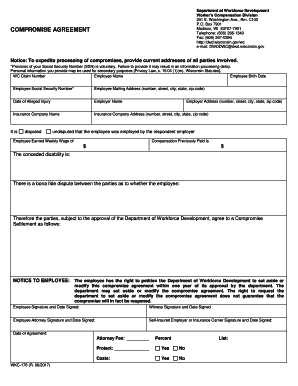
The California Workers' Compensation Compromise and Release is a legal document used by employees and employers to settle workers' compensation claims in California.
pdfFiller scores top ratings on review platforms




Who needs CA DWC Form 10214?
Explore how professionals across industries use pdfFiller.

CA DWC Form 10214 is needed by:
-
Employees filing for workers' compensation settlements
-
Employers settling employees' claims
-
Applicant's Attorneys representing injured workers
-
Defendant's Attorneys handling compensation disputes
-
Insurance adjusters managing claims
-
Human resources professionals overseeing employee claims
Comprehensive Guide to CA DWC Form 10214
What is the California Workers' Compensation Compromise and Release?
The California Workers' Compensation Compromise and Release is a crucial legal document used to settle workers' compensation claims. This form facilitates an agreement between the employee, employer, and their respective attorneys, ensuring a clear resolution of claims related to workplace injuries. Central to this process is the DWC-CA form 10214, which details the specific terms of the compromise. Understanding this form helps injured workers navigate their rights and the settlement process effectively.
Purpose and Benefits of the California Compromise and Release Form
The primary purpose of the California compromise release form is to streamline the settlement process for injured workers. By using this form, both employees and employers can benefit significantly. Key advantages include:
-
Efficient resolution of claims, preventing lengthy legal disputes.
-
Clear documentation that protects the interests of both parties involved.
-
Facilitation of timely compensation for workers, aiding in their recovery.
Documentation is essential in ensuring that all aspects of the settlement are recorded accurately, minimizing future disputes.
Key Features of the California Workers' Compensation Compromise and Release
The California workers comp form is designed with various essential features that must be meticulously completed. The layout includes required fields that gather detailed information about the claim, such as:
-
Injury details, including the nature and extent of the injuries.
-
Signature requirements from all involved parties, ensuring legal validity.
-
Critical dates related to the incident and submission of the form.
Filling out this form accurately is vital, as errors or omissions can lead to complications in the settlement process.
Who Needs the California Workers' Compensation Compromise and Release?
This form is primarily used by employees filing claims for workplace injuries and employers who are settling those claims. Attorneys play a key role in this process, ensuring that both sides understand their rights and obligations under the law. The involvement of legal representation is crucial to navigate the nuances of the California workers comp legal form.
How to Fill Out the California Workers' Compensation Compromise and Release Online
Filling out the California workers comp release form online can simplify the process. Follow this step-by-step guide using pdfFiller:
-
Access the DWC-CA form 10214 on pdfFiller.
-
Enter personal information in designated fields, such as name and address.
-
Detail the injury by describing the nature and cause.
-
Ensure all required signatures are included before submission.
-
Review for accuracy to meet legal requirements.
By meticulously following these steps, you can ensure proper completion of the form and adherence to legal standards.
Submission Methods and Delivery for the California Compromise and Release Form
Upon completion, the California Compromise and Release form can be submitted via various methods. Common submission approaches include:
-
Electronic submission through designated online platforms.
-
Mailing the form to the appropriate Workers' Compensation Appeals Board address.
It is crucial to be aware of deadlines and processing timelines, as these can affect the outcome of your claim.
What Happens After You Submit the California Workers' Compensation Compromise and Release
After submission, the Workers' Compensation Appeals Board will review the California workers comp document. Possible outcomes include:
-
Approval of the compromise, leading to settlement disbursement.
-
Rejection, which may require additional documentation or clarification.
Being informed about these next steps will help you navigate the post-submission process effectively.
Common Errors to Avoid When Filing the California Compromise and Release
Avoiding common errors when completing the California compromise release form is essential. Frequent mistakes include:
-
Omitting critical details about the injury or parties involved.
-
Failure to provide necessary signatures.
Reviewing a checklist before submission can significantly reduce these errors, ensuring a smooth filing process.
Security and Compliance When Handling the California Workers' Compensation Form
Security is paramount when handling sensitive documents such as the California workers compensation form. pdfFiller guarantees secure management of your data through:
-
256-bit encryption to protect against unauthorized access.
-
Compliance with HIPAA and GDPR regulations, ensuring privacy and security.
Maintaining data security is crucial in legal document management, particularly when sensitive information is involved.
Explore pdfFiller for Your California Workers' Compensation Compromise and Release Needs
Utilizing pdfFiller for your California workers compensation form online needs provides significant benefits. Users can enjoy:
-
Ease of filling out and managing the form efficiently.
-
Access to various editing tools to ensure precision and accuracy.
Experience a seamless transition into managing your legal documents effectively with this platform.
How to fill out the CA DWC Form 10214
-
1.To access the California Workers' Compensation Compromise and Release form on pdfFiller, visit the official website and log in or create an account if you don’t have one.
-
2.Once logged in, use the search bar on the dashboard to find the DWC-CA form 10214 by entering the form's name or relevant keywords.
-
3.Open the form by clicking on its title in the search results. This will launch the document in the pdfFiller editor where you can start filling it out.
-
4.Before completing the form, gather necessary information including your personal details, injury specifics, dates, and any prior agreements.
-
5.Use the fillable fields to input your information accurately. Ensure you fill out all required sections marked clearly in the form.
-
6.Navigate through the form using pdfFiller’s intuitive interface, utilizing features like autofill for addresses and dropdown menus for selecting options.
-
7.Once the form is completed, review all entries to verify your information is correct and all fields are appropriately filled out.
-
8.To save your progress, click the 'Save' button. You can also choose to download a copy to your device for your records.
-
9.When ready, use the 'Submit' button for electronic submission directly from pdfFiller, or download the completed document to send by mail.

Who is eligible to use the California Workers' Compensation Compromise and Release form?
The form is primarily for employees and employers involved in a workers' compensation claim in California. Additionally, their respective attorneys must be involved in the signing process.
Are there any deadlines for submitting this form?
While there are no specific deadlines outlined in the form metadata, it's crucial to submit workers' compensation claims and associated forms promptly, ideally within statutory limits set by California law.
How do I submit the California Workers' Compensation Compromise and Release form?
You can submit the form electronically through pdfFiller or download it to print and send it via postal mail. Ensure all required signatures are obtained before submission.
What supporting documents are needed when submitting this form?
Typically, you may need to include any medical records related to the injury, evidence of expenses incurred, and prior settlement agreements, if applicable.
What are common mistakes to avoid when filling out this form?
Common mistakes include leaving fields blank that are required, incorrect personal information, not signing where necessary, and failing to review before submission.
How long does it take to process the California Workers' Compensation Compromise and Release form?
Processing times may vary based on the Workers' Compensation Appeals Board's workload. Generally, it can take several weeks to confirm approval and finalize the release.
What happens after I submit this form?
Once submitted, the form will be reviewed by the responsible parties. If approved, the employer and insurance carrier will be released from liability related to the specified injuries.
Related Content
Related Forms



Get the latest insights from our blog


If you believe that this page should be taken down, please follow our DMCA take down process
here
.
This form may include fields for payment information. Data entered in these fields is not covered by PCI DSS compliance.