
Last updated on
Nov 9, 2026

FCPS SS/SE-222 2013-2026 free printable template
pdfFiller is not affiliated with any government organization

Fill out
Complete the form online in a simple drag-and-drop editor.

eSign
Add your legally binding signature or send the form for signing.

Share
Share the form via a link, letting anyone fill it out from any device.

Export
Download, print, email, or move the form to your cloud storage.
Why pdfFiller is the best tool for your documents and forms


End-to-end document management
From editing and signing to collaboration and tracking, pdfFiller has everything you need to get your documents done quickly and efficiently.
Accessible from anywhere
pdfFiller is fully cloud-based. This means you can edit, sign, and share documents from anywhere using your computer, smartphone, or tablet.
Secure and compliant
pdfFiller lets you securely manage documents following global laws like ESIGN, CCPA, and GDPR. It's also HIPAA and SOC 2 compliant.
What is FCPS SS/SE-222
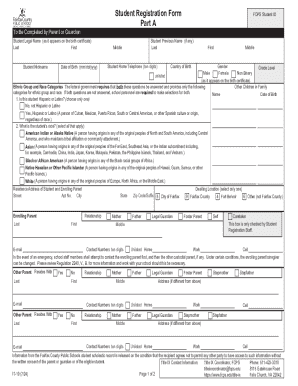
The Initial Student Transfer Application is an education form used by parents or guardians to request a transfer for their school-aged child to another school within the Fairfax County Public Schools (FCPS) system.
pdfFiller scores top ratings on review platforms




Who needs FCPS SS/SE-222?
Explore how professionals across industries use pdfFiller.

FCPS SS/SE-222 is needed by:
-
Parents or guardians of K-12 students seeking a school transfer
-
Base school principals approving transfer applications
-
Requested school principals assessing student enrollment
-
Student registration offices processing transfer requests
-
Families relocating within the Fairfax County area
-
Employees of FCPS wanting to transfer their children
Comprehensive Guide to FCPS SS/SE-222
What is the Initial Student Transfer Application?
The Initial Student Transfer Application is a crucial form that parents or guardians in Fairfax County, Virginia, use to facilitate school transfers within Fairfax County Public Schools (FCPS). This application serves the purpose of ensuring that each student's educational needs are met effectively. By completing the FCPS transfer application, families can initiate a transition to a more suitable educational environment for their child.
This application is essential not only for the transfer process but also for the overall well-being of students, allowing them to continue their education in an environment that best suits their individual needs.
Purpose and Benefits of the Initial Student Transfer Application
The purpose of the Initial Student Transfer Application is to provide a structured method for parents or guardians to request a school transfer for their child. This form is beneficial because it can lead to an improved educational atmosphere tailored to the child's unique circumstances, such as family relocation or personal situations. Additionally, approved transfers are valid for one year, allowing families the flexibility needed for educational planning.
-
Enhances the child's learning experience
-
Adds convenience for families navigating difficult circumstances
-
Ensures continuity in education
Eligibility Criteria for the Initial Student Transfer Application
To fill out the Initial Student Transfer Application, certain eligibility criteria must be met. Applicants must typically be school-aged children (K-12) residing within Fairfax County, Virginia. Common reasons that warrant a transfer include medical issues, childcare hardships, or other personal circumstances that justify the need for a change in educational setting.
Supporting documentation must be provided with the application to substantiate the request, ensuring a thorough review process.
When and How to File the Initial Student Transfer Application
The timeline for filing the Initial Student Transfer Application spans from March 1 to June 1. To successfully submit the transfer request, follow these step-by-step instructions:
-
Download the student transfer form PDF from the FCPS website.
-
Complete all required fields accurately.
-
Attach the necessary supporting documentation.
-
Submit the application to your child's base school by the deadline.
Late submissions may result in rejection, so timely filing is crucial.
Required Documents and Supporting Materials
When submitting the Initial Student Transfer Application, certain mandatory documents must accompany the form. These documents can include:
-
Proof of relocation, such as lease agreements or utility bills
-
Medical documentation for health-related transfer requests
Gathering these documents ahead of time can streamline the application process and ensure a complete submission.
How to Fill Out the Initial Student Transfer Application Online
To complete the Initial Student Transfer Application online, follow this detailed guide:
-
Access the online application form through the FCPS website.
-
Enter personal details, including the student's name and address.
-
Clearly state the reasons for the transfer in the designated section.
-
Ensure all signatures are obtained as required.
Taking care to provide accurate information will help avoid unnecessary delays in processing.
Signing and Submitting the Initial Student Transfer Application
All signatures from the involved parties are necessary for a valid application. This includes the parent or guardian and signatures from both the base school principal and the requested school principal. Understanding digital versus wet signatures is also critical, as both may be accepted based on the submission guidelines.
Once completed, ensure that the form is submitted to the appropriate school office.
Confirmation, Tracking, and What Happens After Submission
After submitting the application, parents or guardians should confirm the successful submission via the designated school contact. Tracking the status of the application is also advised, as various methods may be available to check on the application's progress.
Upon acceptance, families should expect communication regarding the next steps in the transfer process.
Common Issues and How to Avoid Rejection of the Initial Student Transfer Application
Applicants often face rejection due to common errors. To minimize mistakes, consider the following tips:
-
Review the application thoroughly before submission.
-
Ensure all required fields are filled in accurately.
Understanding frequent rejection reasons can further aid in crafting a solid application.
Utilizing pdfFiller to Complete Your Student Transfer Application
pdfFiller offers an intuitive platform for completing the Initial Student Transfer Application. Its features allow users to edit and fill out the form easily while maintaining security for sensitive information. Users are encouraged to take advantage of pdfFiller for a more streamlined and secure application experience.
How to fill out the FCPS SS/SE-222
-
1.To access the Initial Student Transfer Application, visit the pdfFiller website and search for the form in the form library.
-
2.Once located, click on the form to open it in the pdfFiller editor. You will see all fillable fields and signature areas.
-
3.Before starting, gather essential information such as your child's name, date of birth, address, and the reason for the transfer. Collect any supporting documents required for your application.
-
4.Begin filling in the form by entering your child's information, including their full name and address in the designated fields.
-
5.In the section for the reason for transfer, select the appropriate checkbox and provide additional details as required.
-
6.Navigate to the signature sections and ensure that spaces for your signature, base and requested school principals are included.
-
7.After completing all fields, carefully review the form for any missing information or errors, ensuring all necessary signatures are accounted for.
-
8.To finalize your form, use the 'Save' option in pdfFiller. You can also choose to download the form as a PDF file for your records.
-
9.If required, submit the completed application electronically through pdfFiller, or print it out to submit it directly to the relevant school.

Who is eligible to fill out the Initial Student Transfer Application?
The Initial Student Transfer Application can be filled out by parents or guardians of kindergarten through 12th-grade students who are currently enrolled in Fairfax County Public Schools and wish to transfer to a different school.
What is the deadline for submitting the transfer application?
The application must be submitted between March 1 and June 1 each year. Ensure you meet this deadline to be considered for the next academic year.
What supporting documents are required with the application?
Supporting documents may include proof of residency such as a utility bill, medical records, or documentation of family relocation. The specific documents depend on the reason for the transfer.
How can I submit the completed transfer application?
You can submit the completed application electronically via pdfFiller or print and deliver it to the appropriate school’s student registration office. Ensure you follow submission guidelines provided by the FCPS.
What are common mistakes to avoid when filling out the form?
Common mistakes include missing signatures, providing incorrect student information, and failing to include required supporting documents. Double-check all entries before submission.
What is the processing time for transfer applications?
Processing times may vary, but it usually takes several weeks to review and approve applications. Keep an eye on communications from the FCPS after submission.
Can I appeal a denied transfer application?
Yes, if your transfer application is denied, you may have the option to appeal the decision. Contact your local school’s administration for specific appeal procedures.
Related Content
Related Forms



Related Catalogs
Get the latest insights from our blog



If you believe that this page should be taken down, please follow our DMCA take down process
here
.
This form may include fields for payment information. Data entered in these fields is not covered by PCI DSS compliance.