
Last updated on
Nov 10, 2026
AK PG-433 2005-2026 free printable template
pdfFiller is not affiliated with any government organization

Fill out
Complete the form online in a simple drag-and-drop editor.

eSign
Add your legally binding signature or send the form for signing.

Share
Share the form via a link, letting anyone fill it out from any device.

Export
Download, print, email, or move the form to your cloud storage.
Why pdfFiller is the best tool for your documents and forms


End-to-end document management
From editing and signing to collaboration and tracking, pdfFiller has everything you need to get your documents done quickly and efficiently.
Accessible from anywhere
pdfFiller is fully cloud-based. This means you can edit, sign, and share documents from anywhere using your computer, smartphone, or tablet.
Secure and compliant
pdfFiller lets you securely manage documents following global laws like ESIGN, CCPA, and GDPR. It's also HIPAA and SOC 2 compliant.
What is AK PG-433
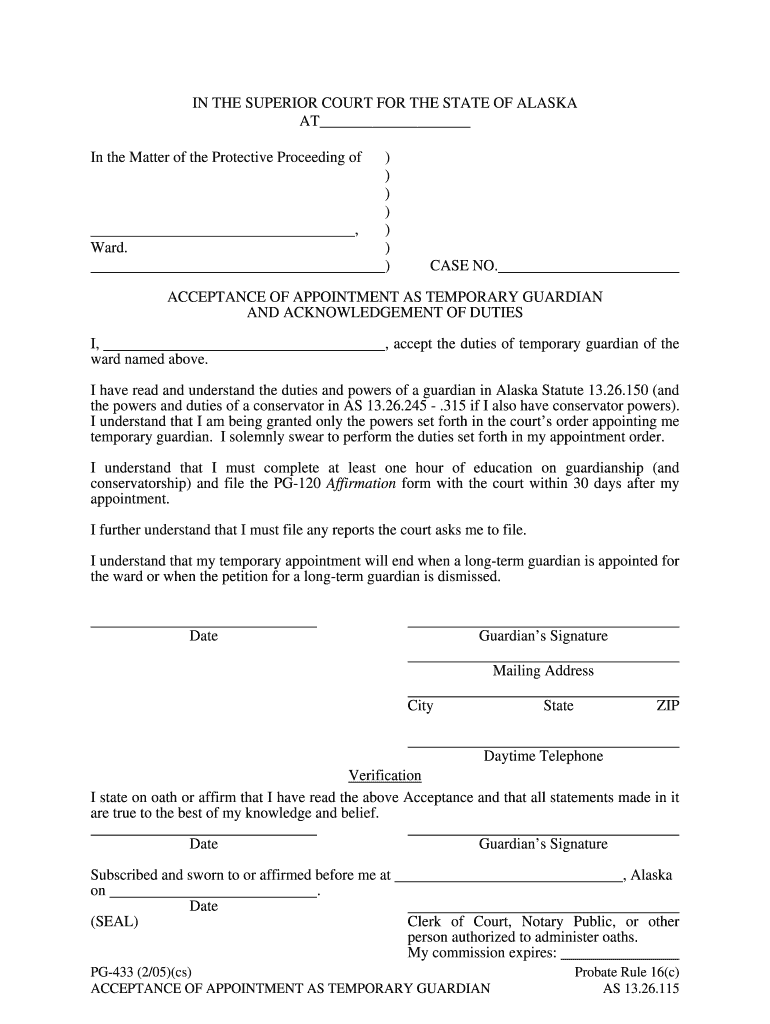
The Alaska Temporary Guardian Acceptance Form is a legal document used by appointed guardians to formally accept their role and acknowledge responsibilities in Alaska.
pdfFiller scores top ratings on review platforms




Who needs AK PG-433?
Explore how professionals across industries use pdfFiller.

AK PG-433 is needed by:
-
Individuals appointed as temporary guardians in Alaska
-
Parents or legal guardians seeking a temporary guardian for their child
-
Legal professionals assisting clients with guardianship matters
-
Courts and legal entities involved in guardianship cases
-
Social workers managing child custody or welfare cases
Comprehensive Guide to AK PG-433
What is the Alaska Temporary Guardian Acceptance Form?
The Alaska Temporary Guardian Acceptance Form serves to recognize the appointment of a temporary guardian and emphasize its legal implications. This form is a crucial document that details the responsibilities and duties expected from the temporary guardian under Alaska law. Upon accepting this appointment, guardians must adhere to specific requirements, including filing the PG-120 Affirmation within 30 days of acceptance.
The role of a temporary guardian is significant, as they are entrusted with the care of a child or incapacitated adult during a predetermined period. By filling out this form, guardians demonstrate their understanding of the duties that such a role entails, ensuring the protection and welfare of those under their care.
Purpose and Benefits of the Alaska Temporary Guardian Acceptance Form
The importance of the Alaska Temporary Guardian Acceptance Form lies in its ability to formalize the guardian's acceptance, which clarifies their responsibilities. By completing this form, guardians acknowledge their duties explicitly, promoting responsible guardianship under Alaska's legal framework.
Formalizing acceptance fosters a better understanding of the obligations of guardianship, thus enhancing the welfare of the child or incapacitated adult. Each guardian must be aware that fulfilling these responsibilities is vital in ensuring a stable and supportive environment during their appointed time.
Key Features of the Alaska Temporary Guardian Acceptance Form
-
Includes signature lines and spaces for personal information such as addresses and telephone numbers.
-
Features checkboxes for various acknowledgments related to the guardianship role.
-
Requires notarization or administration by a court clerk to validate the guardian's acceptance.
-
Specific sections must be filled to comply with Alaska statutes, ensuring legal adherence.
Who Needs the Alaska Temporary Guardian Acceptance Form?
This form is essential in various situations that necessitate a temporary guardian in Alaska, including instances of parental absence or incapacity. Individuals who are eligible to fill out the form must meet specific criteria, including age requirements and legal standing.
Potential guardians should also be aware of the limitations that may apply, as not all individuals may qualify for guardianship roles depending on personal circumstances or prior legal issues.
How to Fill Out the Alaska Temporary Guardian Acceptance Form Online
Completing the Alaska Temporary Guardian Acceptance Form online through platforms like pdfFiller is efficient and straightforward. Before starting, users should gather essential information such as personal identification, details of the person under guardianship, and understanding of the duties involved.
Follow these steps to fill out the form accurately:
-
Access the form on pdfFiller.
-
In each field, provide accurate information as required.
-
Make use of any prompts or instructions included within the form.
-
Review all entries for accuracy before submitting.
How to Sign or Notarize the Alaska Temporary Guardian Acceptance Form
The signing process for the Alaska Temporary Guardian Acceptance Form can be completed with either digital signatures or traditional wet signatures, depending on the requirements. Guardians must ensure that their signatures are provided on the form to validate their acceptance.
Notarization is an essential step for this form, which can be performed by a licensed notary. Guardians should be prepared to present additional documentation, if necessary, to ensure the authenticity of their application.
Where and How to Submit the Alaska Temporary Guardian Acceptance Form
When it comes to submitting the Alaska Temporary Guardian Acceptance Form, users have options for both electronic and physical submission methods. Whether using online portals or mailing physical copies, it's crucial to follow the designated procedures outlined by Alaska's legal system.
Potential fees may apply during the filing process, and guardians should review payment options available through the pertinent legal channels. Moreover, being aware of submission deadlines and processing times is important for ensuring timely compliance with guardianship regulations.
Security and Compliance for the Alaska Temporary Guardian Acceptance Form
Security is a top priority when submitting sensitive documents such as the Alaska Temporary Guardian Acceptance Form. Platforms like pdfFiller implement robust security measures to protect user data, including 256-bit encryption and compliance with HIPAA and GDPR standards.
These security protocols provide users with peace of mind, knowing that their personal and legal information is treated with the utmost confidentiality and adheres to established data protection laws.
Sample or Example of a Completed Alaska Temporary Guardian Acceptance Form
To further aid understanding, an illustrated example of a filled-out Alaska Temporary Guardian Acceptance Form can provide clarity. This example helps prospective guardians visualize the expected details and layout.
It is essential to pay attention to common mistakes that could occur when filling out the form, as these can affect its validity. Each piece of information included should align with legal requirements stipulated by the Alaska statutes to avoid potential issues.
Experience the Ease of Completing Your Alaska Temporary Guardian Acceptance Form with pdfFiller
Utilizing pdfFiller not only simplifies the process of completing the Alaska Temporary Guardian Acceptance Form but also enhances document management through tools for editing and e-signing. Users can take advantage of the platform's cloud-based access, allowing for easy online form filling without downloading software.
Designed to meet the legal documentation needs of users, pdfFiller ensures that custodians can fulfill their responsibilities securely and efficiently.
How to fill out the AK PG-433
-
1.Access the Alaska Temporary Guardian Acceptance Form on pdfFiller by searching for the form name in the platform's search bar.
-
2.Once the form appears, click to open it in the pdfFiller editor. Familiarize yourself with the layout and the fields that require input.
-
3.Before filling out the form, gather necessary information such as your full name, address, telephone number, and a valid form of identification. Ensure you understand the guardian duties outlined in Alaska Statute 13.26.150.
-
4.In the form editor, start filling out the required fields. Use pdfFiller's tools to easily input text into blank sections. Take your time to complete each section accurately.
-
5.If applicable, check the boxes as instructed on the form. Ensure you include all information as required by the instructions provided within the document.
-
6.Review all filled sections to confirm accuracy and completeness. Make sure your name is correctly spelled, and that all necessary signatures are added.
-
7.Once you are satisfied with the completed form, save your work on pdfFiller by clicking the 'Save' button. You can also choose to download a copy to your device.
-
8.To complete the submission process, opt for email submission via pdfFiller or print the form if you prefer to file it physically at the necessary location.

Who is eligible to use the Alaska Temporary Guardian Acceptance Form?
Any individual appointed as a temporary guardian for a child in Alaska is eligible to use this form. The guardian must fully understand their responsibilities before acceptance.
What are the deadlines for filing the acceptance form?
The acceptance form must be filed within 30 days of the guardian's appointment. It is important to complete it promptly to adhere to the state's requirements.
How do I submit the completed Alaska Temporary Guardian Acceptance Form?
You can submit the completed form either electronically through pdfFiller or by printing it and submitting it in person at the relevant court or legal authority.
Are there any required supporting documents for this form?
Yes, usually the guardian must provide identification and may need to file the PG-120 Affirmation form along with this acceptance form, verifying the completion of necessary education.
What common mistakes should I avoid while filling out the form?
Ensure all fields are accurately filled, especially your signature and the information required under your duties. Missing information can lead to delays or rejection of the form.
How long does it take to process the acceptance form?
Processing times can vary by jurisdiction, but it typically takes a few business days once submitted. For a faster process, ensure that all information is complete and accurate.
What happens if I forget to notarize the form?
The form must be notarized or administered by a court clerk to be considered valid. Failing to do so may invalidate your acceptance and require you to refile.
Related Forms



Get the latest insights from our blog



If you believe that this page should be taken down, please follow our DMCA take down process
here
.
This form may include fields for payment information. Data entered in these fields is not covered by PCI DSS compliance.