
Last updated on
Nov 6, 2026
Get the free Defendant Case File Coversheet
We are not affiliated with any brand or entity on this form

Fill out
Complete the form online in a simple drag-and-drop editor.

eSign
Add your legally binding signature or send the form for signing.

Share
Share the form via a link, letting anyone fill it out from any device.

Export
Download, print, email, or move the form to your cloud storage.
Why pdfFiller is the best tool for your documents and forms


End-to-end document management
From editing and signing to collaboration and tracking, pdfFiller has everything you need to get your documents done quickly and efficiently.
Accessible from anywhere
pdfFiller is fully cloud-based. This means you can edit, sign, and share documents from anywhere using your computer, smartphone, or tablet.
Secure and compliant
pdfFiller lets you securely manage documents following global laws like ESIGN, CCPA, and GDPR. It's also HIPAA and SOC 2 compliant.
What is Case File Coversheet
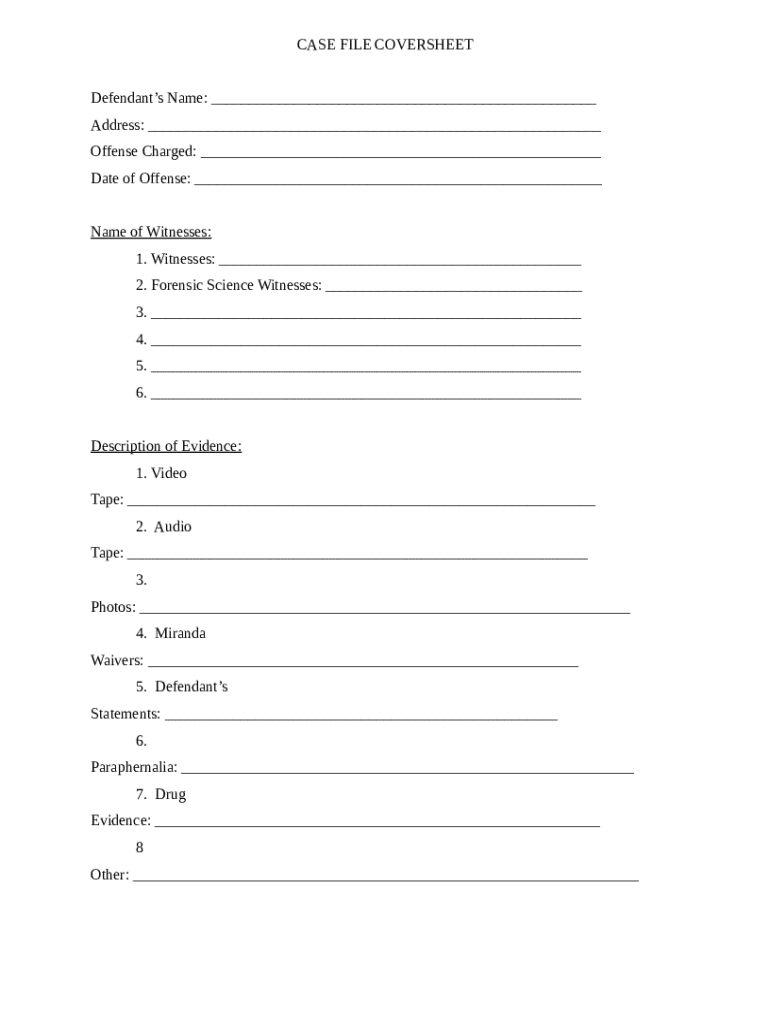
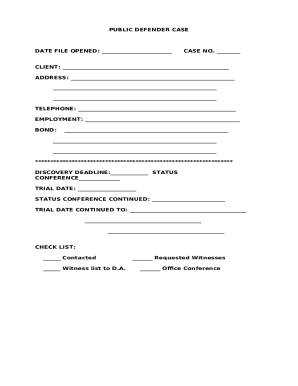
The Defendant Case File Coversheet is a legal document used by law enforcement and legal professionals to record and organize information about a defendant in a criminal case.
pdfFiller scores top ratings on review platforms




Just starting out, but I am impressed with the functionality and short learning curve.
So far, so good. Will be sending out forms for completion soon.
User friendly
Amazing Product - Great for Tweaking our Board Reports
Simple to use once I understood the process
perfect
perfect, simple and easy to work with.....
Who needs Case File Coversheet?
Explore how professionals across industries use pdfFiller.

Case File Coversheet is needed by:
-
Criminal defense attorneys
-
Prosecutors and district attorneys
-
Law enforcement officers
-
Court clerks
-
Private investigators
-
Legal aid organizations
Comprehensive Guide to Case File Coversheet
What is the Defendant Case File Coversheet?
The Defendant Case File Coversheet is a crucial document in the legal process, used to record information pertaining to a defendant in a criminal case. It serves to streamline the organization and presentation of case-related details.
-
Includes essential information like the defendant's name and the offense charged.
-
Facilitates proper documentation for legal professionals and law enforcement.
-
Supports the creation of a comprehensive criminal case coversheet that enhances case management.
Purpose and Benefits of the Defendant Case File Coversheet
This coversheet is essential for ensuring accurate documentation in criminal cases. Legal professionals and defendants benefit tremendously from its structured format, which aids in organizing important information.
-
Enhances the efficiency of case preparation and management.
-
Helps law enforcement maintain an orderly record of evidence and witness testimonies.
-
Provides a standardized format for legal affidavits, increasing reliability in the legal process.
Key Features of the Defendant Case File Coversheet
The design of the Defendant Case File Coversheet includes user-friendly features that facilitate easy completion and organization of case details.
-
Contains fillable fields that allow for quick data entry.
-
Incorporates checkboxes for streamlined documentation of witnesses and evidence gathered.
-
Provides dedicated sections for listing seized items and additional pertinent details.
Who Needs the Defendant Case File Coversheet?
Essentially, the Defendant Case File Coversheet is intended for use by legal professionals and law enforcement personnel involved in criminal cases. Its use spans various situations where detailed documentation is needed.
-
Utilized by defense attorneys to prepare case files effectively.
-
Required by prosecutors for maintaining organized records.
-
Beneficial for police officers during investigations and arrests.
Eligibility and Usage Guidelines for the Defendant Case File Coversheet
Eligibility and proper usage of the Defendant Case File Coversheet can vary based on jurisdiction, thus it's important to understand local regulations.
-
Users must comply with state-specific eligibility criteria to utilize the coversheet.
-
Guidelines for the correct filing process must be followed to ensure validity.
How to Complete the Defendant Case File Coversheet Online
Filling out the Defendant Case File Coversheet online is straightforward, especially using a service like pdfFiller, which streamlines the process.
-
Start by accessing the online form through a web browser.
-
Follow field-by-field instructions to accurately provide the required information.
-
Avoid common pitfalls such as incomplete sections or incorrect data entries.
Processing and Submission of the Defendant Case File Coversheet
After completing the coversheet, users must submit it through the designated channels. Understanding the options available for submission can prevent delays.
-
Choose from various submission methods, including electronic and postal options.
-
Be aware of any applicable fees and submission deadlines.
-
Utilize tracking systems to monitor the status of your submission.
What Happens After Submission of the Defendant Case File Coversheet?
Post-submission, users should anticipate a processing period and understand the procedures for tracking their submission status.
-
Processing timelines can vary; users should inquire locally for specifics.
-
Monitoring submission status helps identify any errors that may need correction.
Security and Compliance for the Defendant Case File Coversheet
Security is paramount when handling legal documents such as the Defendant Case File Coversheet. Using services that prioritize data protection is essential.
-
High-level encryption measures safeguard sensitive information within the form.
-
Compliance with HIPAA and GDPR ensures protection of personal data.
Utilizing pdfFiller to Fill Out the Defendant Case File Coversheet
pdfFiller simplifies the process of filling out the Defendant Case File Coversheet. Its features enhance user experience and support efficient document management.
-
Users can take advantage of tools like text editing and electronic signing.
-
Utilizing pdfFiller's capabilities ensures proper handling and submission of forms.
How to fill out the Case File Coversheet
-
1.Access the Defendant Case File Coversheet on pdfFiller by searching for the form in the templates section or by entering its name in the search bar.
-
2.Open the form by clicking on it. The pdfFiller interface allows you to view and edit the document directly.
-
3.Before filling out the form, gather pertinent information such as the defendant's name, address, charges, date of the offense, and any witness or evidence details you may have.
-
4.As you start completing the fields, click on each section to enter information. Use fillable text boxes for names and details, selecting checkboxes where applicable.
-
5.Ensure that all fields are completed accurately. Review your entries to avoid mistakes, especially regarding legal terminology or dates.
-
6.Once completed, take time to review the entire form for any omissions or errors. This is crucial to ensure the document's validity.
-
7.To save your progress or final version, click on the save button. You can also download the completed file in various formats or submit it directly through pdfFiller.

Who is eligible to use the Defendant Case File Coversheet?
Any legal professional, including defense attorneys and prosecutors, or law enforcement personnel involved in criminal cases can use the Defendant Case File Coversheet.
What kind of information is required to fill out this form?
You will need the defendant's personal details, specific charges, date of offense, witness information, and details about the evidence and any items that have been seized.
How do I submit the completed Defendant Case File Coversheet?
Completed forms can be submitted to the appropriate court or legal authority involved in the case. Check local guidelines for any specific submission procedures.
Are there any common mistakes to avoid when filling out this form?
Ensure that all sections are filled completely; do not leave fields blank unless specifically instructed. Double-check names and dates to ensure accuracy.
How long does it typically take to process this form?
Processing times can vary based on the jurisdiction and the specific court involved. Generally, expect a few days to weeks for processing after submission.
Is notarization required for the Defendant Case File Coversheet?
No, this form does not require notarization. However, always check local regulations to confirm any specific requirements.
Can I save my progress on pdfFiller while filling out the form?
Yes, pdfFiller allows you to save your progress at any time. Make sure to save changes before exiting the form to avoid losing information.
Related Forms



Get the latest insights from our blog


If you believe that this page should be taken down, please follow our DMCA take down process
here
.
This form may include fields for payment information. Data entered in these fields is not covered by PCI DSS compliance.