
Last updated on
Nov 6, 2026
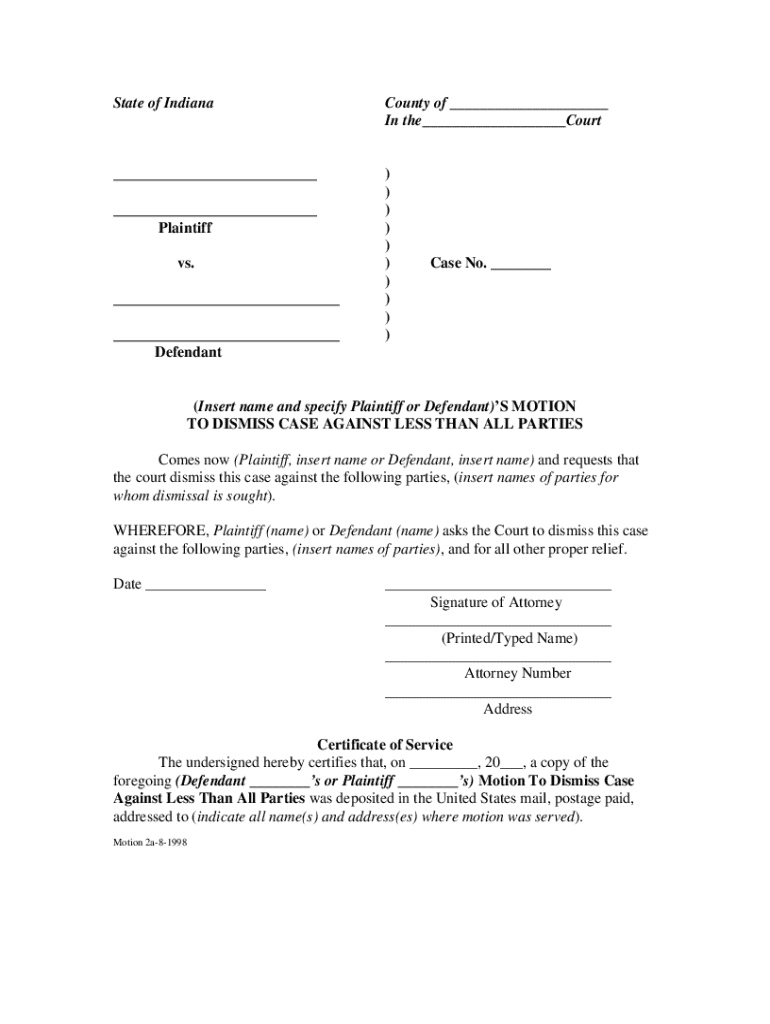
Get the free Motion to Dismiss Case Against Less Than All Parties
We are not affiliated with any brand or entity on this form

Fill out
Complete the form online in a simple drag-and-drop editor.

eSign
Add your legally binding signature or send the form for signing.

Share
Share the form via a link, letting anyone fill it out from any device.

Export
Download, print, email, or move the form to your cloud storage.
Why pdfFiller is the best tool for your documents and forms


End-to-end document management
From editing and signing to collaboration and tracking, pdfFiller has everything you need to get your documents done quickly and efficiently.
Accessible from anywhere
pdfFiller is fully cloud-based. This means you can edit, sign, and share documents from anywhere using your computer, smartphone, or tablet.
Secure and compliant
pdfFiller lets you securely manage documents following global laws like ESIGN, CCPA, and GDPR. It's also HIPAA and SOC 2 compliant.
What is Dismissal Motion
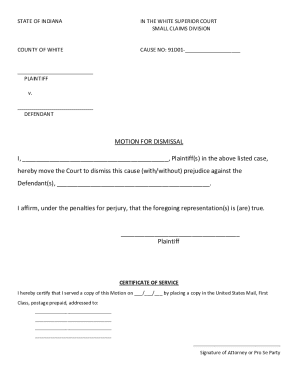
The Motion to Dismiss Case Against Less Than All Parties is a legal document used by plaintiffs and defendants in Indiana to request the dismissal of a case against certain parties while the case continues against others.
pdfFiller scores top ratings on review platforms




Easy, Clear, and Great. It does not require any special skills to master it.
We had a misunderstanding of the duration of the service. PDF was very gracious in correcting the mistake. I will not hesitate to use their services again. I highly reccmend this company for anyone.
Anna did an amazing job stepping me through my problem ! Thanks Anna !!! *****
PDFfiller has been great to work with! It has made it easier in running my business being able to send documents to clients and have them fill it out online and submit.
iT IS AN ENJOYMENT. wORKS BETTER THAN OTHERS.
Used once to extend lease. Plan to study further how I can use in my real estate rental business.
Who needs Dismissal Motion?
Explore how professionals across industries use pdfFiller.

Dismissal Motion is needed by:
-
Plaintiffs looking to manage case defendants
-
Defendants aiming to dismiss claims against them
-
Attorneys representing clients in Indiana courts
-
Legal professionals handling case documentation
-
Individuals wanting to avoid unnecessary litigation
Comprehensive Guide to Dismissal Motion
What is the Motion to Dismiss Case Against Less Than All Parties?
The motion to dismiss case against less than all parties is a legal request used within Indiana courts to dismiss specific parties from a lawsuit while allowing the case to proceed against others. This motion is particularly important as it helps streamline proceedings and can reduce unnecessary legal expenses. In this context, "less than all parties" refers to scenarios where certain defendants or plaintiffs are removed from a case based on specific legal grounds. The Indiana court form for this motion has unique requirements that must be adhered to in order for it to be accepted.
Purpose and Benefits of the Motion to Dismiss
The motion to dismiss provides significant advantages for both plaintiffs and defendants involved in litigation. One primary benefit is that it allows for the dismissal of certain parties while ensuring that the case continues against others. This can lead to a reduction in legal costs by potentially shortening the overall litigation process. By eliminating non-essential parties, the motion streamlines court proceedings, making it easier to focus on the key issues at hand.
Who Needs the Motion to Dismiss?
Various individuals involved in a lawsuit should consider using the motion to dismiss case against less than all parties. This includes plaintiffs who wish to narrow down their claims and defendants seeking to limit their exposure. Attorneys representing either side may find this motion beneficial in specific scenarios. For example, it may be advisable to file this motion when certain parties are not essential to the case or when their involvement unnecessarily complicates the proceedings.
Eligibility Criteria for Filing the Motion to Dismiss
To file a motion to dismiss in Indiana courts, specific eligibility criteria must be met. Individuals seeking to file this motion need to ensure compliance with relevant Indiana statutes or regulations that govern the dismissal process. Not all cases may qualify for this motion; it is essential to review the specific situations that may not meet the criteria required for such a dismissal. Understanding these limitations is crucial before proceeding with the motion.
How to Fill Out the Motion to Dismiss Case Against Less Than All Parties (Step-by-Step)
Filling out the motion to dismiss involves several critical steps to ensure accurate completion. Firstly, gather all necessary documentation, including case numbers and parties involved. The next step is to carefully fill out each field, ensuring to include accurate names, dates, and required signatures. Key tips for accuracy include double-checking for completeness and ensuring legibility of all entries. Following these guidelines helps prevent errors that could delay the processing of the motion.
Review and Validation Checklist for the Motion
Prior to submitting the motion, it is essential to conduct a thorough review. Important aspects to check include the accuracy of names, dates, and signatures. Be aware of common errors that users face while completing this form, such as typos or missing information. It is also advisable to verify that all essential fields are filled out correctly to avoid any complications during submission.
Filing and Submission Process for the Motion
The submission process for the motion to dismiss can be accomplished through various methods, including in-person delivery, mailing, or electronic submission. Understanding the applicable submission fees, deadlines, and overall processing time is vital to ensure timely filing. It is also recommended to familiarize yourself with methods for tracking the status of your submission to stay informed about any updates regarding your case.
Post-Submission: What Happens Next?
After submitting the motion, the next steps can vary based on the circumstances of the case. Potential outcomes include acceptance, rejection, or a request for additional information from the court. If the motion requires correction or amendment, it is important to follow the established procedures. Being aware of common reasons why motions may be rejected can help you navigate the process effectively and avoid unnecessary setbacks.
Security and Compliance When Handling the Motion to Dismiss
When managing the motion to dismiss, ensuring document security is of utmost importance. Employing security measures for sensitive legal documents is essential to protect against unauthorized access. Compliance with regulations, such as HIPAA and GDPR, should be maintained throughout the process. Utilizing platforms like pdfFiller, which offers robust security features, can enhance user privacy and data protection while handling these forms.
Utilizing pdfFiller for Your Motion to Dismiss
pdfFiller is an excellent resource for filling out and managing your motion to dismiss. The platform offers key features that simplify the process, including text editing, eSigning, and cloud storage. By using pdfFiller, users can easily create, edit, and electronically sign their motions all in one secure location, making it a convenient choice for handling legal documents efficiently.
How to fill out the Dismissal Motion
-
1.To begin, access pdfFiller and search for the Motion to Dismiss Case Against Less Than All Parties form using the search bar.
-
2.Once located, click on the form to open it in the editing interface.
-
3.Before you start filling out details, gather essential information such as the names of the parties involved and the relevant case number.
-
4.Navigate through the form, and click on each blank field to enter necessary information, ensuring the correct spelling of all names and accurate dates.
-
5.If applicable, check the instructions provided within the form for additional guidance.
-
6.Include necessary signatures by clicking signature fields; you may need to draw or upload a signature if prompted.
-
7.After completing all required fields, review the entire form for accuracy, checking that all information is correctly filled in and every signature is complete.
-
8.Finally, save your progress by clicking the save button, and choose whether to download the completed form as a PDF or submit it directly through pdfFiller's submission options.

Who is eligible to use the Motion to Dismiss?
The Motion to Dismiss can be utilized by both plaintiffs and defendants involved in a court case in Indiana, specifically those seeking to dismiss claims against certain parties while maintaining others.
Are there deadlines for submitting this form?
Yes, the deadlines for submitting a Motion to Dismiss can vary by case type. It is essential to check with the Indiana court system for specific deadlines relevant to your situation.
How should I submit the completed form?
You can typically submit the completed Motion to Dismiss through the Indiana court system either in person or electronically, depending on the court's submission guidelines.
What supporting documents are needed with this form?
Usually, no additional documents are necessary with the Motion to Dismiss. However, consult local court rules, as requirements may vary based on the specific case.
What are common mistakes to avoid when filling out this form?
Common mistakes include overlooking required signatures, miswriting parties’ names, and failing to include specific case details. Always review the completed form meticulously before submission.
How long does it take to process a Motion to Dismiss?
Processing times for a Motion to Dismiss can vary based on the court's workload. Typically, it may take a few weeks for the court to respond once the motion is submitted.
Do I need to notarize the Motion to Dismiss?
No, notarization is not required for the Motion to Dismiss in Indiana, but make sure to check with the court if there are any specific local rules that apply.
Related Forms




Get the latest insights from our blog


If you believe that this page should be taken down, please follow our DMCA take down process
here
.
This form may include fields for payment information. Data entered in these fields is not covered by PCI DSS compliance.