
Last updated on
Nov 6, 2026
Get the free State Contractor Agreement Template
We are not affiliated with any brand or entity on this form

Fill out
Complete the form online in a simple drag-and-drop editor.

eSign
Add your legally binding signature or send the form for signing.

Share
Share the form via a link, letting anyone fill it out from any device.

Export
Download, print, email, or move the form to your cloud storage.
Why pdfFiller is the best tool for your documents and forms


End-to-end document management
From editing and signing to collaboration and tracking, pdfFiller has everything you need to get your documents done quickly and efficiently.
Accessible from anywhere
pdfFiller is fully cloud-based. This means you can edit, sign, and share documents from anywhere using your computer, smartphone, or tablet.
Secure and compliant
pdfFiller lets you securely manage documents following global laws like ESIGN, CCPA, and GDPR. It's also HIPAA and SOC 2 compliant.
What is CT Contractor Agreement
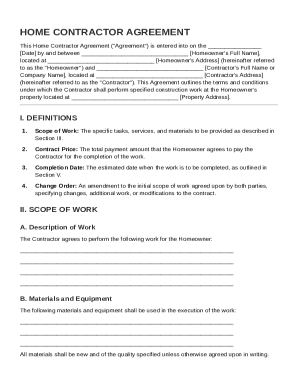
The State Contractor Agreement Template is a service agreement used by contractors and institutions in Connecticut to formalize a contract outlining their responsibilities and terms of service.
pdfFiller scores top ratings on review platforms




PDF Filler and airSlate
I have been using both PDF Filler and airSlate for over a year now to create digital forms and digitally signable forms for my organization. These products make it very easy to create forms and automate your processes. I highly recommend these companies for your digital form needs.
AWESOME SOFTWARE
Great software, the only challenge I had was the sign in process. I have had a few accounts as I had challenges signing in and ended up making additional accounts. This could be user error but I am sure others have had this issue also.
Love the features and tools
Pdf filler has been a great tool for me. I often use to complete documents and send them for my disable uncle.
As a software engineer myself, I'm always amazed at some of the cool feature's and tools..
-Mike G from Florida
Nice Online Editor
Firstly, thank you for this beautiful pdf editor. Lately I was in need of pdf editors and most of them were either paid or working bad, but pdffiller looks clean and easier to use than other free online pdf editors.
I have been using ********** and AirSlate for over a year now to create digital documents and digitally signable documents. The system is very user friendly and all the options to automate my digital forms are logical and intuitive. I highly recommend this product for creating digital forms.
it was great my first time
it was great easy it was my first time using it awesome .
Who needs CT Contractor Agreement?
Explore how professionals across industries use pdfFiller.

CT Contractor Agreement is needed by:
-
State Contractors looking to establish formal agreements.
-
Institutions in Connecticut that hire contractors.
-
Legal advisors drafting service contracts.
-
Business owners needing service agreements.
-
Project managers coordinating contractor services.
-
Freelancers offering services to state institutions.
Comprehensive Guide to CT Contractor Agreement
What is the State Contractor Agreement Template?
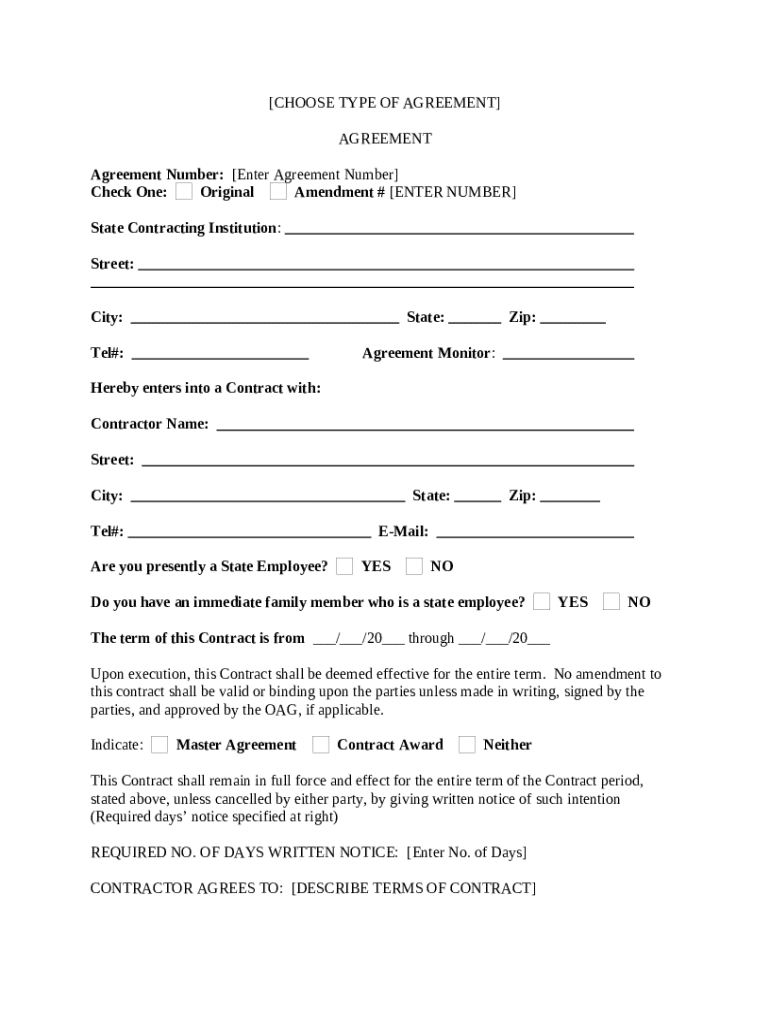
The State Contractor Agreement Template is a fillable form used in Connecticut to establish an agreement between a state contracting institution and a contractor. This template plays a crucial role in defining the expectations and responsibilities of both parties involved. It includes fields for contractor information, project details, and necessary contract terms.
In this agreement, the contractor assumes specific roles defined within the document, while the institution outlines its requirements. Key fields included in the template ensure a clear structure, covering essential information and facilitating smooth transactions. Such templates serve a significant purpose in enhancing transparency and clarity in contractor agreements.
Purpose and Benefits of the State Contractor Agreement Template
The primary purpose of the State Contractor Agreement Template is to establish well-defined terms and obligations for both contractors and institutions. By using this template, parties can reduce misunderstandings and ensure adherence to professional standards in their agreements.
The benefits of utilizing the Connecticut service agreement include:
-
Clear articulation of rights and responsibilities.
-
Structured format that simplifies the contracting process.
-
Mitigation of disputes through explicit contract terms.
Key Features of the State Contractor Agreement Template
This template boasts several key features that facilitate an efficient contracting experience. The fillable fields allow users to input essential details, such as agreement terms, contractor information, and payment schedules, streamlining the completion process.
It's important to note the following features:
-
Signature fields required for both the contractor and the institution.
-
Inclusion of critical terms such as termination conditions.
-
Notification provisions to inform parties of key updates.
Who Needs the State Contractor Agreement Template?
The State Contractor Agreement Template is particularly useful for contractors and institutions engaged in service agreements within Connecticut. Situations where detailed contracts are necessary arise in various industries, ensuring clarity in roles and responsibilities.
Examples of industries that typically require this type of agreement include:
-
Construction services.
-
Consulting agencies.
-
Maintenance and repair services.
How to Fill Out the State Contractor Agreement Template Online
To fill out the State Contractor Agreement Template online using pdfFiller, follow these steps:
-
Access the pdfFiller platform.
-
Locate the State Contractor Agreement Template.
-
Complete key fields such as agreement number and contractor name.
-
Review and validate all entries before submission.
Taking time to carefully fill out each field increases the likelihood of submission acceptance and helps avoid common errors.
Digital Signature and Submission Methods for the State Contractor Agreement Template
When it comes to signing the State Contractor Agreement Template, understanding the different options is crucial. Digital signatures offer a secure alternative to traditional wet signatures, streamlining the signing process.
The process includes:
-
Using pdfFiller to eSign the document securely.
-
Choosing between electronic submission or physical delivery.
Security and Compliance Considerations
pdfFiller prioritizes security when managing sensitive documents. The platform utilizes 256-bit encryption, ensuring that contractor agreements are securely handled in compliance with regulations such as SOC 2, HIPAA, and GDPR.
Key considerations include:
-
Understanding data protection measures during contract processing.
-
Awareness of record retention requirements.
Common Errors and How to Avoid Them When Filling Out the Template
To minimize mistakes when completing the State Contractor Agreement Template, users should watch for common errors, such as:
-
Incomplete fields that may delay processing.
-
Omitting necessary signatures from both parties.
Guidelines for ensuring accuracy include carefully reviewing the completed form for completeness and correcting any errors before submission.
Next Steps After Completing the State Contractor Agreement Template
After successfully filling out and submitting the State Contractor Agreement Template, several actions should be taken to ensure the process is smooth:
-
Verify the submission and track the status of the agreement.
-
Keep copies of the agreement for future reference.
-
Be aware of renewal or resubmission processes if necessary.
Enhance Your Experience with pdfFiller for Your Contractor Agreement Needs
Utilizing pdfFiller for completing the State Contractor Agreement Template allows users to benefit from an array of features that enhance document management. The user-friendly interface ensures a smooth experience for filling out forms securely and efficiently.
pdfFiller stands out as a valuable tool for contractors, combining security, ease of use, and powerful editing capabilities to meet all contracting needs.
How to fill out the CT Contractor Agreement
-
1.Access the State Contractor Agreement Template on pdfFiller by searching its name in the pdfFiller search bar.
-
2.Open the form, and familiarize yourself with its layout, including fillable fields, checkboxes, and relevant instructions.
-
3.Gather necessary information beforehand, such as the agreement number, contractor details, payment schedules, and any specific provisions relevant to your agreement.
-
4.Begin by entering the 'Agreement Number' in the designated field. Make sure this is accurate to avoid future complications.
-
5.If creating an amendment, select the appropriate checkbox next to 'Check One: Original Amendment # [ENTER NUMBER]', and enter the amendment number.
-
6.Fill in the 'Contractor Name' field with the complete legal name of the contractor, ensuring correct spelling for validation.
-
7.Proceed to fill out all required fields, including contract terms, payment details, and any specific clauses that apply to your agreement.
-
8.After completing all fields, thoroughly review the information entered for accuracy and completeness to avoid mistakes.
-
9.Once satisfied with the completed form, use the 'Save' option to keep your work, then choose 'Download' to save a copy to your device or use the 'Submit' option if applicable for online submission.
-
10.Finally, ensure you have printed or downloaded a copy for your records, and securely forward the signed agreement to the other party for their records.

Who is eligible to use the State Contractor Agreement Template?
The State Contractor Agreement Template is intended for contractors and institutions in Connecticut entering into a service agreement. Various entities including freelancers, service providers, and state institutions can use this form for formalizing agreements.
What documents are needed to complete the form?
To complete the State Contractor Agreement Template, you will need the agreement number, contractor's legal name, payment schedule, any specific contractual clauses, and contact information for both parties involved. Gathering this information in advance will streamline the process.
How should the completed form be submitted?
After completing the form, you can submit it online through pdfFiller if that option is available. Alternatively, download it and send the signed document via email or mail to the relevant parties involved in the agreement.
What are some common mistakes when filling out this form?
Common mistakes include leaving mandatory fields blank, misspelling names, or mismatching the agreement number. Always double-check entries and make sure that all required sections are completed fully.
Are there any deadlines I need to be aware of?
Deadlines may vary based on the specific project or institutional requirements. Always confirm if there are deadlines for submitting the State Contractor Agreement to ensure compliance with any contractual obligations.
Is notarization required for this form?
No, the State Contractor Agreement Template does not require notarizing. However, both parties must sign the document to make it legally binding.
How can I ensure my contract is legally enforceable?
To ensure your contract is enforceable, make sure that all parties are clearly identified, terms are comprehensive, and signatures are obtained from both the contractor and the institution. Consulting a legal advisor for review before finalizing can also be beneficial.
Related Forms


Get the latest insights from our blog


If you believe that this page should be taken down, please follow our DMCA take down process
here
.
This form may include fields for payment information. Data entered in these fields is not covered by PCI DSS compliance.